


If you own a Black and Decker 12V cordless drill, knowing how to charge it properly can save you time and keep your tools ready for any job. You might wonder how long to charge it or which charger to use.
Getting this right means your drill will last longer and work better when you need it most. Keep reading, and you’ll learn simple steps to charge your drill safely and efficiently every time.

Credit: www.shoshitamam.com
Choosing The Right Charger
Choosing the right charger for your Black and Decker 12V cordless drill ensures safe and efficient charging. Using the correct charger keeps the battery healthy and extends its life. It also prevents damage to your drill and avoids safety risks. Understanding the types of chargers and how to identify original ones helps you make the best choice for your tool.
Types Of Chargers Compatible
Black and Decker 12V cordless drills usually use smart chargers. These chargers adjust the power to the battery automatically. Standard chargers supply a fixed amount of power and may take longer to charge. Fast chargers reduce charging time but can generate more heat. Choose a charger that matches your drill’s battery type and voltage. Always check the charger’s output to match the 12V battery. Using the wrong charger can harm the battery or drill.
Identifying Original Vs Third-party Chargers
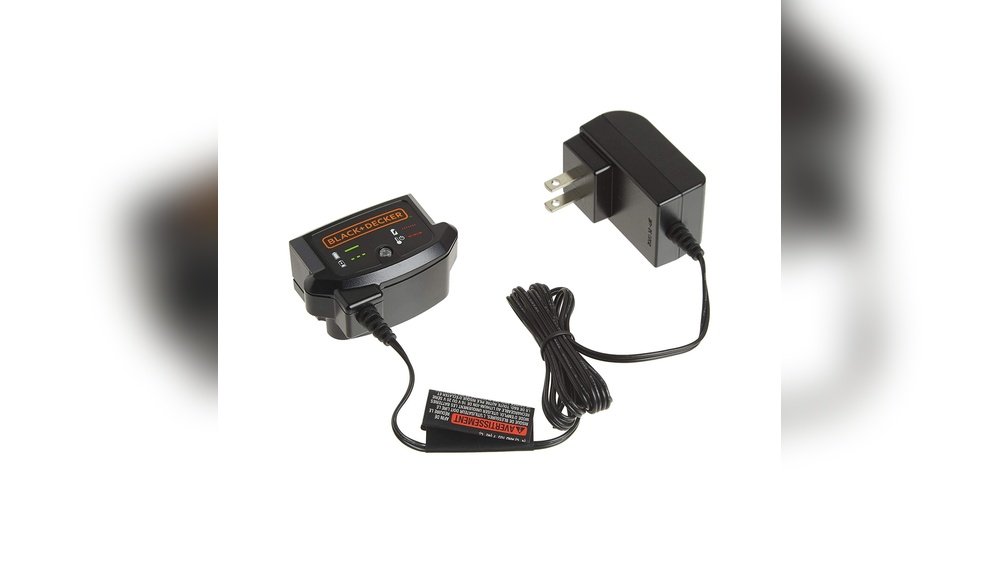
Original chargers come directly from Black and Decker. They have the company logo and specific model numbers. The build quality is usually higher, with safety features included. Third-party chargers can be cheaper but vary in quality. Some may not fit well or charge properly. Look for certifications like UL or CE on third-party chargers. Avoid chargers with unclear labels or missing safety marks. Using original or certified chargers protects your drill and battery.
Preparing The Drill For Charging
Preparing the Black and Decker 12V cordless drill for charging is an important first step. It helps keep the battery healthy and safe. Proper preparation makes sure the drill charges correctly and lasts longer. Follow simple steps before placing the battery on the charger.
Removing The Battery Pack
Start by turning off the drill. Locate the battery pack at the base of the handle. Press the release buttons on both sides. Pull the battery pack out carefully. Avoid using force to prevent damage. Place the battery on a clean, flat surface before charging.
Inspecting Battery For Damage
Look at the battery pack closely. Check for cracks, leaks, or swelling. Do not charge a damaged battery. Inspect the contacts for dirt or corrosion. Clean contacts gently with a dry cloth if needed. A safe battery ensures proper charging and longer life.
Step-by-step Charging Process
Charging your Black and Decker 12V cordless drill is simple. Follow the steps carefully to keep your drill ready for work. Proper charging helps the battery last longer and perform well.
Connecting The Charger
First, locate the battery on your drill. Remove it by pressing the release button. Take the charger and plug it into a power outlet. Insert the battery into the charger slot. Make sure it fits securely. Avoid forcing the battery to prevent damage.
Charging Indicators And Their Meanings
Check the charger’s light indicator. A red light means the battery is charging. A green light shows the battery is fully charged. A blinking light may signal a problem. In that case, check the battery or charger for issues.
Optimal Charging Time
Charging usually takes about 3 to 5 hours. Do not overcharge the battery as it can reduce its life. Remove the battery once the green light appears. Store the battery in a cool, dry place when not in use.
Safety Tips During Charging
Charging your Black and Decker 12V cordless drill safely is very important. It keeps you and your tool safe. Following some simple safety tips helps avoid damage and accidents. Always pay attention during charging to protect your battery and charger.
Avoiding Overcharging
Do not leave the drill charging for too long. Overcharging can damage the battery. It causes overheating and reduces battery life. Use the charger’s automatic shut-off feature if it has one. Unplug the charger once the battery is full.
Proper Charger Placement
Place the charger on a flat, stable surface. Keep it away from water and heat sources. Avoid charging in direct sunlight or damp places. Good airflow around the charger helps prevent overheating. Never cover the charger with cloth or other materials.
Handling Faulty Batteries
Check the battery for cracks or leaks before charging. Do not use a battery that looks damaged. Faulty batteries can cause fires or explosions. If the battery feels hot or smells strange, stop charging immediately. Replace damaged batteries with new, original ones.
Maintaining Battery Health
Keeping your Black and Decker 12V cordless drill’s battery healthy is key. It helps the drill work longer and stay reliable. Proper care of the battery saves money and time. A few simple habits make a big difference in battery life.
Storage Recommendations
Store the battery in a cool, dry place. Avoid places with extreme heat or cold. High temperatures can damage the battery cells. Cold can reduce battery performance temporarily. Remove the battery from the drill when not in use. Keep the battery away from metal objects to prevent short circuits.
Regular Usage Tips
Use the drill regularly to keep the battery active. Let the battery drain partly before charging it again. Avoid charging the battery immediately after use. Full discharges are not needed but avoid leaving it fully drained. Charge the battery fully before storing it for long periods. Use the charger that came with your drill for best results.
When To Replace The Battery
Replace the battery if it loses charge quickly. If the drill runs for a much shorter time, the battery may be weak. Swelling or leaking batteries are signs to stop use immediately. A battery that does not hold a charge after a full cycle needs replacement. Use genuine Black and Decker batteries for safety and performance.

Credit: www.blackanddecker.com
Troubleshooting Charging Issues
Troubleshooting charging issues with your Black and Decker 12V cordless drill can save time and money. Knowing how to identify and fix common problems helps keep your drill ready for use. Some issues may be simple to resolve, while others might need expert help.
Common Charging Problems
The charger not turning on is a frequent issue. Check if the power outlet works. Sometimes, the charger or battery gets dirty, causing poor contact. Dust or debris on the battery or charger contacts can stop charging. Battery overuse or old age reduces its ability to hold charge. A damaged charger cable may also block power flow.
Resetting The Battery
Resetting the battery can fix charging glitches. Remove the battery from the drill. Leave it out for 10 minutes to cool down. Reinsert the battery firmly into the charger. This can reset the battery’s internal circuits and improve charging. Try this step before replacing any parts.
When To Seek Professional Help
Persistent charging problems need expert attention. If the battery still won’t charge after cleaning and resetting, call a professional. Avoid trying to open or fix the battery yourself. Incorrect handling can cause damage or injury. A technician can safely test and repair or replace faulty parts.

Credit: www.amazon.com
Frequently Asked Questions
How Long Does It Take To Charge A 12v Black & Decker Drill?
Charging a 12V Black & Decker cordless drill usually takes 1 to 3 hours. Charging time varies by battery condition and charger model. Always use the original charger for optimal charging speed and battery health.
Can I Use Any Charger For Black & Decker 12v Drill?
No, use only the charger designed for your specific 12V Black & Decker drill model. Using incompatible chargers can damage the battery and reduce its lifespan. Always refer to the user manual for charger compatibility.
How Do I Know When The Drill Battery Is Fully Charged?
Most Black & Decker chargers have an indicator light that changes color when fully charged. Typically, a green light means the battery is charged. Avoid overcharging to maintain battery health and performance.
Is It Safe To Charge The Drill Overnight?
Charging overnight is generally safe with original chargers that have automatic shutoff. However, avoid leaving the battery on the charger for days to prevent overheating and battery damage. Follow manufacturer guidelines for best results.
Conclusion
Charging your Black and Decker 12V cordless drill is simple and quick. Always use the original charger for best results. Make sure the battery is fully seated in the charger. Avoid overcharging to keep the battery healthy. A fully charged drill helps you work without interruptions.
Keep your drill ready for any project by charging it regularly. This small step saves time and improves drill performance. Now, you can handle your tasks with confidence and ease.
