


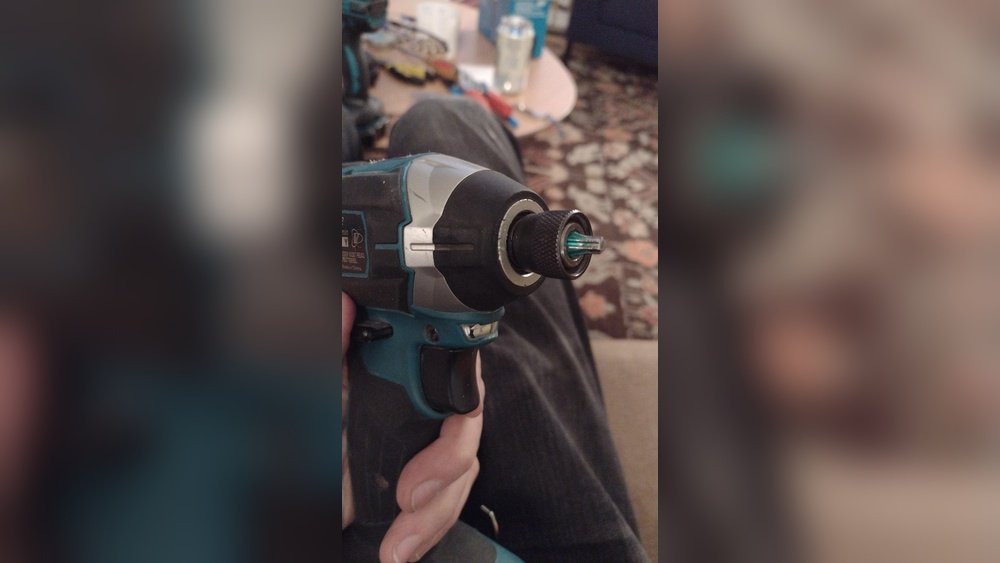
Struggling to get a stuck bit out of your impact driver can be frustrating and time-consuming. You might feel stuck, unsure of how to free it without damaging your tool.
But don’t worry—this guide will show you simple, effective ways to quickly remove that bit and get your impact driver working smoothly again. Keep reading, and you’ll learn easy steps that save you time, protect your tools, and keep your projects moving forward.
Credit: www.reddit.com
Common Causes Of Bit Stuck
Bits stuck in an impact driver cause frustration and delay work. Understanding common causes helps prevent this issue. Many factors lead to a bit getting stuck. Knowing these can save time and effort.
Worn Or Damaged Bits
Bits wear out after long use. They lose their shape and grip. A damaged bit slips inside the screw head. This slipping causes the bit to get stuck. Always check bits for wear before use.
Incorrect Bit Size
Using the wrong bit size causes problems. Too small or too large bits do not fit well. Poor fit makes the bit catch inside the screw. This tight catch leads to a stuck bit. Choose the right size for each screw.
Debris And Rust Build-up
Dirt, dust, and rust can block the bit’s movement. Build-up creates extra friction inside the tool. This friction can trap the bit tightly. Clean the driver and bits regularly to avoid this. Keep tools dry to prevent rust.

Credit: www.youtube.com
Safety Tips Before Removal
Removing a stuck bit from an impact driver needs care and attention. Safety is the first step before trying to fix the tool. Taking simple precautions can prevent injuries and damage. Follow the safety tips to protect yourself and your tool.
Unplugging Or Removing Battery
Always unplug the impact driver from power or remove the battery. This stops the tool from starting by mistake. A sudden start can cause injury or make the bit stuck deeper. Check twice that the tool is off before working on it.
Wearing Protective Gear
Wear safety glasses to protect your eyes from flying debris. Gloves help protect your hands from sharp edges and slipping tools. Use sturdy clothes to avoid cuts or scratches. Safety gear keeps you safe while you work on the bit.
Manual Techniques To Remove Bits
Removing a stuck bit from an impact driver can be tricky without power tools. Manual techniques help you safely and effectively pull out the bit. These methods require simple tools and a bit of patience. You can avoid damage to both the bit and the driver by trying these steps.
Using Pliers Or Wrenches
Grip the bit firmly with pliers or a wrench. Hold the driver steady with your other hand. Pull the bit straight out while twisting gently. Avoid bending or forcing the bit too hard. This method works best if the bit is only lightly stuck.
Tapping The Bit Gently
Use a small hammer or mallet to tap the bit. Tap gently on the back end of the bit. This can help loosen rust or debris holding the bit in place. Do not hit too hard to avoid damaging the driver. After tapping, try pulling the bit out again with pliers.
Applying Penetrating Oil
Spray penetrating oil around the bit base. Let the oil sit for 10 to 15 minutes. The oil seeps into tight spots to loosen rust and dirt. Wipe away any excess oil before trying removal. Use pliers or tapping to remove the bit after oil treatment.

Credit: www.youtube.com
Using Impact Driver Features
Using the features of your impact driver can make removing a stuck bit easier. These tools are built with helpful functions that control power and direction. Knowing how to use these features saves time and reduces damage to your tools and work.
Focus on two main features: reverse mode and torque settings. Both help manage the force applied to the bit. Using them correctly helps loosen bits stuck tight.
Leveraging Reverse Mode
Reverse mode spins the bit the opposite way. This helps loosen screws or bits stuck in place. Switch to reverse mode by pressing the direction control button.
Hold the tool firmly. Start at a low speed to avoid sudden force. Gradually increase speed if the bit begins to turn. This method reduces the risk of stripping the screw or damaging the bit.
Adjusting Torque Settings
Torque controls the twisting force of the driver. Lower torque means less force, useful for delicate jobs. Higher torque applies more power to break loose stuck bits.
Adjust torque using the driver’s setting ring or dial. Start with a low setting to prevent damage. Increase torque slowly until the bit moves free. This careful approach protects both the tool and the material.
Tools To Assist Bit Removal
Removing a stuck bit from an impact driver can be tricky. Using the right tools makes the job easier and safer. The right tools help prevent damage to the driver and the bit. Below are some common tools that assist with bit removal.
Bit Extractors
Bit extractors are small tools designed to grip and pull out stuck bits. They come in various shapes, such as pliers or specialized grips. These tools provide extra leverage to loosen the bit gently. Using a bit extractor reduces the risk of slipping and hurting your hand. They are often made of strong steel for durability. Bit extractors are easy to use and affordable for most users.
Heat Application Tools
Heat can help loosen a stuck bit by expanding the metal parts. Tools like heat guns or small torches apply controlled heat to the driver’s chuck. The heat softens the grip around the bit, making removal easier. It is important to apply heat carefully to avoid damage. Allow the bit to cool slightly after heating before trying to remove it. Heat application works well with metal bits stuck due to rust or debris.
Preventing Bits From Getting Stuck
Bits stuck in an impact driver slow down your work and cause frustration. Preventing this issue saves time and effort. A few simple steps keep your bits working smoothly. Focus on maintenance, storage, and bit quality to avoid stuck bits.
Regular Maintenance
Clean the impact driver often. Remove dust and debris from the chuck and bit holder. Use a soft brush or compressed air to clear dirt. Check for rust or damage. Lubricate moving parts lightly to keep them working well. Regular care stops bits from getting stuck.
Proper Bit Storage
Store bits in a dry, clean place. Use a bit holder or case to keep them organized. Avoid dropping bits on hard surfaces. Keep bits away from moisture to prevent rust. Proper storage protects bits from damage and makes them easy to use.
Choosing Quality Bits
Use bits made from strong materials like steel or titanium. Cheap bits wear out quickly and get stuck. Pick bits designed for your impact driver. Good bits fit tightly and resist breaking. Investing in quality bits reduces problems and improves performance.
Frequently Asked Questions
How Do I Remove A Stuck Bit From An Impact Driver?
To remove a stuck bit, first turn off and unplug the driver. Use pliers to grip and gently twist the bit. If stuck, apply penetrating oil and wait a few minutes. Avoid using excessive force to prevent damage.
What Tools Help To Get A Bit Out Of Impact Driver?
Pliers, needle-nose pliers, or locking pliers work best. A rubber grip or bit extractor tool also helps. These tools provide a firm grip to twist and pull the bit safely out.
Can I Use An Impact Driver Without A Bit Inserted?
No, an impact driver requires a bit for proper function. Operating without a bit can damage the tool and reduce performance. Always insert the correct bit before use to ensure safety and efficiency.
Why Is My Impact Driver Bit Stuck Frequently?
Bits often get stuck due to debris, rust, or incorrect bit size. Using the right bit and cleaning the chuck regularly prevents sticking. Applying lubricant also helps maintain smooth bit changes.
Conclusion
Removing a bit from an impact driver is simple with the right steps. Hold the collar firmly and pull it back. This releases the bit quickly and safely. Avoid forcing the bit out to prevent damage. Practice these steps to save time and effort.
Soon, changing bits will feel easy and quick. Keep your tools ready for any job. A smooth bit removal helps you work better.
