


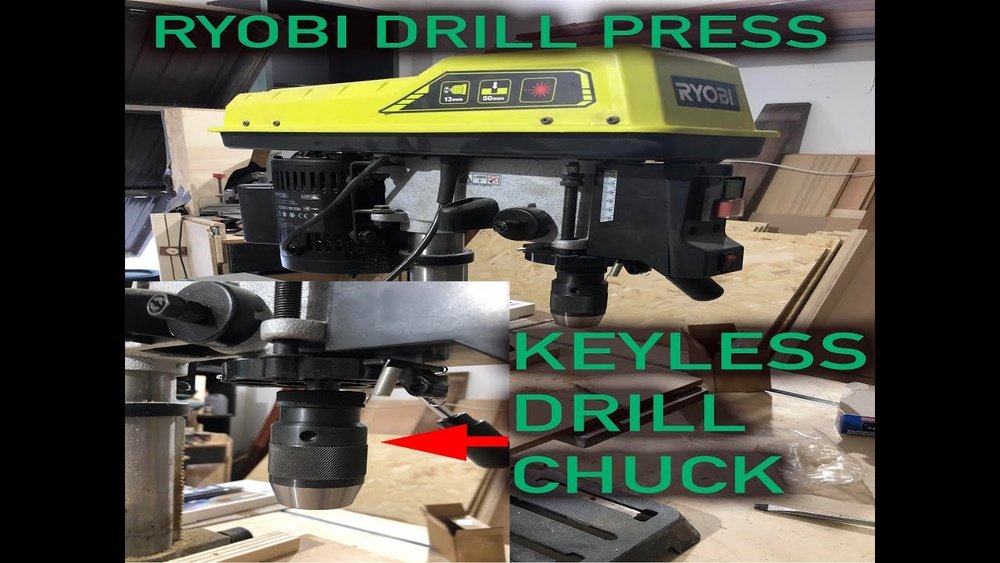
If you’ve ever needed to change a drill bit or fix your Ryobi drill press, you know that removing the chuck can be tricky. But don’t worry—removing the chuck doesn’t have to be frustrating or time-consuming.
You’ll learn simple, step-by-step instructions to safely and easily take the chuck off your Ryobi drill press. Whether you’re a beginner or experienced DIYer, these tips will save you time and prevent damage to your tool. Keep reading to master this essential skill and make your next project smoother than ever.

Credit: www.ereplacementparts.com
Tools Needed
Removing the chuck from a Ryobi drill press needs a few simple tools. A wrench, screwdriver, and a hammer help loosen and remove parts easily. These basic tools keep the process smooth and safe.
Essential Tools For Removing The Chuck
Removing the chuck from a Ryobi drill press needs a few simple tools. These tools help you work safely and make the process easier. Having the right tools ready saves time and effort.
Make sure each tool is in good condition. Damaged tools can cause problems or injury. Prepare your workspace with enough light and space.
Chuck Key
The chuck key fits into the holes on the chuck. It loosens the jaws that hold the drill bit. The chuck key is essential to unlock the chuck before removal. Without it, the chuck will stay tight.
Adjustable Wrench
An adjustable wrench helps you grip the spindle or the chuck firmly. It provides the leverage needed to turn and loosen the chuck. This tool works well for different sizes of nuts and bolts.
Hammer
A hammer is useful for tapping the chuck or spindle gently. This action can help loosen stuck parts. Use light taps to avoid damage. A small hammer or mallet works best.
Cloth Or Rag
Use a cloth to protect the drill press from scratches. Wrap the wrench jaws with the cloth for better grip. It also keeps dirt and grease off your hands. A clean workspace improves safety and efficiency.
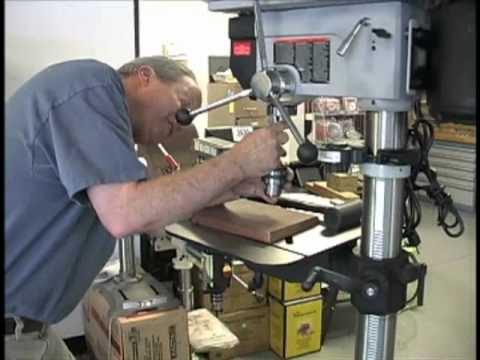
Credit: www.youtube.com
Safety Tips
Safety is the top priority when removing the chuck from a Ryobi drill press. Following safety tips prevents accidents and injuries. Simple precautions keep your work smooth and secure.
Always prepare your workspace before starting. A clean area reduces risks. Proper tools and clear instructions help complete the task safely.
Wear Protective Gear
Use safety glasses to protect your eyes from dust and debris. Gloves shield your hands from sharp edges and pinches. Wear closed-toe shoes to guard your feet.
Disconnect Power Supply
Unplug the drill press before beginning any work. This stops the drill from starting by accident. Double-check power cords to ensure no electricity flows.
Use Proper Tools
Select the correct wrench or chuck key designed for your drill press. Using wrong tools can damage parts or cause slips. Keep tools in good condition for safe handling.
Secure The Drill Press
Ensure the drill press is stable on a flat surface. Tighten clamps or bolts to prevent movement. Stability helps avoid accidents during chuck removal.
Follow Manufacturer Instructions
Read the Ryobi drill press manual before removing the chuck. Instructions give step-by-step guidance and safety warnings. Following them lowers the chance of mistakes.
Locate The Chuck
Start by unplugging the drill press to stay safe. Next, find the chuck key and loosen the chuck by turning it counterclockwise. Pull the chuck off carefully once it feels loose.
Identify The Drill Press Spindle
The chuck is attached to the drill press spindle. The spindle is the part that spins when you turn on the machine. It is located at the front of the drill press head. You can see the spindle shaft sticking out from the drill press. The chuck clamps onto this shaft tightly.
Look For The Chuck Shape And Size
The chuck is usually round and has jaws that hold the drill bit. It is larger than the spindle. The jaws open and close to grip different bit sizes. On a Ryobi drill press, the chuck is often metal and shiny. It may have a keyhole if it needs a chuck key to tighten or loosen.
Check For The Chuck Key Hole
Many Ryobi drill presses use a keyed chuck. Look for a small hole on the side of the chuck. This hole fits the chuck key. The key helps to turn the jaws open or closed. The hole is a clear sign you found the chuck. It is near the front end of the spindle.
Confirm By Spinning The Chuck
Try to spin the chuck by hand. The chuck should turn smoothly around the spindle. The jaws will move slightly if it is loose. This confirms you are holding the chuck. The chuck is the part that holds and releases drill bits.
Loosen The Chuck
Loosening the chuck is the first step to removing it from your Ryobi drill press. The chuck holds the drill bit tightly. You need to loosen it carefully to avoid damage. This process is simple but requires the right tools and some effort. Two common ways to loosen the chuck include using a chuck key and manual loosening.
Use Chuck Key
Find the chuck key that fits your Ryobi drill press chuck. Insert the key into one of the holes on the side of the chuck. Turn the key counterclockwise to loosen the chuck jaws. Keep turning until the jaws open enough to remove the drill bit or the chuck itself. The chuck key gives you extra leverage, making the task easier. Never use a wrench or pliers; it can damage the chuck.
Manual Loosening
Sometimes, the chuck key might not be available. In that case, try manual loosening. Grip the chuck firmly with your hand. Turn the chuck counterclockwise to open the jaws. It may be tight at first. Apply steady force to avoid slipping. If the chuck is too tight, tap it gently with a rubber mallet to help loosen it. Avoid using excessive force to protect your drill press parts.
Remove The Chuck
Removing the chuck from a Ryobi drill press is a simple task. It allows you to change bits or fix problems with the drill. This process takes only a few steps. Having the right tools helps the job go smoothly.
Follow these steps carefully to remove the chuck without damage. Safety is important, so make sure the drill press is off and unplugged.
Unscrew From Spindle
Start by opening the chuck jaws fully. This gives better access to the spindle screw inside. Use a screwdriver to turn the screw counterclockwise. This screw holds the chuck tightly to the spindle. Keep turning until it comes out completely.
Once the screw is removed, hold the chuck firmly. Turn the chuck counterclockwise to unscrew it from the spindle. If it turns easily, continue until it is free. If it feels stuck, do not force it. Try the next method instead.
Handle Stuck Chuck
Sometimes the chuck will not unscrew easily. Dust and rust can cause it to stick. Use a rubber handle or strap wrench for better grip. Wrap it around the chuck and turn counterclockwise. This adds more force without slipping.
Tap the chuck lightly with a rubber mallet. This can loosen rust or dirt inside. Avoid using metal tools that can damage the chuck. After tapping, try to unscrew the chuck again. Repeat if needed but do not rush.
Clean And Inspect
Cleaning and inspecting the chuck after removal keeps your Ryobi drill press in good shape. Dirt and dust can cause problems if left inside the chuck or spindle. Regular checks help spot damage early. This saves money and improves safety during use.
Clean The Chuck Thoroughly
Start by wiping the chuck with a dry cloth. Use a small brush to remove dust from tight spots. For tough grime, dip a cloth in mild soapy water. Avoid soaking the chuck to protect metal parts. Dry it completely before putting it back.
Inspect For Wear And Damage
Look closely at the jaws and body of the chuck. Check for cracks, dents, or rust spots. Test the jaws by opening and closing them smoothly. Any rough movement may mean the chuck needs repair or replacement. Replace damaged parts to keep your drill press safe.
Clean The Spindle And Surrounding Area
Remove dust and debris from the spindle where the chuck fits. Use a clean cloth or brush to clear the area. Dirt here can affect chuck grip and drill accuracy. Keep this area clean to maintain smooth operation.
Reinstall Or Replace Chuck
After removing the chuck from your Ryobi drill press, the next step is to either reinstall the same chuck or replace it with a new one. This process is important to ensure your drill press works smoothly and safely. Proper installation keeps the drill bit secure during use.
Reinstalling or replacing the chuck is simple and takes only a few minutes. Following the right steps helps avoid damage and ensures good performance. The chuck should fit tightly on the spindle without wobbling.
Preparing The Chuck For Installation
Clean the chuck and spindle thoroughly. Remove any dirt, dust, or old grease. Use a cloth to wipe both surfaces. This helps the chuck fit properly and prevents slipping.
Aligning The Chuck With The Spindle
Place the chuck on the spindle carefully. Align the keyway or threads correctly. Avoid forcing it, as this may damage the parts. The chuck should slide easily into place.
Securing The Chuck Firmly
Use the chuck key or wrench to tighten the chuck. Turn it clockwise to lock it securely. Check for tightness by trying to move the chuck by hand. It should not move or wobble.
Testing The Installation
Turn on the drill press at low speed. Observe the chuck and drill bit for any shaking. If everything spins smoothly, the chuck is installed correctly. Stop the machine immediately if you notice any issues.

Credit: www.instructables.com
Frequently Asked Questions
How Do I Safely Remove The Chuck From A Ryobi Drill Press?
To safely remove the chuck, first unplug the drill press. Use a chuck key to loosen the chuck jaws. Then, unscrew the chuck by turning it counterclockwise. Always wear safety gloves and follow the manufacturer’s instructions for safe handling.
What Tools Are Needed To Remove A Ryobi Drill Press Chuck?
You need a chuck key to loosen the jaws and a wrench to unscrew the chuck. Sometimes, a hammer or mallet helps to gently tap the chuck loose if it’s stuck. Always use the right size tools to avoid damage.
Why Is My Ryobi Drill Press Chuck Difficult To Remove?
The chuck may be stuck due to dirt, rust, or overtightening. Applying penetrating oil and letting it sit can help. Using the correct tools and gentle tapping usually loosens it without damage.
Can I Remove The Chuck Without A Chuck Key?
Removing the chuck without a chuck key is not recommended. The chuck key is designed to loosen the jaws safely. Without it, you risk damaging the chuck or drill press spindle.
Conclusion
Removing the chuck from a Ryobi drill press is simple with the right steps. Follow the guide carefully and take your time. Use proper tools to avoid damage. Keep your workspace clean and safe. Practice this process to build confidence.
Soon, you will handle this task without trouble. Enjoy better maintenance and longer tool life. Remember, patience makes the job easier and safer.
