


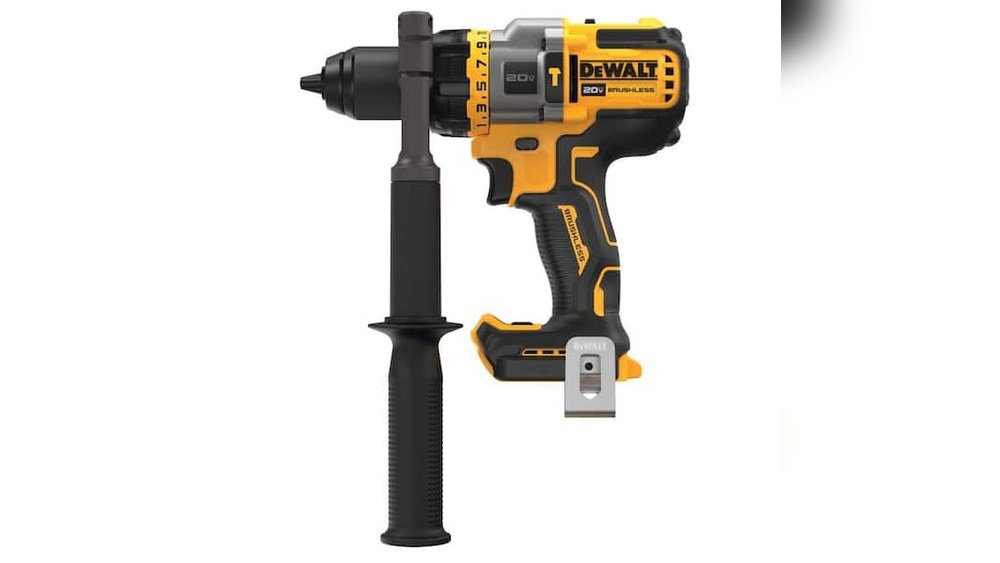
Is your drill driver from Home Depot acting up just when you need it most? You rely on this tool to get the job done quickly and smoothly, so dealing with a broken drill can be frustrating.
But don’t worry—fixing it might be easier than you think. You’ll discover simple, clear steps to get your drill driver repaired without hassle. Keep reading to save time, avoid extra costs, and get back to work with confidence.
Credit: www.homedepot.com
Common Drill Driver Issues
Drill drivers can face many problems over time. Knowing common issues helps you fix them faster. Most problems come from parts that wear out or get damaged. Understanding these issues can save time and money when you get repairs done.
Here are some common drill driver problems and what they mean for your tool.
Power Problems
Power problems often mean the drill will not start or stops suddenly. This can happen due to faulty wiring or a broken switch inside the drill. Sometimes, the power source is the issue, like a poor connection in the plug or cord. Check these parts if your drill has power troubles.
Chuck Malfunctions
The chuck holds the drill bit. If it does not tighten or releases the bit, it needs fixing. Dirt, rust, or worn parts can cause the chuck to fail. Sometimes, the chuck gear slips, making it hard to keep the bit in place. Regular cleaning and proper use help avoid these issues.
Battery Troubles
Battery problems are common with cordless drill drivers. The battery may not hold a charge or drain quickly. This happens if the battery cells are old or damaged. Sometimes the charger is the problem, not the battery. Testing both can find the real cause of battery troubles.
Motor And Gear Issues
The motor makes the drill spin. If the drill is weak or noisy, the motor or gears might be damaged. Worn gears can cause slipping or grinding sounds. Dirt and dust inside the motor can also cause problems. Regular maintenance keeps the motor and gears working well.

Credit: powertools.ridgid.com
Home Depot Repair Services
Home Depot offers repair services for your drill driver. Their services help fix many common problems. You can get your tool checked by trained staff. The repair process is straightforward and customer-friendly.
Home Depot’s repair centers use genuine parts. They work to restore your drill driver to good condition. The stores aim to provide quick and reliable repairs. This helps you get back to your projects faster.
Service Options Available
Home Depot provides several repair choices. You can bring your drill driver to the store. Some locations offer mail-in repair services. The staff will assess the problem and suggest a fix. Basic repairs and part replacements are common services.
Warranty And Coverage
Many drill drivers come with manufacturer warranties. Home Depot repairs may be covered under these warranties. Warranty terms depend on the brand and purchase date. Check your warranty before requesting repair. Repairs outside warranty usually cost extra.
Cost Estimates
Home Depot gives cost estimates before starting repairs. Prices depend on the issue and parts needed. Minor repairs are usually affordable. Complex problems may cost more. Always ask for an estimate to avoid surprises.
Preparing For Your Repair Visit
Preparing for your repair visit to Home Depot ensures a smooth experience. It saves time and helps staff assist you better. Simple steps before the visit can make a big difference. Being ready with the right information speeds up the process.
Gathering Purchase Information
Find your receipt or proof of purchase. Note the date you bought the drill driver. Check the model number and any product details. This information helps Home Depot confirm your product and repair options.
Checking Warranty Status
Look for your warranty papers or check online. Know if your drill driver is still under warranty. A valid warranty can cover repair costs. Understanding your warranty status avoids unexpected charges.
Backing Up Important Data
Some drill drivers have digital settings or apps. Save or write down these settings before repair. Backing up data prevents loss of important information. This step protects your customized tool functions.

Credit: www.reddit.com
Diy Troubleshooting Tips
DIY troubleshooting tips help you fix common drill driver problems. These simple steps save time and money. You do not need special tools or skills. Follow these easy guides to get your drill driver working again.
Basic Maintenance Steps
Start with basic maintenance to keep your drill driver healthy. Check for loose screws and tighten them. Look for worn or damaged parts. Lubricate moving parts with light oil. Regular care prevents many issues.
Replacing Batteries
Battery problems cause many drill driver issues. Remove the old batteries carefully. Insert new, fully charged batteries. Make sure they fit correctly and the contacts are clean. Test the tool after battery replacement.
Cleaning The Chuck
The chuck holds drill bits tightly. Dirt or debris can block it. Open the chuck fully and wipe it with a dry cloth. Use a brush to remove dust inside. Clean chuck parts improve grip and performance.
Resetting The Tool
Resetting helps fix electronic errors. Turn off the drill driver. Remove the battery and wait 5 minutes. Reinsert the battery and turn the tool on. This often clears minor faults in the system.
When To Seek Professional Help
Knowing when to seek professional help for your drill driver saves time and money. Some problems need expert skills to fix safely. Trying repairs alone can cause more damage or risk injury.
Signs Your Drill Needs Repair
Listen and watch for unusual sounds like grinding or buzzing. Notice if the drill stops working or loses power. Check for overheating or smoke during use. Look for loose parts or damaged cords. These signs show your drill needs repair.
Avoiding Further Damage
Stop using the drill if it acts strange or smells hot. Using a broken drill can harm the motor or battery. Keep the drill clean and dry to avoid rust. Handle the tool gently to prevent cracks or breaks. Early care helps avoid costly repairs.
Choosing A Qualified Technician
Find a technician with experience in power tool repair. Check reviews or ask for recommendations. Confirm they use original parts and offer a warranty. A skilled technician ensures safe and lasting repairs. This choice protects your drill and your safety.
Alternative Repair Options
Sometimes, fixing your drill driver from Home Depot means exploring other repair choices. These options can save time and money. They also offer different ways to get your tool working again quickly.
Local Repair Shops
Local repair shops often fix power tools fast. They know common problems with drill drivers. You can visit them to get an estimate and repair time. Many shops use original parts. This keeps your drill working like new.
Manufacturer Support
Contacting the drill driver’s manufacturer can help. They offer repair services and replacement parts. Some brands have mail-in repair programs. This option ensures expert care for your tool. Check if your drill is still under warranty.
Online Repair Services
Online repair services provide convenience and expert help. You send your drill driver by mail. They diagnose and fix it professionally. Many services offer tracking and fast turnaround. This option works well if local shops are far away.
Preventing Future Drill Driver Problems
Preventing future problems with your drill driver saves time and money. Small steps keep your tool working well. Proper care extends its life and performance. Follow simple habits to avoid common issues.
Regular Maintenance Tips
Clean your drill driver after each use. Remove dust and debris from vents and chuck. Check the battery and charge it fully. Tighten loose screws and parts regularly. Lubricate moving parts as per the manual. This keeps everything running smoothly and avoids breakdowns.
Proper Storage Practices
Store your drill driver in a dry place. Avoid damp or dusty areas that harm the tool. Use a case or box for protection. Keep it away from extreme heat or cold. Proper storage stops rust and damage. It also keeps the battery safe and healthy.
Using The Right Accessories
Choose drill bits and attachments made for your drill driver. Using wrong sizes or types can cause damage. Follow the tool’s guidelines for accessories. Using proper parts ensures better results and less wear. It also keeps the motor and chuck safe.
Frequently Asked Questions
How Do I Check My Drill Driver Warranty At Home Depot?
You can check your drill driver warranty by visiting Home Depot’s website or contacting their customer service. Keep your purchase receipt ready. Warranty terms vary by brand and product model. Home Depot usually offers limited warranties covering defects and repairs within a specific period.
Can Home Depot Repair My Drill Driver On-site?
Home Depot typically does not repair drill drivers on-site. Instead, they offer warranty service or direct you to authorized repair centers. For out-of-warranty issues, they may suggest local repair shops or replacements. Always ask at your local store for specific repair options.
What Is The Process To Get My Drill Driver Fixed?
First, locate your receipt and warranty details. Next, visit the Home Depot store or their website. Submit a repair request or seek a replacement if under warranty. Follow instructions for shipping or drop-off. Keep communication with customer service for updates.
Does Home Depot Offer Free Drill Driver Repairs?
Home Depot may offer free repairs if your drill driver is under warranty and the issue is covered. Warranty usually covers manufacturing defects, not accidental damage. Always verify warranty status before requesting free service to avoid unexpected costs.
Conclusion
Getting your drill driver fixed at Home Depot is simple and quick. Start by checking your warranty and receipt. Visit the tool repair desk or use their online service. Explain the problem clearly to get the right help. Keep in mind repair times and costs.
Taking care of your tools helps them last longer. Don’t wait too long to fix issues. A working drill driver saves time and effort on projects. Now, you know how to get your tool back in shape fast.
