


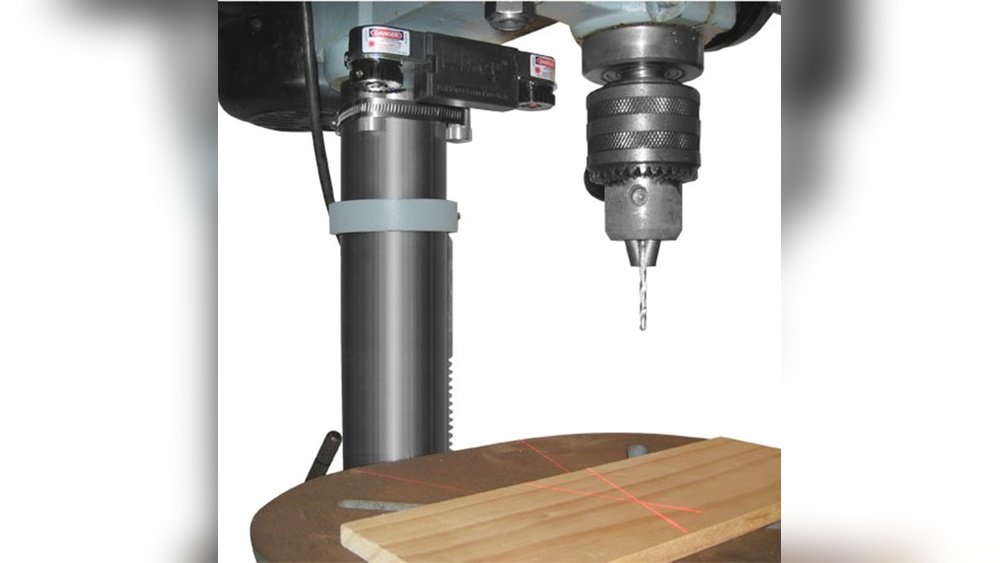
Are you tired of missing the mark when drilling? A laser guide on your drill press can change that instantly—but only if it’s set up right.
If your laser is off even by a little, your holes won’t be as precise as you want. Don’t worry, adjusting the laser isn’t as tricky as it sounds. You’ll learn simple, step-by-step tips to get your laser perfectly aligned.
By the end, you’ll drill with confidence, accuracy, and save time on every project. Ready to make your drill press work smarter for you? Let’s get started.

Credit: www.woodcraft.com
Benefits Of Laser Guides
Laser guides on a drill press help improve accuracy and speed. They show exactly where the drill will hit the material. This helps users drill perfect holes every time. The benefits of laser guides make them a valuable tool.
They save time and reduce mistakes. Many people find drilling easier with the clear visual aid. Below are key benefits of using laser guides on your drill press.
Improved Precision
Laser guides shine a bright line on the work surface. This line shows the exact drill point. Users can position the material quickly and accurately. This reduces the chance of drilling off-target holes.
Faster Setup
Without laser guides, measuring takes more time. The laser eliminates guesswork by showing the drill’s path. Setup becomes faster, letting users start drilling sooner. This speeds up the whole project.
Less Material Waste
Accurate drilling means fewer mistakes. Mistakes cause damaged or wasted material. Laser guides help avoid these errors. This saves money and reduces waste in the workshop.
Better Safety
Laser guides reduce the need to look closely at the drill bit. This keeps hands and fingers safer. Users can keep focus on the laser line, not the spinning bit. This lowers the risk of injury.
Ease For Beginners
New users find laser guides helpful for learning. They provide a clear visual target to follow. This builds confidence and improves skills quickly. The drill press becomes less intimidating to use.
Tools Needed For Adjustment
Adjusting the laser on a drill press needs the right tools. These tools help you align the laser safely and correctly. Having them ready makes the job easier and faster.
Allen Wrenches
Allen wrenches fit the small screws that hold the laser in place. They come in different sizes. Choose the one that fits your drill press laser screws. These wrenches help you tighten or loosen the screws during adjustment.
Screwdrivers
Screwdrivers are necessary for adjusting laser mounts or brackets. Use a flathead or Phillips screwdriver depending on your drill press model. The right screwdriver prevents damage to the screws or laser parts.
Measuring Tape
A measuring tape helps check the laser’s position. Measure the distance between the laser line and the drill bit. This ensures the laser points exactly where the bit will drill. Accurate measurement improves drilling precision.
Marker Or Pencil
Use a marker or pencil to mark adjustment points. Mark where the laser should align with the drill bit. Clear marks guide you during the adjustment process. This avoids guesswork and saves time.
Safety Glasses
Wear safety glasses to protect your eyes. Adjusting the laser near moving parts can be risky. Glasses shield your eyes from dust and accidental contact with the laser beam.
Preparing The Drill Press
Preparing the drill press is the first step to adjust the laser accurately. A well-prepared machine makes the laser alignment easier and safer. Take time to get your drill press ready before starting the adjustment process.
Safety Precautions
Always unplug the drill press before making any adjustments. Wear safety glasses to protect your eyes from dust and debris. Avoid loose clothing or jewelry that can get caught in moving parts. Clear the area around the drill press to prevent tripping. Keep your hands dry and free of oil. Double-check the machine is stable and secure on the workbench.
Cleaning And Inspection
Clean the drill press table and base using a dry cloth. Remove dust, metal shavings, and oil residues that can affect laser accuracy. Inspect the drill bit and chuck for damage or wear. Check the laser attachment for dirt or loose parts. Tighten any screws or bolts that appear loose. Ensure the drill press moves smoothly without unusual noises or resistance.

Credit: www.martinispa.com
Aligning The Laser
Aligning the laser on a drill press helps improve drilling accuracy. A properly aligned laser shows the exact spot where the drill will hit. This saves time and reduces mistakes. Follow these steps to align the laser correctly.
Positioning The Workpiece
Place the workpiece firmly on the drill press table. Make sure it does not move during drilling. Adjust clamps or holders to keep the workpiece steady. Position the workpiece so the laser can point clearly on the drilling spot. This step ensures the laser guide matches the drill bit’s path.
Adjusting Laser Horizontally
Turn on the laser and check its horizontal alignment. The laser line should run across the workpiece where the drill will go. Loosen the laser mount screws slightly. Move the laser left or right until it matches the drill bit’s center. Tighten the screws to lock the laser in place. Double-check to confirm the laser stays aligned.
Adjusting Laser Vertically
Next, adjust the laser vertically to match drill height. Loosen the vertical adjustment screws on the laser mount. Slide the laser up or down until the beam hits the tip of the drill bit. Tighten the screws to fix the position. Test by lowering the drill to see if the laser stays on target.
Testing The Laser Accuracy
Testing the laser accuracy is a key step in adjusting the laser on your drill press. It shows if the laser points exactly where the drill bit will go. Accurate laser alignment saves time and materials by preventing mistakes. This part guides you through checking the laser’s precision with simple tests. It also explains how to make small changes to improve its aim.
Performing Test Drills
Start by placing a piece of scrap wood on the drill press table. Turn on the laser and lower the drill bit close to the wood. Mark the laser dot on the wood surface with a pencil or marker. Drill a hole exactly where the laser dot appears. Check if the hole matches the laser mark. Repeat this step a few times in different spots to confirm accuracy. If the hole and laser dot do not align, you need to adjust the laser.
Making Fine Adjustments
Locate the laser adjustment screws or knobs on the drill press. Use a small screwdriver or your fingers to turn them slightly. Move the laser beam toward the center of the drilled hole. Make tiny changes and test again with a new drill mark. Keep adjusting and testing until the laser dot and drill hole line up perfectly. Tighten the screws firmly to hold the laser in place after adjustment. This process ensures your laser guide is reliable for precise drilling.

Credit: www.wixey.com
Maintaining Laser Alignment
Maintaining laser alignment on a drill press keeps your work precise. A well-aligned laser helps you drill exact holes every time. Regular care prevents errors and saves time.
Regular Checks
Check the laser alignment before each use. Turn on the laser and lower the drill bit. Look for the laser dot on the drill bit tip. The dot should line up perfectly with the bit.
Use a small ruler or tape to measure the distance. Make sure the laser beam is straight and steady. Tighten any loose screws holding the laser in place. Clean the laser lens to keep the beam clear.
Troubleshooting Common Issues
If the laser dot moves while drilling, check the mount. It might be loose or damaged. Adjust the screws or replace parts if needed. If the laser beam is dim, replace the batteries. Dirt or dust on the lens can blur the light. Wipe the lens gently with a soft cloth.
For uneven laser lines, recalibrate by adjusting the laser housing. Follow your drill press manual for specific steps. Consistent laser alignment improves drilling accuracy and work quality.
Frequently Asked Questions
How Do I Align The Laser On A Drill Press?
To align the laser, turn off the drill press and loosen the laser mount screws. Adjust the laser until the beam hits the drill bit’s center. Tighten the screws to secure the laser in place. Test by drilling on a test piece.
Why Is Laser Alignment Important On A Drill Press?
Laser alignment ensures precise drilling by showing the exact drill point. It reduces errors and improves accuracy. This saves material and time during drilling tasks. Proper alignment makes your work safer and more efficient.
Can I Adjust The Laser Without Tools?
Most drill press lasers require a small screwdriver or Allen wrench. Some models have tool-free adjustment knobs. Check your laser’s manual for specific instructions. Using the right tool ensures accurate and stable laser positioning.
How Often Should I Check Laser Alignment?
Check laser alignment before each major project or after moving the drill press. Regular checks keep drilling precise and prevent errors. Frequent alignment ensures consistent, high-quality results every time you use the drill press.
Conclusion
Adjusting the laser on your drill press improves drilling accuracy. Start by turning off the machine for safety. Loosen the laser mount screws gently. Move the laser so the beam aligns with the drill bit tip. Tighten the screws carefully to hold the laser in place.
Test by drilling a small hole on scrap wood. Make small adjustments if needed until the hole matches the laser line perfectly. Regular checks keep your work precise and reduce mistakes. A well-set laser saves time and material in every project.
