


Is your cordless drill battery no longer holding a charge? You’re not alone, and the good news is you don’t have to buy a new one just yet.
Imagine bringing your dead battery back to life with simple steps you can do at home. In this guide, you’ll discover easy and effective ways to revive your cordless drill battery, saving you time and money. Keep reading, and you’ll be able to power up your tools again faster than you think.
Credit: www.youtube.com
Signs Of A Dead Battery
A cordless drill that won’t start may have a dead battery. Signs include slow spinning or no power at all. Batteries that don’t charge fully often need reviving.
A cordless drill battery does not fail without warning. You can often spot signs before it dies completely. Knowing these signs saves time and effort. It helps decide if the battery needs charging, repair, or replacement.
Noticing these signs early keeps your drill ready for work. It prevents unexpected stops during projects. Watch for changes in battery performance and behavior.
Common Symptoms
The drill stops working suddenly despite showing a full charge. The battery drains much faster than before. The drill runs weaker or slower during use. The battery feels unusually hot after short use. Charging the battery takes longer than usual. The battery does not hold a charge at all. Sometimes, the battery light may blink or not turn on. These symptoms often point to a dead or dying battery.
Battery Testing Methods
Use a multimeter to check battery voltage. Compare the reading with the battery’s rated voltage. A much lower voltage means the battery is weak or dead. Try a battery tester designed for cordless tools. It gives a quick health report. Some drills have built-in battery indicators. Observe these for unusual signals. Test with a different, working battery in your drill. If the drill works fine, your battery is likely dead.
Safety Precautions
Working with cordless drill batteries can be risky without proper care. Safety is the top priority before trying to revive a dead battery. Batteries contain chemicals and store electricity. Mishandling can cause harm or damage.
Handling Batteries Safely
Always wear safety gloves and goggles. Avoid touching battery terminals with bare hands. Keep batteries away from water and heat. Do not crush or puncture the battery. If a battery leaks, do not touch the liquid. Use a cloth to clean any spills. Work in a well-ventilated area to avoid fumes. Keep children and pets away from batteries.
Tools And Equipment Needed
Gather the right tools before starting. Use a multimeter to check battery voltage. Have a charger suitable for your battery type. A small screwdriver can open the battery casing. Use insulated pliers to handle terminals. Keep a fire extinguisher nearby for emergencies. Prepare a clean workspace with good lighting. Make sure all tools are in good condition.
Basic Battery Revival Techniques
Basic battery revival techniques can bring a dead cordless drill battery back to life. These methods help fix common issues that stop the battery from working. Simple steps like cleaning and resetting can improve battery performance. They do not require special tools or skills. Anyone can try these techniques at home. Understanding these basics is the first step to restoring your battery.
Cleaning Battery Contacts
Dirty battery contacts often cause power failure. Dust, dirt, or rust block the flow of electricity. Use a soft cloth or small brush to clean the contacts gently. For tough dirt, use a bit of rubbing alcohol on the cloth. Let it dry fully before reassembling. Clean contacts help the battery connect properly with the drill. This simple step can fix many battery problems fast.
Resetting Battery Connections
Sometimes, the battery connections inside the pack lose contact. This causes the battery to show as dead. Open the battery case carefully with a screwdriver. Check all wires and connections for looseness or damage. Push the wires back into place if they moved. Tighten any loose screws holding the connections. Close the case securely before testing the battery again. Resetting connections can restore power flow and revive the battery.

Credit: www.instructables.com
Charging Tricks To Restore Power
Charging a dead cordless drill battery requires patience and the right approach. Using specific charging methods can bring back some power. These tricks help improve battery life and make your drill useful again.
Two effective ways to restore battery power include slow charging and jump-starting. Both methods focus on careful recharging without damaging the battery. They are easy to try at home with basic tools.
Using A Slow Charger
Slow charging gives the battery time to regain strength gently. It uses low current over a longer period. This method reduces heat and avoids stress on battery cells.
Start by connecting the battery to a charger with a low amp setting. Leave it charging for 8 to 12 hours. Check the battery regularly to avoid overcharging.
Slow charging works best for batteries that seem completely dead. It helps recover some charge without harming the battery’s lifespan.
Jump-starting The Battery
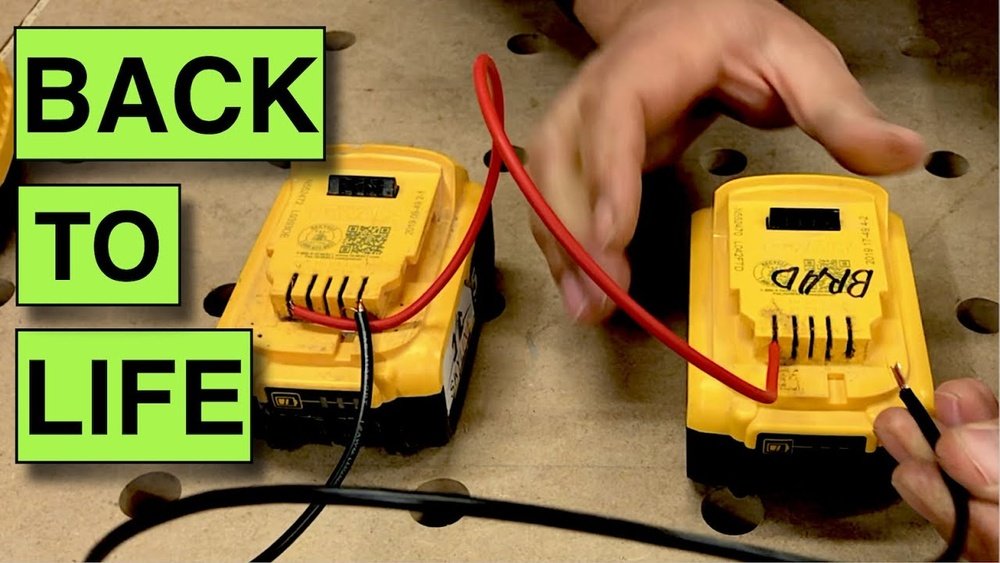
Jump-starting uses a small boost of power to wake the battery. This method can help batteries that refuse to charge normally. It is a quick way to reset the battery’s internal circuits.
Use a fully charged battery of the same voltage. Connect its terminals to the dead battery carefully, matching positive to positive and negative to negative. Hold the connection for a few seconds.
After jump-starting, place the battery on a slow charger. This helps stabilize the charge and improve battery health. Be cautious to avoid sparks or short circuits during this process.
Diy Battery Pack Repairs
DIY battery pack repairs help save money and reduce waste. You can fix many cordless drill batteries at home. It takes some care and basic tools. This guide shows two common repair methods. Both focus on restoring the battery’s power and life.
Replacing Faulty Cells
Battery packs have several small cells inside. Some cells lose charge or stop working. Replacing these cells can bring the pack back to life. First, open the battery case carefully. Look for swollen or damaged cells. Use a multimeter to test cell voltage. Remove faulty cells with a soldering iron. Insert new, compatible cells in the same order. Solder the connections firmly and safely. Close the case and test the battery on your drill. This method saves the good cells and restores power.
Rebuilding Battery Packs
Rebuilding means making a new battery pack from old parts. You need new cells that match the original type. Remove all old cells and clean the battery shell. Arrange new cells in the same pattern. Connect them using nickel strips and solder. Check the voltage and current before sealing the pack. This process takes time and care but gives a fresh battery. It works well if many cells are bad. Always use proper safety gear and tools. A rebuilt pack can work like new for months or years.
Credit: www.theartofdoingstuff.com
Preventive Maintenance Tips
Taking care of your cordless drill battery can make it last longer. Small habits help avoid battery problems. These preventive steps keep your battery healthy and ready to use.
Proper Charging Habits
Charge the battery fully before using it for the first time. Avoid overcharging by unplugging once it reaches 100%. Use the charger that comes with your drill. Fast chargers may cause heat and damage. Charge in a cool, dry place to keep the battery safe. If you do not use the drill often, charge it every few weeks to keep the battery alive.
Storage Recommendations
Store the battery in a cool, dry place away from sunlight. Avoid leaving the battery in the drill if not in use for a long time. Remove it and store separately. Keep the battery partially charged, around 40-60%, during storage. Extreme cold or heat can harm the battery cells. Check the battery every month and recharge if needed to prevent it from dying.
When To Replace The Battery
Knowing when to replace a dead cordless drill battery saves time and money. Not all batteries can be revived. Sometimes, they reach the end of their life and need replacement. Recognizing the signs helps avoid frustration and damage to your tools.
Signs Beyond Repair
The battery won’t hold a charge anymore. It drains very fast during use. The drill stops suddenly, even when the battery shows power. Swelling or leaking of the battery case is dangerous. The battery gets very hot while charging or use. These signs mean the battery is beyond repair.
Choosing A New Battery
Match the new battery to your drill model. Check the voltage and capacity to ensure compatibility. Buy from trusted brands or official suppliers. Avoid cheap, low-quality batteries that can cause damage. Consider batteries with longer warranty and good reviews. Proper choice ensures better performance and safety.
Frequently Asked Questions
How Can I Revive A Dead Cordless Drill Battery?
To revive a dead battery, fully discharge it first. Then, recharge slowly using a compatible charger. Repeat the discharge-charge cycle a few times to restore capacity.
Why Does My Cordless Drill Battery Die Quickly?
A battery dies quickly due to age, overuse, or improper charging. Heat and lack of maintenance also reduce battery life and performance.
Can I Fix A Dead Cordless Drill Battery At Home?
Yes, you can fix it by cleaning contacts and resetting the battery. Use a slow charger and avoid overheating to revive it safely.
How Long Does It Take To Recharge A Dead Drill Battery?
Recharging time varies, usually between 1 to 5 hours. Use the manufacturer’s recommended charger for optimal and safe charging speed.
Conclusion
Reviving a dead cordless drill battery is possible with simple steps. Clean the contacts, charge it properly, and test the power. Small efforts can extend your battery’s life and save money. Keep your drill ready for any job by caring for the battery.
Try these tips and bring your cordless drill back to work. It’s easier than you think. Don’t give up on old batteries too soon. A little patience and care can make a big difference.
