



If you’ve ever picked up a cordless drill, you might have noticed numbers or settings labeled on it without fully understanding what they mean. Those are the torque settings, and they play a crucial role in how your drill performs.
Knowing the right torque setting can save your screws from stripping, protect your drill from damage, and make your projects go smoother. You’ll discover exactly what torque settings are, why they matter, and how to use them to get the best results every time you pick up your drill.
Stick around—getting this right will make your DIY work easier and more professional.
Credit: www.villaggiolepalme.com
Torque Basics
Understanding torque is key to using a cordless drill well. Torque controls how much force the drill applies. It helps manage different tasks easily and safely.
This section explains basic torque concepts. Knowing these basics improves your drilling results.
What Torque Means
Torque is a twisting force. It turns the drill bit to drive screws or drill holes. Higher torque means more force for tough jobs. Lower torque works best for delicate tasks. Cordless drills let you adjust torque settings for control.
Importance Of Torque In Drilling
Torque affects drilling quality and safety. Too much torque can strip screws or damage materials. Too little torque can stop screws from going in fully. Using the right torque prevents tool wear and keeps work neat. It also saves battery power by avoiding extra effort.
Cordless Drill Torque Settings
Understanding cordless drill torque settings helps you work smarter and safer. Torque controls how much force the drill applies to screws or bolts. Using the right torque prevents damage to materials and fasteners. It also makes your work more efficient and professional.
How Torque Settings Work
Torque settings adjust the drill’s twisting power. Lower settings apply less force. Higher settings deliver more force to the bit. When the drill reaches the set torque, it stops turning. This prevents overdriving screws or stripping threads.
The drill uses a clutch mechanism inside. It senses resistance and slips when the torque limit hits. This protects both the drill and the material you are working on.
Common Torque Levels
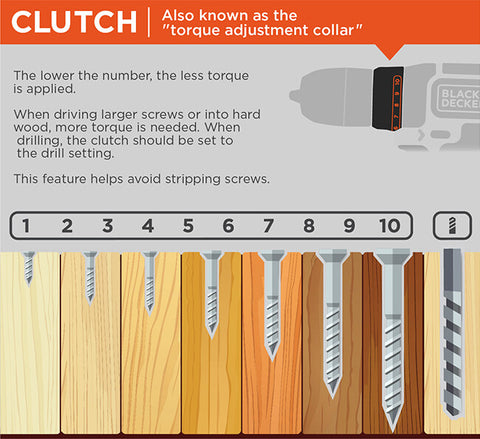
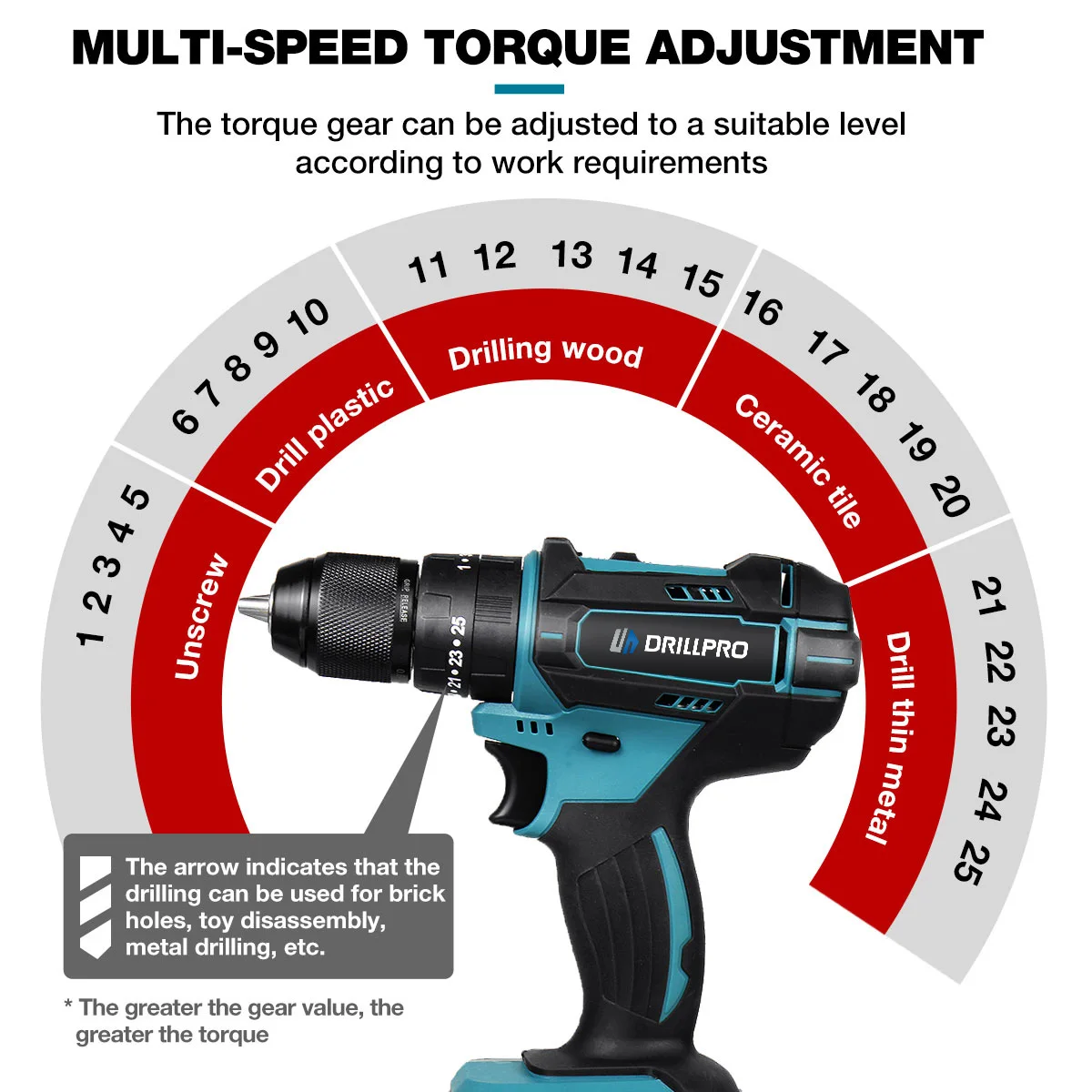
Torque levels vary by drill but usually range from 1 to 20 or more. Low levels suit soft materials like wood or plastic. Medium levels work well for general household tasks. High levels fit tough materials like metal or dense wood.
Some drills show torque in numbers, others use symbols or clicks. Each step increases the torque slightly, giving you control for different jobs.
Adjusting Torque On Different Models
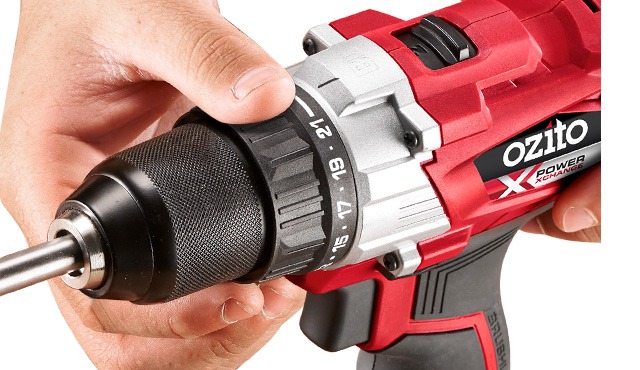
Most cordless drills have a torque ring near the chuck. Turn the ring to select the torque number or icon. Some models have electronic controls to change torque digitally.
Different brands may have unique settings or extra features. Always check your drill’s manual for exact instructions. Adjust torque before starting your task for best results.
Choosing The Right Torque
Choosing the right torque setting on a cordless drill is key for every task. It controls how much force the drill uses to turn screws or drill holes. Using the correct torque helps protect your materials and tools. It also makes your work easier and faster.
Material Considerations
Different materials need different torque levels. Soft wood needs less torque than hard wood or metal. Too much torque can damage soft materials by cracking or splitting them. Hard materials need higher torque to drive screws in properly. Adjust the torque based on the material you work with.
Screw Size And Type
Small screws require low torque to avoid stripping their heads. Larger screws need higher torque for a secure fit. The screw’s thread type also matters. Coarse threads need less torque than fine threads. Match the torque to the screw size and type for best results.
Avoiding Over-tightening
Over-tightening screws can damage both the material and the screw. It may strip the screw head or break the material. Using the correct torque prevents these problems. Stop tightening as soon as the screw feels secure. This saves time and protects your work.
Credit: www.ozito.com.au
Tips For Using Torque Settings
Using the right torque settings on a cordless drill helps you work better and avoid damage. Proper torque control protects your tools and materials. It also makes your projects safer and faster. Below are some easy tips to get the most out of your drill’s torque settings.
Testing Torque Before Use
Always test the torque setting before starting a project. Pick a scrap piece of wood or metal. Set the drill to a low torque level first. Try driving a screw to see how tight it gets. Increase the torque slowly if the screw feels loose. This simple test helps you find the right setting for your task.
Maintaining Consistent Torque
Keep the torque steady while drilling or driving screws. Avoid pressing too hard or too lightly. Let the drill do the work by itself. If you push too much, you risk stripping screws or damaging materials. Use a smooth, steady motion for best results. Consistent torque saves time and prevents mistakes.
When To Use Maximum Torque
Use maximum torque only for tough jobs like drilling into hard wood or metal. High torque helps the drill power through thick materials. Avoid using max torque on soft or delicate surfaces. Too much force can break screws or crack materials. Choose the highest setting only when extra power is truly needed.
Troubleshooting Torque Issues
Troubleshooting torque issues on a cordless drill is important. Torque controls how hard the drill turns. Problems with torque can cause poor performance. Fixing these issues helps the drill work better and lasts longer.
Drill Slipping Or Stripping Screws
Slipping or stripping happens when the torque is too low. The drill spins but does not tighten the screw. Check the torque setting and increase it if needed. Use the right drill bit size for the screw. Press the drill firmly to avoid slipping.
Torque Setting Not Changing
Sometimes the torque dial does not change the setting. Dirt or dust can block the dial mechanism. Clean around the torque ring gently with a brush. Make sure the drill is off before adjusting. If the problem continues, the internal parts may need repair.
Battery Impact On Torque
A weak battery reduces the drill’s torque power. The drill may slow down or stop working well. Charge the battery fully before use. Use the right battery model for your drill. Replace old batteries to keep torque strong and steady.
Advanced Torque Features
Advanced torque features improve the control and precision of cordless drills. These features help prevent damage to screws and materials. They also make drilling easier and more efficient. Many modern cordless drills include smart technology to manage torque settings automatically.
Smart Torque Control
Smart torque control adjusts the drill’s power based on the task. It senses resistance and changes torque to avoid stripping screws. This feature protects your work and extends battery life. It is especially useful for delicate jobs and varied materials.
Torque Memory Functions
Torque memory lets you save preferred torque settings for future use. This is helpful when working on projects with similar requirements. You can switch between saved settings quickly. It saves time and keeps your work consistent.
Digital Torque Displays
Digital torque displays show the exact torque level on a screen. They provide clear feedback for precise adjustments. You can see real-time torque changes while drilling. This feature helps beginners and professionals work with confidence.
Credit: temperville.com.br
Frequently Asked Questions
What Is The Ideal Torque Setting For A Cordless Drill?
The ideal torque setting depends on the material and screw size. Lower settings prevent damage to soft materials, while higher settings suit tougher tasks. Adjust torque incrementally to find the right balance between power and control for your project.
How Do Torque Settings Affect Drill Performance?
Torque settings control the drill’s twisting force. Higher torque delivers more power for drilling or driving large screws. Lower torque prevents overdriving or stripping screws, ensuring precision and protecting materials.
Can Incorrect Torque Damage My Cordless Drill?
Yes, using too high torque can strain the motor and battery. Too low torque may cause incomplete fastening. Always match torque settings to the task to extend drill lifespan and improve efficiency.
How To Adjust Torque Settings On A Cordless Drill?
Most cordless drills have a torque collar with numbered settings. Rotate the collar to select the desired torque level. Refer to your drill’s manual for specific guidance on torque adjustment.
Conclusion
Setting the right torque on a cordless drill keeps your work safe and strong. It helps avoid damage to screws and materials. Different tasks need different torque levels. Adjust the settings to match your project. This makes drilling easier and gives better results.
Practice using the torque settings to feel confident. You will save time and reduce mistakes. Keep your drill in good shape by using the right torque. Simple steps lead to better work and longer tool life.
