


You rely on your cordless drill to get the job done quickly and efficiently. But what happens when it suddenly stops working?
Most of the time, the problem lies with the battery. Knowing how to check a cordless drill battery can save you time, money, and frustration. You’ll discover simple and effective ways to test your battery’s health. By the end, you’ll feel confident that your drill is ready whenever you need it.
Keep reading to unlock these easy tips and never get caught off guard again.
Credit: www.ereplacementparts.com
Types Of Cordless Drill Batteries
Cordless drills use different types of batteries. These batteries power the drill and affect how long it works. Knowing the battery type helps to check and maintain it properly. Each type has its own features and care needs. Understanding these helps you choose and use the right battery for your drill.
Lithium-ion Batteries
Lithium-ion batteries are common in cordless drills. They are light and hold charge well. These batteries charge quickly and last longer. They do not lose power when not in use. They also have no memory effect, so charging anytime is fine. These features make them popular and easy to use.
Nickel-cadmium Batteries
Nickel-cadmium batteries are older but still in use. They are heavier than lithium-ion batteries. They can work in cold weather better. These batteries have a memory effect. It means they lose capacity if not fully charged before recharging. Proper charging helps keep them working well.
Nickel-metal Hydride Batteries
Nickel-metal hydride batteries are a middle option. They hold more charge than nickel-cadmium batteries. These batteries do not have a strong memory effect. They are heavier than lithium-ion but lighter than nickel-cadmium. They offer good power and are less toxic than nickel-cadmium.
Signs Of A Weak Battery
Knowing the signs of a weak cordless drill battery helps you avoid interruptions. It saves time and keeps your work smooth. Spotting problems early can prevent damage to the drill and battery.
Reduced Run Time
A weak battery drains power quickly. It lasts shorter than before. You may need to recharge often during tasks. This change shows the battery cannot hold charge well.
Slow Charging
If your battery takes too long to charge, it could be weak. Charging might drag on past the usual time. This delay means the battery is losing efficiency. It may struggle to reach full power.
Overheating Issues
Batteries that get very hot during use or charging are weak. Overheating can harm the battery and drill. It signals internal problems or damage. Watch out for unusual warmth as a warning sign.
Tools Needed For Battery Testing
Testing a cordless drill battery requires a few basic tools. These tools help you check the battery’s health and charge level. Using the right tools saves time and prevents damage to the battery or drill. Here are the main tools needed for battery testing.
Multimeter
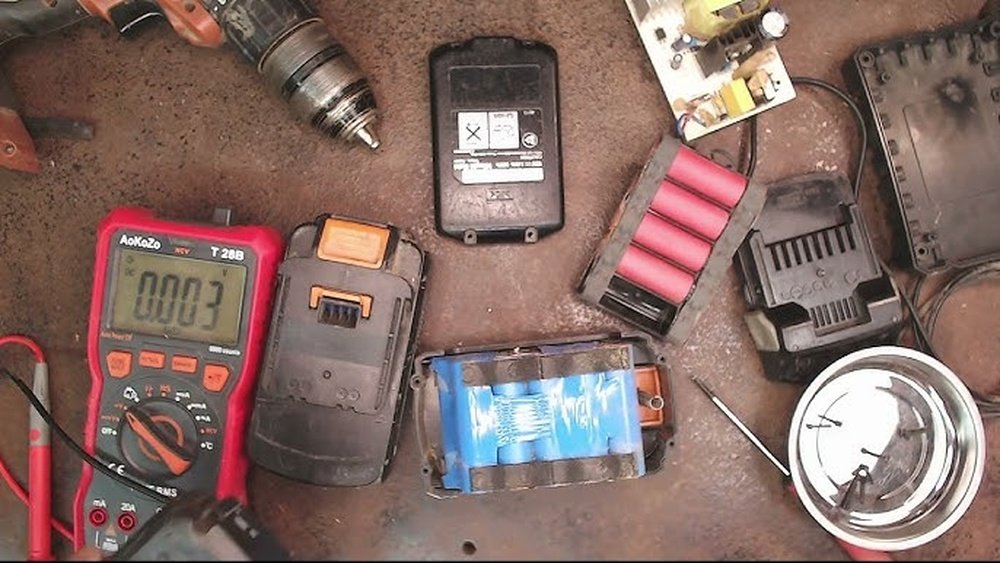
A multimeter measures voltage, current, and resistance. It shows the battery’s exact voltage level. This tool helps find out if the battery holds a charge. A multimeter is affordable and easy to use. Just set it to measure volts and touch the battery terminals.
Battery Tester
A battery tester is a simple device designed to check battery power. It gives a quick reading of battery strength. Some testers show if the battery needs charging or replacement. This tool is handy for quick checks without complex steps.
Charger
The charger is essential for testing battery function. It restores the battery’s charge before testing. A good charger can detect battery problems during charging. Always use the charger made for your drill model. A proper charge ensures accurate test results.
Step-by-step Battery Check
Checking a cordless drill battery helps ensure it works well. Follow simple steps to find out if your battery needs charging or replacing. These steps use basic tools and easy methods anyone can do.
Removing The Battery
First, remove the battery from the drill. Press the release button or slide the latch. Pull the battery out carefully. Keep it away from metal objects to avoid short circuits.
Visual Inspection
Look closely at the battery. Check for cracks, leaks, or swelling. Look for corrosion on the terminals. Dirty or damaged parts can cause battery problems. Clean terminals with a dry cloth if needed.
Measuring Voltage
Use a multimeter to check the battery voltage. Set the meter to DC volts. Touch the red probe to the positive terminal. Touch the black probe to the negative terminal. Compare the reading to the battery’s rated voltage.
Load Testing
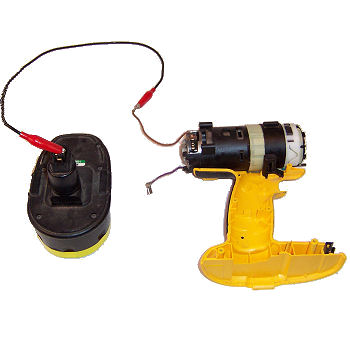
Load testing shows how the battery performs under use. Use a battery tester or connect the battery to the drill. Turn on the drill and watch the power level. If the battery drains quickly, it may be weak.
Charging And Retesting
Charge the battery fully using the correct charger. After charging, measure the voltage again. Perform a load test once more. A good battery holds charge and powers the drill well.
Tips To Extend Battery Life
Extending the battery life of your cordless drill saves money and ensures better performance. Good care helps the battery hold charge longer. Follow simple tips to protect your battery and keep it working well.
Proper Charging Habits
Charge the battery fully before using the drill. Avoid overcharging by unplugging it once full. Use the charger made for your drill’s battery type. Charge in a cool, dry place. Regular charging keeps the battery healthy.
Storage Recommendations
Store the battery in a cool, dry spot away from direct sunlight. Remove the battery from the drill if not used for weeks. Avoid leaving the battery in extreme heat or cold. Keep the battery partially charged if stored long-term.
Avoiding Deep Discharge
Do not let the battery run completely out of power. Deep discharge can damage battery cells. Recharge the battery as soon as you notice low power. Frequent deep discharge shortens battery life. Keep an eye on the battery level during use.

Credit: www.ebay.com
When To Replace The Battery
Knowing when to replace your cordless drill battery saves time and money. A battery that no longer holds charge or works well can slow your tasks. It is important to spot the right time to change it. This keeps your drill working at its best.
Signs Of Irreparable Damage
Look for swelling or leaking on the battery. These are clear signs it is unsafe to use. If the battery overheats quickly, it may be damaged inside. Cracks or corrosion on battery contacts mean it might not connect well. Physical damage like these means replacement is necessary.
Performance Benchmarks
Notice if the drill runs shorter than before on a full charge. A big drop in battery life signals a problem. If the drill loses power fast or stops suddenly, check the battery. Slow charging times or no charge at all also indicate issues. These signs show the battery is wearing out.
Cost Considerations
Compare the price of a new battery with repair costs. Sometimes, buying a new battery is cheaper than fixing the old one. Consider how often you use your drill and how much a new battery costs. Investing in a new battery can save money and frustration over time.

Credit: www.youtube.com
Frequently Asked Questions
How Do I Test A Cordless Drill Battery?
To test a cordless drill battery, use a multimeter to check voltage. Fully charged batteries show voltage near their rated capacity. You can also insert the battery into the drill and observe performance. Weak or no power indicates the battery may need replacement.
How Can I Tell If My Drill Battery Is Dead?
If your drill battery won’t hold a charge or runs out quickly, it may be dead. Also, swollen or leaking batteries signal failure. Testing voltage with a multimeter below the rated level confirms a dead battery. Replacing it is usually the best solution.
What Tools Are Needed To Check Cordless Drill Batteries?
A digital multimeter is the primary tool to check cordless drill batteries. It measures voltage and helps identify battery health. Additionally, a battery charger and the drill itself help test real-world performance. These tools provide accurate and practical battery condition insights.
How Often Should I Check My Cordless Drill Battery?
Check your cordless drill battery every few months or if performance drops. Regular checks ensure the battery remains healthy and prolongs its life. Frequent use or extreme conditions may require more frequent testing. Proper maintenance helps avoid unexpected battery failures.
Conclusion
Checking a cordless drill battery is simple and important. A good battery keeps your drill working strong. Test the battery regularly to avoid surprises. Use a multimeter or battery tester for quick checks. Clean the contacts to ensure proper power flow.
Store batteries in a cool, dry place for longer life. Taking these small steps saves time and money. Keep your drill ready for any project. Easy maintenance means better performance every time. Stay prepared with a healthy battery.
