


If you’ve ever struggled to drill holes at the right depth, you know how frustrating it can be. Using a depth gauge on your hammer drill is a simple trick that can save you time and ensure precision every time.
In this guide, you’ll discover exactly how to set up and use a depth gauge, so your drilling projects come out perfect—without guesswork or damage. Keep reading, and you’ll learn how this small tool can make a big difference in your work.
Choosing The Right Depth Gauge
Choosing the right depth gauge is important for accurate drilling. It helps control how deep the drill bit goes. The right depth gauge saves time and avoids mistakes. Not all depth gauges fit every hammer drill. Knowing the types and materials helps pick the best one for your tool.
Types Of Depth Gauges
Depth gauges come in different styles. Some are fixed, meaning they set one depth only. Others are adjustable and can change depth easily. Some gauges attach to the drill shaft. Others clip onto the drill body. Choose a type that matches your drilling needs.
Compatibility With Hammer Drills
Check if the depth gauge fits your hammer drill model. Not all gauges work with every drill brand. Some gauges fit specific drill bit sizes. Confirm the size and attachment style before buying. A proper fit ensures stable and safe drilling.
Material And Build Quality
Look for depth gauges made from strong materials. Metal gauges last longer than plastic ones. A sturdy build resists bending or breaking. Good quality gauges hold their settings well. This keeps your drilling depth precise every time.

Credit: www.bigtoolstore.com
Setting Up Your Hammer Drill
Setting up your hammer drill correctly ensures precise and safe drilling. This step helps control the depth of each hole. Using a depth gauge is key to drilling consistent holes without going too deep. Follow simple steps to attach and adjust the gauge before starting your work.
Attaching The Depth Gauge
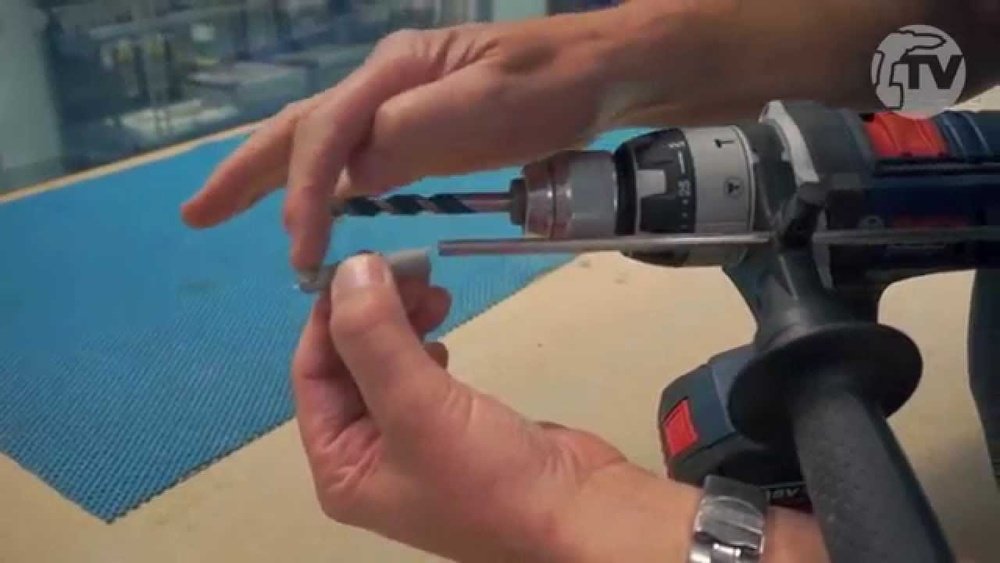
First, locate the depth gauge rod that comes with your drill. It usually fits into a small hole near the drill chuck. Slide the rod into this hole until it clicks or feels secure. Tighten the locking screw to hold the gauge in place. Make sure the gauge is firm and does not move during drilling.
Adjusting Drill Bits
Choose the right drill bit size for your project. Insert the drill bit into the chuck and tighten it firmly. Next, adjust the depth gauge rod to match the desired drilling depth. Move the rod up or down until it stops at the correct length. Lock the rod by tightening the screw. This stops the drill bit from going deeper than needed.
Safety Precautions
Always wear safety glasses to protect your eyes from debris. Check that the drill bit and depth gauge are secure before use. Keep hands away from the spinning drill bit. Work on a stable surface to avoid slips. Disconnect the drill from power when making adjustments. Follow these steps to stay safe during drilling tasks.
Calibrating The Depth Gauge
Calibrating the depth gauge on a hammer drill is important for precise drilling. It helps set the exact depth for holes. This avoids drilling too deep or too shallow. Proper calibration makes your work neat and accurate.
Measuring Desired Depth
First, decide how deep the hole should be. Use a ruler or tape measure to check the length. Mark this length on the drill bit or gauge. This mark shows where the drilling must stop.
Locking The Gauge In Place
Next, move the depth gauge to the mark you made. Tighten the locking screw or knob firmly. The gauge should not move during drilling. A secure gauge keeps the depth consistent for every hole.
Testing For Accuracy
Before starting your project, test the setup. Drill a hole into a scrap piece of wood or material. Check the hole depth with a ruler. Adjust the gauge if the depth is not correct. This step saves time and materials later.

Credit: www.youtube.com
Techniques For Precision Drilling
Techniques for precision drilling help you get exact holes every time. Using a depth gauge on a hammer drill ensures you don’t drill too deep. Learning to control pressure, speed, and material type improves your drilling accuracy. These techniques protect your work and tools.
Maintaining Steady Pressure
Apply steady pressure on the drill without forcing it. Too much force can damage the drill bit and material. Too little pressure slows drilling and wastes time. Let the drill do the work. Keep your hand firm but relaxed.
Controlling Drill Speed
Adjust drill speed depending on the material and bit size. Use slower speeds for hard materials like concrete or metal. Faster speeds suit soft materials such as wood or plastic. A consistent speed helps prevent overheating. It also improves hole quality.
Working With Different Materials
Different materials need different techniques for best results. Concrete requires a hammer drill mode with steady speed and pressure. Wood drills faster but needs careful depth control to avoid splintering. Metal needs slow speed and steady pressure to avoid damage. Know your material to adjust your drilling technique.
Troubleshooting Common Issues
Using a depth gauge on a hammer drill helps you control how deep you drill into a surface. Sometimes, problems may occur that affect the gauge’s accuracy. Troubleshooting these issues is key to keeping your work precise and safe.
Depth Gauge Slipping
The depth gauge may slip during use. This causes uneven drilling depths. Tighten the locking screw to secure the gauge in place. Clean the gauge and drill shaft from dust and debris. Check for worn parts that might cause slipping. Replace any damaged components promptly.
Inconsistent Drill Depths
Drilling depths may vary even if the gauge looks set correctly. Make sure the gauge is aligned properly with the drill bit. Adjust the gauge carefully before starting. Test on a scrap piece to confirm the depth. Avoid forcing the drill, as it can push the gauge out of position.
Wear And Tear Maintenance
Regular maintenance keeps the depth gauge working well. Inspect the gauge for signs of wear or rust. Lubricate moving parts lightly with oil to prevent sticking. Store the drill and gauge in a dry place. Replace the depth gauge if it shows heavy damage or bending.
Enhancing Efficiency With Accessories
Using accessories with a depth gauge on a hammer drill makes your work easier and faster. These tools help you drill holes with the right depth every time. They save time and reduce mistakes. The right accessories improve accuracy and protect materials.
Using Drill Stoppers
Drill stoppers attach to your drill bit. They stop the bit from going deeper than needed. This keeps holes consistent in depth. Drill stoppers are simple but very useful. They work well with a depth gauge for better control.
Pairing With Laser Guides
Laser guides project a light line on the work surface. This shows exactly where to drill. They help keep the drill steady and straight. Using a laser guide with a depth gauge improves precision. It reduces errors and saves time.
Upgrading Drill Bits
Good drill bits make a big difference. Use bits designed for hammer drills and your material. Sharp, strong bits cut cleaner holes. They also last longer and reduce effort. Pairing quality bits with a depth gauge gives better results.

Credit: www.reddit.com
Frequently Asked Questions
What Is A Depth Gauge On A Hammer Drill?
A depth gauge is a tool attachment that controls drilling depth. It ensures holes are consistent and precise, preventing overdrilling. This feature is essential for tasks requiring exact hole depths, like installing anchors or electrical fittings.
How Do You Set The Depth Gauge On A Hammer Drill?
Loosen the depth gauge screw, slide the gauge to the desired length, then tighten the screw. This sets the maximum drilling depth. Always double-check the measurement before starting to drill for accuracy.
Why Use A Depth Gauge With A Hammer Drill?
Using a depth gauge prevents drilling too deep, protecting surfaces and materials. It improves precision and saves time by avoiding guesswork. This tool is especially useful for repetitive drilling tasks.
Can A Depth Gauge Improve Drilling Accuracy?
Yes, a depth gauge ensures holes are drilled to uniform depths. This consistency improves overall project quality and fit. It helps avoid mistakes and material damage during hammer drilling.
Conclusion
Using a depth gauge on a hammer drill helps control drilling depth easily. It keeps holes uniform and prevents drilling too deep. Adjust the gauge to match your project needs. This simple step saves time and avoids mistakes. Practice a few times to feel confident.
Soon, you will drill with better accuracy and safety. Keep your work neat and professional every time.
