



Have you ever wondered what powers your Ryobi cordless drill and makes it such a handy tool? Understanding how your drill works can help you use it better and keep it running longer.
Whether you’re fixing things around the house or taking on a big project, knowing the basics behind your drill’s operation gives you more control and confidence. You’ll discover exactly how a Ryobi cordless drill works, breaking down its key parts and functions in a simple, clear way.
Keep reading, and you’ll see why this tool is a must-have for your toolbox.
Credit: www.homedepot.com
Cordless Drill Basics
A cordless drill is a handy tool for many tasks. It helps you drill holes and drive screws without a cord. The Ryobi cordless drill is popular for its ease of use and power. Understanding its basics helps you use it better and keep it in good shape.
Knowing the main parts and how the power works makes the drill less confusing. It also helps you choose the right drill for your needs. Let’s look at the core components and power source of a Ryobi cordless drill.
Core Components
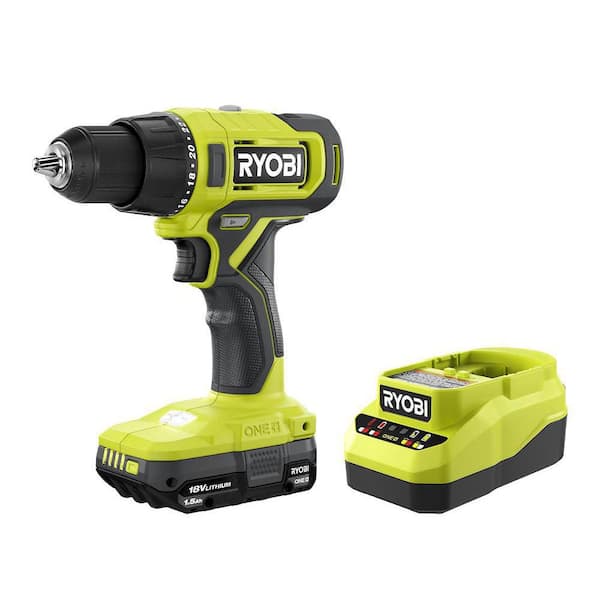
The Ryobi cordless drill has several key parts. The motor spins the drill bit. The chuck holds the drill bit tightly. The trigger controls the motor speed. The handle gives you a firm grip. The clutch controls the torque to prevent over-tightening.
Each part works together to make drilling easy. The drill’s body keeps all parts in place. Some models include a built-in LED light for better visibility. These parts make the drill simple and efficient to use.
Power Source Explained
The Ryobi cordless drill uses a rechargeable battery. This battery powers the motor without a cord. Most Ryobi models use lithium-ion batteries. These batteries are lightweight and last longer than older types.
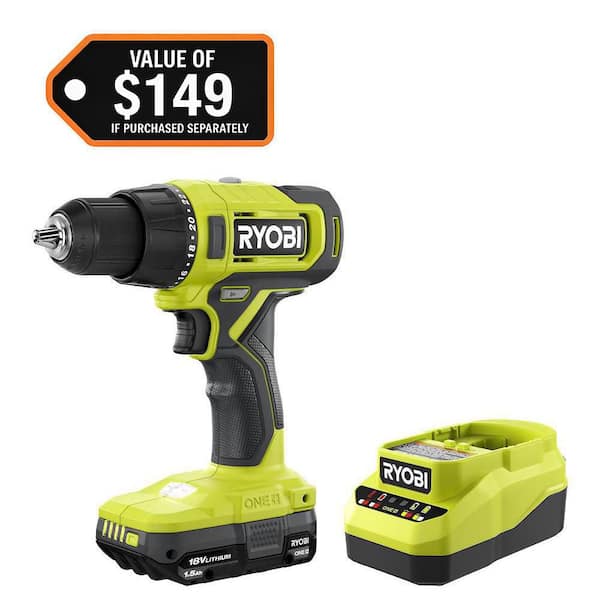
You charge the battery with a charger that comes with the drill. The battery slides into the drill’s base for easy removal. A full battery allows you to work for hours. It is important to keep the battery charged for best results.
Ryobi Drill Features
Ryobi cordless drills offer a mix of power, comfort, and smart design. They help users complete tasks faster and easier. Each feature focuses on making the drill reliable and simple to use. Below are key features that make Ryobi drills popular.
Battery Technology
Ryobi drills use lithium-ion batteries for longer life and quick charging. These batteries hold more power than older types. They provide consistent energy, so the drill works without slowing down. The batteries are light, which helps keep the drill easy to handle. You can swap batteries between other Ryobi tools too.
Motor Design
Ryobi drills have efficient motors that deliver strong torque. The motor design helps the drill run smoothly. It reduces heat, which protects the tool during long work sessions. The motor also supports variable speed control. This lets users adjust power for different materials and tasks.
Ergonomic Build
Ryobi drills feature a comfortable grip to reduce hand fatigue. The design balances the drill’s weight well. Controls are easy to reach and simple to use. This makes the drill suitable for both beginners and experts. The compact size allows users to work in tight spaces comfortably.
Drill Operation Mechanics
The drill operation mechanics explain how a Ryobi cordless drill works. It uses simple parts to perform complex tasks. Understanding these parts helps you use the drill better. Each part plays a key role in drilling or driving screws.
Trigger And Speed Control
The trigger controls the drill’s power. Pressing it starts the motor. The harder you press, the faster the drill spins. This helps you adjust speed for different materials. Slow speed for soft wood, faster for hard surfaces.
Chuck And Bit Attachment
The chuck holds the drill bit in place. It tightens around the bit to stop it from slipping. You turn the chuck to change bits quickly. This feature makes the drill versatile for many jobs.
Torque Settings
Torque settings control the drill’s twisting force. Low torque avoids damage to soft materials. High torque handles tough tasks like drilling metal. Adjusting torque helps prevent stripping screws or overdriving them.
Credit: www.reddit.com
Battery Management
Battery management plays a key role in how a Ryobi cordless drill performs. A well-maintained battery ensures longer use and better power. Proper care keeps the battery healthy and ready for any job.
This section covers how to charge the battery, tips to extend battery life, and safety rules to follow.
Charging Process
Use only the charger made for Ryobi batteries. Connect the battery firmly to the charger. The light on the charger shows the battery status. Green means fully charged, red means charging. Avoid leaving the battery on the charger for days. Unplug the charger after the battery is full. This helps protect the battery from damage.
Battery Life Tips
Store the battery in a cool, dry place. Avoid extreme heat or cold. Remove the battery from the drill if you won’t use it for a while. Charge the battery before it is completely empty. Regular use keeps the battery healthy. Clean the battery contacts with a dry cloth. This improves connection and charging speed.
Safety Precautions
Never expose the battery to water or fire. Use gloves if the battery leaks. Do not try to open or repair the battery yourself. Keep batteries away from children. Use only Ryobi-approved batteries and chargers. Dispose of old batteries at a recycling center. Follow all instructions in the user manual for safe use.
Common Uses And Applications
The Ryobi cordless drill is a versatile tool with many uses. It suits different tasks around homes and workplaces. Its cordless design offers freedom to work anywhere.
This section explains common uses and applications of the Ryobi cordless drill. Understanding these helps you get the most from your tool.
Diy Projects
Many people use Ryobi drills for DIY projects at home. They help build shelves, furniture, and decorations. Drills make drilling holes and driving screws quick and easy. The cordless feature lets users work in tight spaces. It also reduces the hassle of tangled cords.
Professional Work
Ryobi drills are popular with professionals like carpenters and electricians. They use the drill for installing fixtures and assembling structures. The tool’s power handles tough materials such as wood and metal. Lightweight design reduces fatigue during long jobs. Professionals value its reliability and ease of use.
Outdoor And Indoor Tasks
Ryobi cordless drills work well both indoors and outdoors. Users fix fences, assemble garden furniture, and hang pictures. The drill adapts to different environments with its durable build. Its battery lasts long enough for most outdoor tasks. It is also great for quick repairs inside the house.
Credit: www.homedepot.com
Troubleshooting Tips
Troubleshooting a Ryobi cordless drill is simple with the right steps. Problems can stop your work, but many issues are easy to fix. Understanding common faults helps you save time and money. Here are some tips to solve the most frequent problems.
Power Issues
Check the battery connection first. Loose contacts can stop the drill from working. Make sure the battery is fully charged. Test the drill with another battery if possible. Inspect the trigger switch for damage or dirt. Clean the contacts gently if they look dirty. A faulty power switch may need replacement.
Motor Problems
If the drill runs slowly or makes noise, the motor might be the cause. Dust and debris can block the motor vents. Use compressed air to clean the vents carefully. Worn brushes inside the motor reduce power. Brushes can be replaced easily with basic tools. Listen for unusual sounds that indicate motor damage.
Battery Maintenance
Keep your battery healthy to avoid drill problems. Charge the battery fully before use. Do not leave the battery in the charger for too long. Store batteries in a cool, dry place. Avoid exposing batteries to extreme heat or cold. Clean battery terminals regularly for good contact. Replace old or damaged batteries for best results.
Enhancing Drill Performance
Enhancing the performance of your Ryobi cordless drill helps you get better results. Small changes can make a big difference. You can work faster and with more control. This section covers simple ways to improve how your drill works.
Accessory Options
Choosing the right accessories improves drill performance. Use drill bits designed for the material you work on. Different bits fit wood, metal, or plastic better. Attachments like sanding pads or mixing paddles add more uses. Ryobi offers many compatible accessories to expand your drill’s functions. Changing accessories to match the job makes your work easier and cleaner.
Maintenance Practices
Keeping your cordless drill clean helps it last longer. Wipe dirt and dust off after use. Check the chuck and tighten it regularly. Lubricate moving parts to reduce friction and wear. Store the drill in a dry place to avoid rust. Inspect the drill for damage and loose parts. Well-maintained drills perform better and stay reliable.
Upgrading Batteries
Battery power directly affects drill performance. Using high-capacity Ryobi batteries gives longer run time. Newer battery models often charge faster and last longer. Keep batteries charged and avoid letting them fully drain. Replacing old batteries can restore the drill’s strength. Upgrading batteries means more work done without interruptions.
Frequently Asked Questions
How Does A Ryobi Cordless Drill Operate?
A Ryobi cordless drill runs on a rechargeable battery. It powers the motor, which spins the drill bit to create holes or drive screws efficiently.
What Powers A Ryobi Cordless Drill?
Ryobi cordless drills use lithium-ion batteries. These batteries provide long-lasting power and quick charging for convenient, cordless operation.
How Do I Maintain My Ryobi Cordless Drill?
Keep the drill clean and dry. Charge the battery regularly and store it in a cool, dry place to ensure optimal performance.
Can Ryobi Cordless Drills Handle Tough Materials?
Yes, Ryobi cordless drills have adjustable torque settings. They can drill through wood, metal, and plastic with the right drill bit.
Conclusion
A Ryobi cordless drill runs on a rechargeable battery. It uses an electric motor to turn the drill bit. The drill’s trigger controls the speed easily. Its portability makes it handy for many jobs. You don’t need a power cord to work.
This tool offers convenience and good power. Understanding how it works helps you use it better. A cordless drill fits well in any toolbox. Simple to operate, it saves time and effort. Now, you can tackle drilling tasks with confidence.
