



Are you wondering how long it takes to charge your Dewalt cordless drill? Knowing the right charging time can save you from unexpected interruptions during your projects.
Whether you’re working on a quick fix or a big build, having your drill ready when you need it is crucial. You’ll discover the exact charging times for different Dewalt models and get tips to keep your drill’s battery healthy and long-lasting.
Keep reading to make sure your Dewalt drill is always powered up and ready to go!
Dewalt Drill Battery Types
Dewalt cordless drills use different types of batteries. Each battery type affects charging time and performance. Understanding these battery types helps in knowing how long to charge your Dewalt drill.
Lithium-ion Batteries
Lithium-ion batteries are common in Dewalt drills. They are lightweight and hold charge longer. These batteries charge faster, usually in about 30 to 60 minutes. They do not lose power quickly when not in use. Lithium-ion batteries also last longer over many charge cycles. This type is ideal for most DIY and professional tasks.
Nickel-cadmium Batteries
Nickel-cadmium (NiCd) batteries are older technology. They are heavier and have a lower energy density. NiCd batteries take longer to charge, sometimes up to 2 hours. They can suffer from memory effect, which reduces battery life if not fully discharged. These batteries are less common in newer Dewalt drills but are still used in some models.
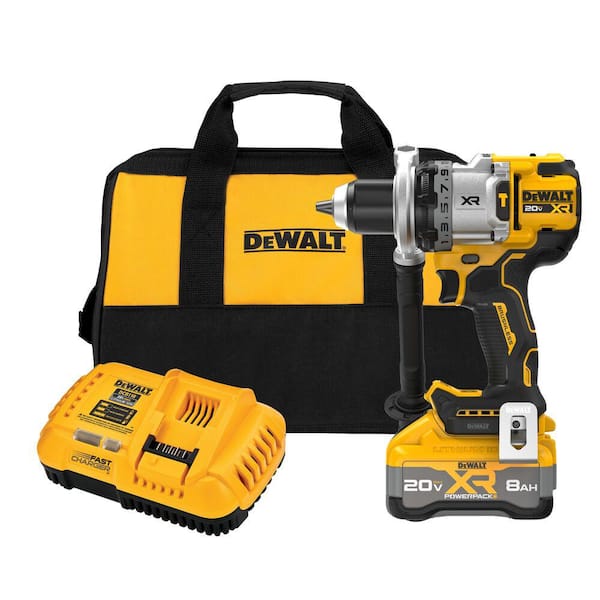
Credit: www.homedepot.com
Charging Time Factors
Charging time for a Dewalt cordless drill depends on several factors. These factors affect how fast or slow your battery will charge. Understanding them helps you plan your work better.
Some batteries charge quickly, while others take longer. The charger and battery condition also play a role. Let’s explore these important points.
Battery Capacity
Battery capacity shows how much power the battery holds. It is measured in amp-hours (Ah). Larger capacity batteries take longer to charge. Smaller batteries fill up faster. A 2.0Ah battery may charge in 30 minutes. A 5.0Ah battery might need over an hour.
Charger Type
Dewalt offers different chargers for their drills. Fast chargers provide more power and reduce charging time. Standard chargers take longer but are gentler on the battery. Using the correct charger ensures safe and efficient charging. Using a slow charger will extend the charge time.
Battery Condition
Old batteries lose their ability to hold charge well. Damaged or worn batteries charge slower than new ones. Proper care improves battery life and charging speed. Storing batteries in a cool, dry place helps. Check your battery regularly for any damage.
Typical Charging Times
Knowing the typical charging times helps you plan your work better. Dewalt cordless drills use different chargers that affect how fast the battery fills up. Charging times depend on the charger type and battery size. Understanding these times saves you waiting and keeps your projects moving.
Standard Chargers
Standard chargers are the most common type for Dewalt drills. They usually take about 1 to 2 hours to fully charge a battery. The exact time depends on the battery’s amp-hour (Ah) rating. Higher Ah batteries take longer to charge. These chargers are reliable and safe for everyday use.
Standard charging works well if you have time to wait. It gently fills the battery without overheating. This helps keep the battery healthy over many charges. Most Dewalt kits include a standard charger for convenience.
Fast Chargers
Fast chargers reduce charging time significantly. They can charge a battery in about 30 to 60 minutes. This speed helps when you need the drill ready quickly. Fast chargers use higher power to push more current into the battery.
Using a fast charger can save hours on the job. It works best with compatible Dewalt batteries. These chargers often have extra safety features. They prevent damage from overheating or overcharging. Fast charging is ideal for busy workdays.

Credit: www.youtube.com
Charging Tips
Charging your Dewalt cordless drill properly helps keep the battery healthy and ready. Good charging habits improve battery life and save time. Follow simple tips to get the best results.
Optimal Charging Practices
Use the charger that comes with your Dewalt drill. It matches the battery and gives the right power. Avoid using cheap or third-party chargers. They can damage the battery.
Charge the battery at room temperature. Too hot or cold slows charging and harms the battery. Keep the battery on the charger until it is fully charged. Unplug once charged to save energy.
Do not leave the battery on the charger for days. This can cause overheating and reduce battery life. Charge the battery after each use, even if not fully empty. It helps keep the battery ready.
Battery Maintenance
Store the battery in a cool, dry place. Avoid places with high heat or moisture. Clean the battery contacts with a dry cloth to keep good connection. Dirt or dust can block power flow.
Do not let the battery fully drain. Deep discharge can damage the battery cells. Recharge the battery as soon as possible after use. Use the battery regularly to keep it healthy.
If not using the drill for a long time, charge the battery every few months. This prevents the battery from losing its charge completely. Proper care helps your Dewalt drill work longer and better.
Signs Of A Fully Charged Battery
Knowing when your Dewalt cordless drill battery is fully charged saves time and prevents overcharging. It helps keep the battery healthy and ready for use. Watch for clear signs to know the battery is done charging. This way, you avoid guessing and keep your tools working well.
Indicator Lights
The most common sign is the indicator lights on the charger. Dewalt chargers usually have small LED lights. These lights change color or turn off when the battery is full. For example, a red light may show charging, and a green light means the battery is ready. Always check your charger’s manual for exact light signals.
Battery Heat Levels
Heat is another clue. While charging, the battery can get warm but not hot. If the battery feels cool or slightly warm, it is likely fully charged. A very hot battery may mean a problem or overcharging. Touch the battery carefully to check its temperature during charging. Safe heat levels show the charging is almost done.
Troubleshooting Charging Issues
Charging problems with a Dewalt cordless drill can slow down your work. Troubleshooting these issues helps keep your drill ready to use. Some simple checks can save time and money.
Look for signs that the battery or charger might be faulty. Small fixes often solve the problem quickly. Understanding when to replace parts keeps your drill working well.
Common Problems
The drill does not charge at all. This may mean the charger or battery is broken.
The charger light blinks but never turns solid. This shows a poor connection or a bad battery.
The battery loses power very fast after charging. This can be a sign of an old or damaged battery.
Check the charger cord for cuts or damage. Make sure the charger fits well into the battery and power outlet.
Try charging with a different charger if possible. This helps find if the charger or battery is the issue.
When To Replace Batteries
Batteries that do not hold charge need replacement. If charging takes much longer than usual, the battery may be worn out.
Swollen or leaking batteries must be replaced immediately. These are unsafe and can damage your drill.
Replace batteries after heavy use for over two years. Old batteries lose power and reduce drill performance.
Buying a new battery restores full power and charging speed. It keeps your Dewalt drill working at its best.

Credit: www.youtube.com
Frequently Asked Questions
How Long Does It Take To Fully Charge A Dewalt Cordless Drill?
A Dewalt cordless drill usually takes about 30 to 60 minutes to fully charge. Charging times vary by battery type and charger model.
Can I Use The Drill While It’s Charging?
No, Dewalt cordless drills cannot be used while charging. Always wait for the battery to charge fully before use.
How Do I Know When The Dewalt Drill Battery Is Fully Charged?
Most Dewalt chargers have indicator lights that turn green when charging is complete. This signals the battery is fully charged and ready.
Does Battery Size Affect Dewalt Drill Charging Time?
Yes, larger batteries take longer to charge. For example, a 5. 0Ah battery will take longer than a 2. 0Ah battery to fully charge.
Conclusion
Charging a Dewalt cordless drill usually takes about 30 to 60 minutes. This depends on the battery type and charger used. Always use the charger that comes with your drill. Avoid overcharging to keep the battery healthy. Quick charging saves time but may reduce battery life.
Regular charging helps your drill work better and last longer. Keep your battery clean and store it well. Now, you know how long to charge your Dewalt drill safely and effectively.
