



If you’ve ever struggled with a stuck drill bit or wasted time figuring out how to swap it out, you’re not alone. Changing the bit on your Genesis cordless drill doesn’t have to be confusing or frustrating.
In fact, once you know the simple steps, you’ll save time and keep your projects moving smoothly. Keep reading, and you’ll learn exactly how to change your drill bit quickly and safely—no extra tools or headaches needed. Your next project just got a whole lot easier.
Tools Needed
Changing a drill bit on your Genesis cordless drill is simple. Having the right tools makes the process quick and safe. Prepare these items before starting.
Genesis Cordless Drill
Of course, you need your Genesis cordless drill. It is the main tool for this task. Make sure the drill is turned off before changing bits.
New Drill Bit
Pick the correct drill bit for your project. Check the size and type to fit the job. Using the right bit protects your drill and work.
Chuck Key Or Keyless Chuck
Your drill may have a chuck key or a keyless chuck. A chuck key helps loosen and tighten the drill bit. A keyless chuck lets you twist the bit by hand.
Gloves
Wear gloves to protect your hands. Gloves help avoid cuts and slips. Choose gloves that fit well and allow good grip.
Cleaning Cloth
Keep a clean cloth nearby. Use it to wipe dust or dirt from the drill and bits. Clean parts work better and last longer.
Safety First
Safety is the top priority when changing a drill bit on your Genesis cordless drill. Taking simple safety steps protects you from injury and keeps your tool in good condition. Always prepare your workspace and gear before starting any work with power tools.
Turn Off And Unplug The Drill
Always turn off the drill before changing the bit. Remove the battery to stop the tool from accidentally starting. This step prevents injuries and damage to the drill.
Wear Protective Gear
Wear safety glasses to protect your eyes from dust and debris. Use gloves to protect your hands from sharp edges. Proper gear lowers the risk of cuts and eye injuries.
Work In A Clean Area
Clear your workspace of clutter and distractions. A tidy area helps you focus and prevents accidents. Good lighting also helps you see the drill and bit clearly.
Handle Drill Bits Carefully
Hold the drill bit by the smooth end only. Avoid touching the sharp part directly. Careful handling prevents cuts and keeps the bit clean for better performance.
Locate The Chuck
Locating the chuck is the first step to changing a Genesis cordless drill bit. The chuck holds the drill bit in place. Knowing where it is helps you change bits safely and quickly.
The chuck is at the front of the drill. It looks like a round collar with three jaws inside. These jaws grip the drill bit tightly.
Identify The Front Part Of The Drill
Hold your drill and point it forward. The chuck is the part at the very tip. It is different from the handle and battery area.
Look For The Rotating Collar
The chuck has a ring or collar you can twist. This collar opens and closes the jaws inside. Twisting it allows you to insert or remove bits.
Spot The Jaws Inside The Chuck
Inside the chuck, you will see three metal pieces. These jaws hold the drill bit firmly. They move when you turn the collar.
Loosen The Chuck
Loosening the chuck is the first step to change a drill bit on your Genesis cordless drill. The chuck holds the drill bit tightly. You need to loosen it to remove the old bit and insert a new one. This step is simple and quick. It requires either your hands or a chuck key. Both methods work well depending on your drill model. Follow the steps below to loosen the chuck safely and easily.
Using Your Hands
Most Genesis cordless drills have a keyless chuck. This means you can loosen it by hand. Hold the drill firmly with one hand. Use your other hand to turn the chuck counterclockwise. Turn until the jaws open wide enough to remove the bit. You may need to use some force if the chuck is tight. Once loose, pull the old drill bit out. Insert the new bit and tighten the chuck clockwise. Make sure it is secure before use.
Using A Chuck Key
Some Genesis drills use a keyed chuck. You will need a chuck key to loosen it. Find the hole on the side of the chuck. Insert the chuck key into the hole. Turn the key counterclockwise to open the jaws. Keep turning until the bit can be removed easily. Take out the old bit and put in the new one. Use the chuck key to tighten the chuck clockwise. Ensure the bit is held firmly before drilling.
Remove The Old Bit
Start by holding the drill firmly. Twist the chuck counterclockwise to loosen the old bit. Pull the bit out carefully to remove it.
Prepare Your Drill
First, switch off your cordless drill. Remove the battery for safety. This stops the drill from turning on by mistake. Always work with the tool off.
Open The Chuck
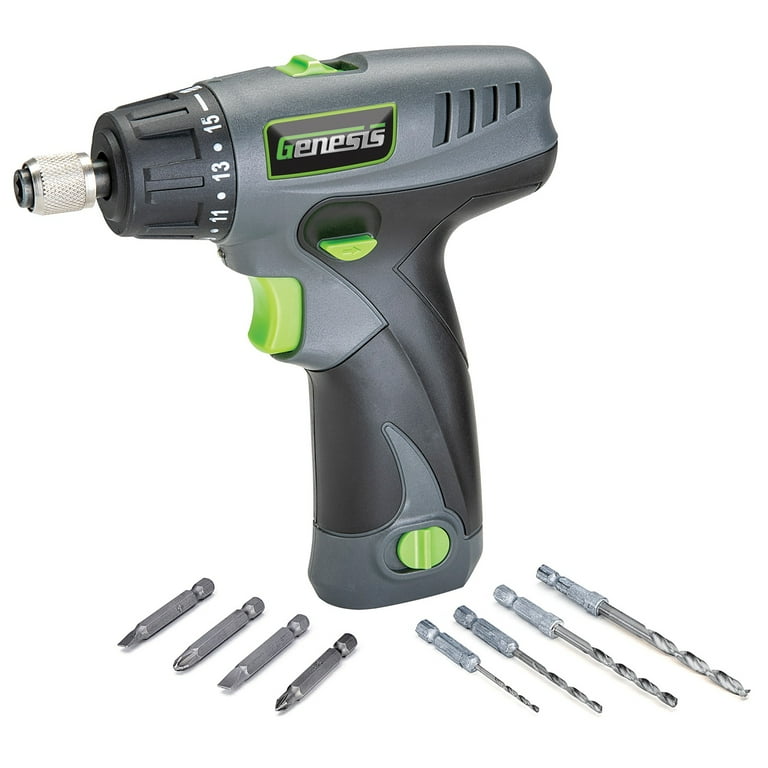
Hold the drill firmly. Twist the chuck collar counterclockwise. This loosens the grip on the drill bit. Keep turning until the bit moves freely.
Pull the drill bit straight out. If it feels stuck, wiggle it gently. Avoid using force to prevent damage. The bit should come out smoothly.
Check The Chuck For Debris
Look inside the chuck. Remove any dust or small pieces. Clean the area with a dry cloth. This helps the new bit fit better.
Credit: www.walmart.com
Insert The New Bit
Inserting a new bit into your Genesis cordless drill is simple and quick. This step gets your drill ready for the next job. Follow clear steps to avoid mistakes and ensure the bit fits perfectly.
Prepare The Drill Chuck
Hold the drill firmly with one hand. Use your other hand to twist the chuck. Turn it counterclockwise to open the jaws wide. This creates space to insert the new bit.
Place The New Bit
Pick the correct bit size for your task. Insert the smooth end of the bit into the chuck. Push it in as far as it will go for a strong hold.
Tighten The Chuck Securely
Twist the chuck clockwise to close the jaws. Keep turning until the bit is locked tightly. Check by gently pulling the bit to ensure it won’t slip.
Tighten The Chuck
Tightening the chuck is a key step when changing a drill bit on your Genesis cordless drill. The chuck holds the drill bit firmly in place. A loose chuck can cause the bit to slip or fall out during use. Tightening it properly ensures safety and better drilling performance.
There are two main ways to tighten the chuck. You can do it by hand or use a chuck key. Each method works well, depending on the chuck design of your drill.
Hand Tightening
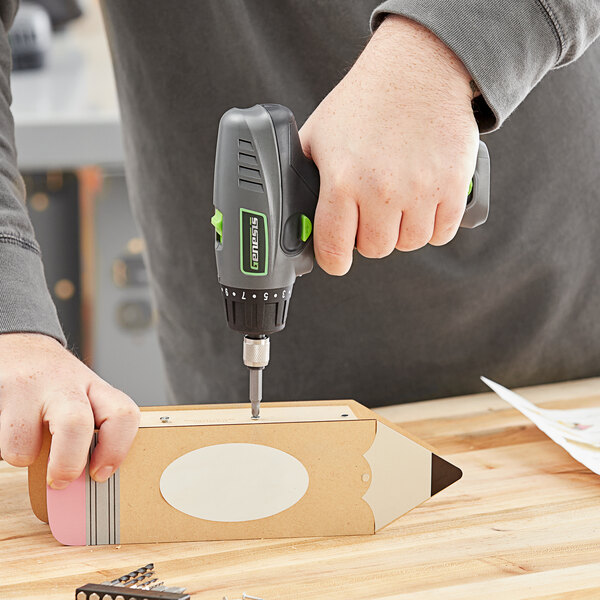
Most Genesis cordless drills have a keyless chuck. This means you can tighten it by hand. Hold the drill with one hand. Use your other hand to turn the chuck sleeve clockwise. Keep turning until you feel it lock tightly. Make sure the drill bit is centered before tightening. This method is quick and easy.
Using The Chuck Key
Some models require a chuck key to tighten the chuck. Insert the key into the hole on the chuck. Turn the key clockwise to close the jaws around the drill bit. Tighten firmly, but avoid over-tightening. Remove the key before starting the drill. This method gives a strong grip on the bit.
Credit: www.webstaurantstore.com
Test The Drill Bit
Testing the drill bit after changing it is important. It ensures the bit is secure and works properly. A loose or damaged bit can cause poor drilling and be unsafe. Take a moment to check the bit before starting your project.
Check The Bit Tightness
Hold the drill and try to move the bit by hand. It should not wiggle or turn. If the bit moves, tighten the chuck again. A tight bit stays in place during drilling.
Power On The Drill
Turn on the drill at a low speed. Watch the bit carefully. It should spin straight without shaking. Shaking means the bit is not set right.
Test Drill On Scrap Material
Try drilling on a piece of scrap wood or metal. This helps check the bit’s cutting ability. If the bit drills smoothly, it is ready to use.
Maintenance Tips
Proper maintenance keeps your Genesis cordless drill working well for a long time. It also makes changing drill bits easier and safer. Simple care steps prevent damage and improve tool performance.
Cleaning The Chuck Regularly
Remove dust and dirt from the chuck after each use. Use a dry cloth or small brush to clean inside. This stops debris from blocking the drill bit holder.
Lubricating Moving Parts
Apply a small amount of machine oil to the chuck’s moving parts. This keeps the chuck turning smoothly. Avoid using too much oil to prevent dirt buildup.
Checking For Wear And Tear
Inspect the chuck and drill bits for signs of damage. Replace worn or damaged parts quickly. This prevents accidents and ensures a secure grip on bits.
Storing The Drill Properly
Keep the drill in a dry, cool place when not in use. Avoid exposing it to moisture or extreme temperatures. Proper storage helps prevent rust and battery damage.

Credit: www.amazon.sa
Frequently Asked Questions
How Do I Remove A Drill Bit From A Genesis Cordless Drill?
To remove the bit, first power off the drill. Hold the chuck firmly, then twist it counterclockwise. This loosens the bit. Pull the bit out carefully once it’s loose. Always ensure the drill is off to avoid accidents.
How Can I Insert A New Drill Bit In Genesis Drill?
Hold the chuck and twist it counterclockwise to open the jaws. Insert the new bit fully into the chuck. Tighten the chuck by twisting it clockwise until the bit is secure. Check the bit is firmly in place before use.
What Safety Tips Should I Follow When Changing Drill Bits?
Always turn off and unplug the drill first. Wear safety glasses to protect your eyes. Use the correct bit size for your task. Tighten the chuck securely to prevent the bit from slipping during use.
How Do I Know If The Drill Bit Is Properly Secured?
After inserting the bit, tighten the chuck firmly by hand or with a key. Try pulling the bit gently; it should not move. If the bit wiggles or slips, retighten the chuck until it’s secure.
Conclusion
Changing a Genesis cordless drill bit is quick and simple. First, loosen the chuck by turning it counterclockwise. Next, remove the old bit carefully. Then, insert the new bit firmly into the chuck. Tighten the chuck by turning it clockwise until the bit feels secure.
Always check the bit before starting your work. This ensures safety and better performance. Practice this a few times to get comfortable. Your drill is now ready for any task. Keep your tools well-maintained for longer use. Simple steps make your projects easier and more efficient.
