


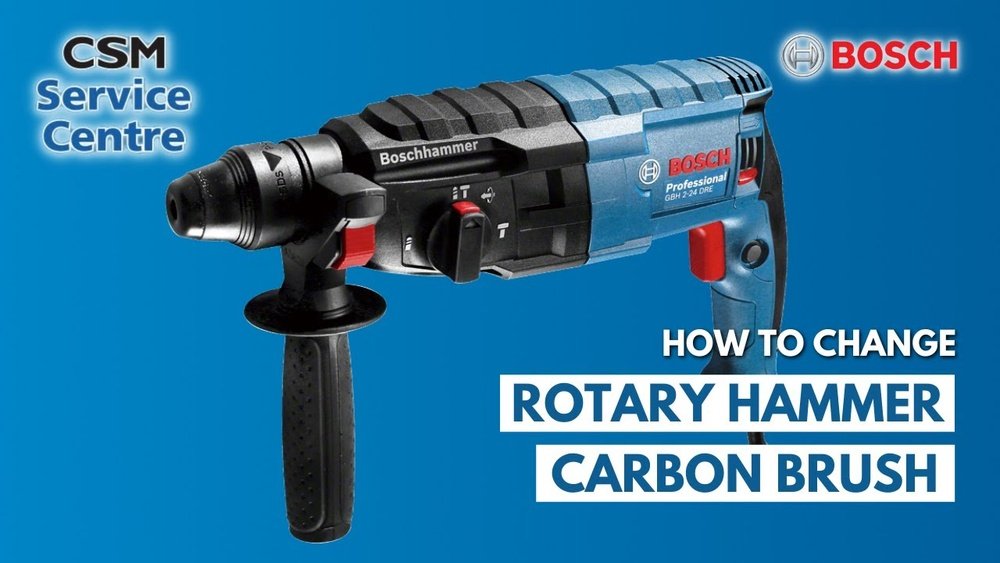
If your Bosch hammer drill isn’t working as smoothly as before, the problem might be worn-out brushes. Knowing how to change brushes in your Bosch hammer drill can save you time and money.
In this guide, you’ll learn simple steps to replace the brushes yourself, even if you’re not a pro. Keep reading to get your drill running like new again and avoid costly repairs.
Bosch Hammer Drill Brushes Basics
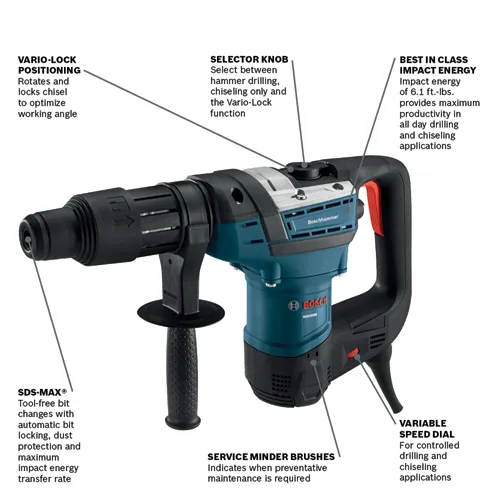
Understanding the basics of Bosch hammer drill brushes helps keep your tool running smoothly. Brushes are small parts inside the drill that help transfer electricity to the motor. Over time, these brushes wear out and need replacement. Knowing how brushes work and when to change them saves time and money.
Before changing brushes, learn to identify signs of wear and gather the right tools. This guide breaks down the essentials for caring for Bosch hammer drill brushes.
Purpose Of Brushes
Brushes deliver electric current to the motor’s spinning parts. They maintain contact with the motor’s armature. This contact powers the drill and keeps it running. Without good brushes, the motor may stop or lose power. Brushes play a key role in the drill’s performance and lifespan.
Signs Of Worn Brushes
Worn brushes cause the drill to run weak or stop suddenly. Listen for sparks or crackling sounds inside the tool. The drill might run slower or unevenly. Sometimes, it will not start at all. Regular checks help catch brush wear early before damage occurs.
Tools Needed
Changing Bosch hammer drill brushes requires basic tools. You will need a screwdriver to open the drill case. A pair of needle-nose pliers helps remove old brushes. New brushes must match the drill model exactly. Having a clean cloth is useful to wipe dust inside the drill.

Credit: www.youtube.com
Preparing For Brush Replacement
Preparing to replace the brushes in a Bosch hammer drill requires careful steps. This ensures the process is safe and effective. Proper preparation helps avoid damage to the drill and injury to yourself.
Start by gathering all necessary tools. A small screwdriver and replacement brushes are usually needed. Clear a clean workspace to keep parts organized.
Safety Precautions
Always prioritize safety before starting any repair. Wear safety glasses to protect your eyes from dust and debris. Use gloves to avoid cuts and scrapes. Keep the work area free of clutter to prevent accidents.
Never attempt brush replacement with the drill plugged in. Make sure you have stable footing to work comfortably. Follow all manufacturer guidelines to maintain safety standards.
Unplugging The Drill
Disconnect the drill from any power source. This is the most important step to prevent electric shock. Check twice to ensure the cord is unplugged before proceeding. If the drill uses a battery, remove it completely. This stops the drill from accidentally turning on during the repair.
Locating The Brush Caps
Find the brush caps on the drill’s motor housing. They are usually round and located near the handle or rear. Use the screwdriver to carefully unscrew the caps. Keep the screws in a safe place to avoid losing them. Once removed, you can access the brushes for replacement.
Removing Old Brushes
Removing old brushes from your Bosch hammer drill is the first step to keep it working well. Brushes wear out over time and need replacing to maintain power and efficiency. This process is simple and requires no special tools. Follow these steps carefully to avoid damage.
Opening The Brush Caps
Locate the brush caps on the side of the drill’s motor housing. Use a screwdriver to turn the caps counterclockwise. They should come off easily. Keep the caps safe; you will need them to close the brushes later.
Extracting The Brushes
Gently pull the brushes out from their slots. They may be attached to a small spring. Handle with care to avoid breaking the spring. If brushes are stuck, wiggle them slowly to loosen. Do not force them out harshly.
Inspecting Brush Condition
Look at the brushes carefully. If they are shorter than 1/4 inch or cracked, they must be replaced. Worn brushes reduce drill performance and can damage the motor. Clean any dust or debris before inserting new brushes.
Credit: www.boschtools.com
Installing New Brushes
Installing new brushes in your Bosch hammer drill is key to keeping it running smoothly. Worn brushes cause poor performance and damage. This process is simple and saves money. Follow these steps carefully to ensure your drill works like new.
Selecting Compatible Brushes
Use brushes designed for Bosch hammer drills only. Check the model number on your drill. Match it with the brush size and type. Using the wrong brushes can harm the motor. Buy genuine or high-quality replacements. This keeps your drill safe and efficient.
Inserting The New Brushes
Turn off and unplug the drill. Remove the old brushes carefully. Insert the new brushes into the slots gently. Make sure they fit snugly without forcing. The brushes must touch the commutator properly. This ensures good electrical contact and power flow.
Securing The Brush Caps
Replace the brush caps after inserting the brushes. Screw them in tightly but do not overtighten. Loose caps cause poor brush contact and wear. Check that the caps hold the brushes firmly. This step prevents movement during drill operation.
Testing The Drill After Replacement
After changing the brushes in your Bosch hammer drill, testing it is important. This step ensures the drill works properly. Testing helps find any problems early and keeps the tool safe to use.
Reassembling The Drill
Put all parts back in the right order. Make sure the brushes fit tightly in their holders. Tighten screws carefully to avoid damage. Check that no wires are pinched or loose. The drill should look the same as before opening it.
Powering On And Testing
Plug in the drill or insert the battery. Turn on the drill slowly. Listen for smooth sounds without sparks or grinding. Test the drill by running it at low speed first. Try using the hammer mode briefly to check all functions.
Troubleshooting Common Issues
If the drill does not start, check the brush contacts again. Loose connections can stop power flow. Sparks or unusual noises may mean the brushes are not seated properly. Replace brushes if they wear out quickly. Clean the brush holders to improve contact.
Credit: www.homedepot.com
Maintenance Tips For Brush Longevity
Proper maintenance helps your Bosch hammer drill brushes last longer. Regular care keeps the motor working well. It saves money by avoiding early replacements. Follow simple tips to protect your drill brushes.
Regular Inspection
Check the brushes often for wear and tear. Look for cracks or uneven surfaces. Replace brushes if they look damaged or worn out. Early detection prevents damage to the motor. A quick check after every few uses helps.
Cleaning The Brush Area
Keep the brush area free from dust and debris. Use a small brush or compressed air to clean. Dirty brushes cause poor contact and reduce performance. Clean the area gently to avoid damage. Clean brushes work better and last longer.
Proper Usage Habits
Avoid using the drill at full power all the time. Let the drill rest during long jobs to prevent overheating. Use the right drill bit for each task. Avoid pressing too hard on the drill. Proper use reduces stress on the brushes and motor.
Frequently Asked Questions
How Do I Know When To Change Bosch Hammer Drill Brushes?
Brushes wear down after extended use, causing power loss or sparking. Check regularly for wear or damage. Replace brushes if performance drops or visible wear occurs.
What Tools Are Needed To Change Bosch Hammer Drill Brushes?
You need a screwdriver, replacement brushes, and possibly pliers. Always unplug the drill before starting. Use the correct brush size specified by Bosch.
How To Safely Remove Old Brushes From A Bosch Drill?
Unplug the drill and remove the brush caps with a screwdriver. Gently pull out the worn brushes without damaging the brush holder or spring.
Can I Use Generic Brushes For Bosch Hammer Drills?
It’s best to use Bosch original brushes for compatibility and performance. Generic brushes may not fit properly or last as long, risking drill damage.
Conclusion
Changing brushes in a Bosch hammer drill is simple and quick. Follow the steps carefully to avoid damage. Using the right tools makes the job easier. Regular brush checks help keep your drill working well. Clean and replace brushes when needed for best results.
This small task can save you time and money. Keep your drill ready for any job ahead. Practice safety and take your time during the process. Now you can maintain your Bosch hammer drill confidently.
