


Are you struggling to get the perfect speed on your drill press? Knowing how to change the speed can make a huge difference in your projects.
Whether you’re drilling into wood, metal, or plastic, the right speed keeps your work clean and your tools safe. In this guide, you’ll learn simple steps to adjust your drill press speed quickly and confidently. Keep reading, and you’ll soon master the key to better, faster, and more precise drilling every time.
Drill Press Speed Basics
Understanding drill press speed is key to using the tool correctly. The right speed keeps your work safe and accurate. It also helps the drill bit last longer. Changing speed depends on the material and the drill bit size. Knowing these basics helps you get the best results.
Speed And Material Relation
Different materials need different drill speeds. Soft materials like wood require faster speeds. Hard materials like metal need slower speeds. Too fast can burn the material or dull the bit. Too slow may cause rough holes or broken bits. Adjusting speed to match the material improves your work.
Common Speed Ranges
Most drill presses have speeds from 300 to 3,000 RPM. Wood usually drills well at higher speeds, around 1,500 to 3,000 RPM. Metals often need slower speeds, about 300 to 1,200 RPM. Plastic can vary but often works best in the middle range. Use these common speeds as a starting point.
Types Of Drill Press Speed Controls
Drill presses have different ways to control their speed. Choosing the right speed is important for drilling different materials. Some controls are simple and manual, while others are more advanced and electric. Understanding these types helps you use your drill press better and safer.
Belt And Pulley Systems
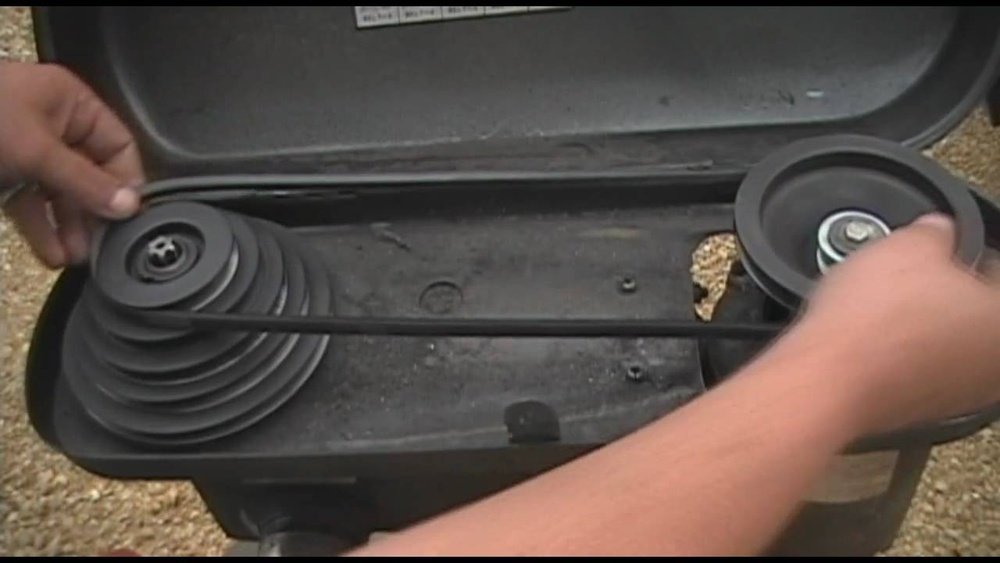
This system uses belts and pulleys to change speed. You move the belt to a different pulley to adjust the speed. It is common on older or basic drill presses. This method requires stopping the machine first. It is simple but needs some effort to switch speeds.
Variable Speed Motors
Variable speed motors allow speed changes without stopping the machine. You turn a dial or use a lever to adjust speed smoothly. This system is common in modern drill presses. It gives precise control and saves time during work. It works well for different materials and drill bits.
Gear-driven Adjustments
Gear-driven drill presses change speed by shifting gears. You move a lever or knob to change the gear. This method is very reliable and strong. It can handle heavy tasks and keeps speed steady. Gear adjustments are easy to use but usually need the machine to pause before shifting.
Preparing To Change Speed
Preparing to change the speed on a drill press is important for safety and efficiency. Taking simple steps before you start helps prevent accidents. It also ensures the machine works well after the change.
Before adjusting the speed, you must understand the basic setup of your drill press. Different models have different ways to change speed. Some use belts, while others have electronic controls. Knowing your machine helps you prepare properly.
Safety Precautions
Always unplug the drill press before changing speed. This stops the motor from running unexpectedly.
Wear safety glasses to protect your eyes from dust or debris.
Remove any loose clothing or jewelry that could get caught in moving parts.
Keep your hands clear of belts and pulleys when adjusting the speed.
Make sure the drill bit is not spinning and fully stopped before starting.
Tools Needed
You will need a wrench or Allen key to loosen and tighten belts or pulleys. Check your drill press manual for the right size.
Use a screwdriver if your drill press has a speed control cover or guard.
A flashlight can help you see the belts and pulleys clearly inside the machine.
Have a clean cloth ready to wipe dust or grease from parts before touching.
Keep a small container nearby to hold screws or small parts safely.

Credit: www.youtube.com
Changing Speed On Belt And Pulley Drill Press
Changing the speed on a belt and pulley drill press is simple and useful. It helps you work with different materials and drill sizes. By adjusting the belt position on the pulleys, you can control the drill’s speed. This section explains how to do it step-by-step.
Accessing The Belt Area
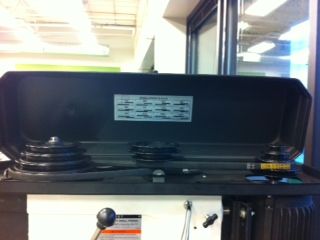
First, unplug the drill press for safety. Locate the belt cover, usually on top of the machine. Open or remove the cover to see the belts and pulleys. The belts connect the motor pulley and spindle pulley. Make sure the area is clean and free from dust.
Adjusting The Belt Position
Loosen the motor mount bolts to move the motor. Slide the belt off the pulleys carefully. Choose the desired speed by selecting different pulley steps. Place the belt on the new pulley positions. Tighten the motor mount bolts to keep the belt tight. The belt should be firm but not too tight.
Testing The New Speed
Close the belt cover before starting the drill press. Plug the machine back in and switch it on. Listen for smooth running without slipping or noise. Check if the speed matches your drilling needs. Adjust again if the speed is not right.
Adjusting Speed On Variable Speed Drill Press
Adjusting the speed on a variable speed drill press is simple and flexible. This type of drill press lets you change speed without stopping the machine. It helps you match the speed to the material you work on. Using the right speed improves cutting quality and tool life.
Using The Speed Control Dial
The speed control dial is easy to use. Turn the dial slowly to increase or decrease speed. Numbers or marks show the current speed setting. Start at a low speed for hard materials. Turn the dial up for soft materials or bigger drill bits. Watch the dial while adjusting to find the right speed. The dial gives smooth control and quick changes during work.
Monitoring Speed Accuracy
Check the drill press speed with a tachometer or RPM meter. This tool shows the exact speed of the drill bit. Keep the speed within the recommended range for your task. Too fast can overheat and damage the bit. Too slow can make drilling harder and less clean. Regularly checking speed helps keep work safe and precise.

Credit: www.instructables.com
Optimizing Speed For Precision
Optimizing speed on a drill press is key to achieving clean, precise holes. The right speed reduces wear on drill bits and prevents damage to materials. Adjusting speed based on drill bit size and material type helps maintain control and accuracy.
Matching Speed To Drill Bit Size
Smaller drill bits need faster speeds to cut efficiently. Larger bits require slower speeds to avoid overheating and dulling. Check the drill bit packaging or manual for recommended speeds. Use the drill press speed control to set the right RPM. Proper speed keeps the bit sharp and the hole smooth.
Adjusting Speed For Different Materials
Soft materials like wood or plastic allow higher speeds. Hard materials like metal need slower speeds to prevent damage. Adjusting speed prevents burning or melting the material. Always start slower and increase speed carefully. This helps you find the best speed for a clean cut.
Troubleshooting Speed Issues
Speed issues on a drill press can slow your work or cause poor results. Identifying and fixing these problems helps keep your drill press running smoothly. Below are common speed problems and how to troubleshoot them.
Belt Slippage
Belt slippage happens when the belt moves on the pulleys instead of turning them. This reduces the drill’s speed and power. Check if the belt is loose or worn out. Tighten or replace the belt to stop slipping. Clean any oil or dust on the belt and pulleys. Proper tension ensures steady speed and better performance.
Motor Overheating
The motor may overheat if it runs too fast or too long without rest. Overheating can cause speed drops or damage the motor. Make sure the motor vents are clear of dust and debris. Allow the motor to cool down between heavy tasks. Using the correct speed for your material also helps prevent overheating.
Speed Inconsistencies
Speed inconsistencies cause the drill to run unevenly or change speed unexpectedly. Check for worn or damaged belts and pulleys. Inspect the speed control switch or variable speed dial for faults. Loose parts or poor lubrication in the spindle can also cause issues. Regular maintenance keeps the drill press running at steady speeds.
Credit: www.instructables.com
Frequently Asked Questions
How Do I Adjust The Speed On A Drill Press?
To adjust speed, first unplug the drill press. Open the pulley cover, then move the drive belt to the desired pulley. Closing the cover, plug it back in, and test the speed by running the drill press. Adjust as needed for your project.
What Tools Are Needed To Change Drill Press Speed?
Generally, no special tools are needed. Some models may require a wrench or screwdriver to loosen pulley covers. Always consult your drill press manual to confirm specific tools required and safety steps for adjusting speed settings.
Why Is Changing Drill Press Speed Important?
Changing speed optimizes drilling for different materials and bit sizes. Low speeds work best for metals; high speeds suit wood or plastics. Correct speed increases precision, extends bit life, and prevents damage to your workpiece.
Can I Change Drill Press Speed While Running?
No, always turn off and unplug the drill press before changing speed. Adjusting the belt or pulleys while running can cause injury or damage. Safety first to ensure proper speed changes and avoid accidents.
Conclusion
Changing the speed on a drill press is simple and important. It helps you work safely and finish tasks faster. Always check the machine’s guide before changing speeds. Use the right speed for the material you drill. Remember to turn off the drill press first.
Practice this to feel more confident and avoid mistakes. A well-set speed improves your drilling results every time. Keep these tips in mind for better work and safer use.
