


If you own a Black and Decker 12V cordless drill, you know how handy it is for quick fixes and projects around your home. But when the battery runs low, it can slow you down.
Knowing exactly how to charge your drill the right way ensures it’s ready whenever you need it. You’ll discover simple steps to keep your drill powered up and working efficiently. Keep reading to never get stuck with a dead battery again!

Credit: www.shoshitamam.com
Battery Types For 12v Drills
Choosing the right battery type is key for your 12V cordless drill. Different batteries affect how your drill performs and charges. Understanding battery types helps you keep your drill ready for work. Two main types power these drills: NiCd and Li-Ion. Each has unique features and benefits.
Nicd Vs Li-ion Batteries
Nickel-Cadmium (NiCd) batteries are older but reliable. They handle cold temperatures well and offer a steady power supply. NiCd batteries weigh more and can suffer from memory effect. This means they lose capacity if not fully discharged before charging.
Lithium-Ion (Li-Ion) batteries are newer and lighter. They hold more charge and last longer between charges. Li-Ion batteries do not have memory effect. They also charge faster and maintain power better during use.
Benefits Of Each Battery Type
NiCd batteries cost less and tolerate rough use. They work well in tough environments and are durable. These batteries are easier to recycle but need full discharge regularly.
Li-Ion batteries provide longer run time and lighter weight. They charge quickly and keep steady voltage. Li-Ion batteries are better for frequent use and longer projects.

Credit: www.amazon.com
Preparing The Drill For Charging
Preparing your Black and Decker 12V cordless drill for charging is an important step. It helps keep the battery healthy and ensures the drill works well. Before charging, take time to get the drill ready.
Removing The Battery Pack
First, turn off the drill. Find the battery pack at the drill’s base. Press the release buttons on both sides. Gently pull the battery pack out. Handle the battery carefully to avoid damage.
Inspecting The Battery For Damage
Look closely at the battery pack. Check for cracks or leaks. Do not charge if the battery is damaged. Also, see if the contacts are clean. Wipe the contacts with a dry cloth if needed.
Charging The Battery
Charging the battery of your Black and Decker 12V cordless drill is simple. Proper charging keeps the battery healthy and ready to use. Follow the steps carefully to get the best results and avoid damage.
Using The Original Charger
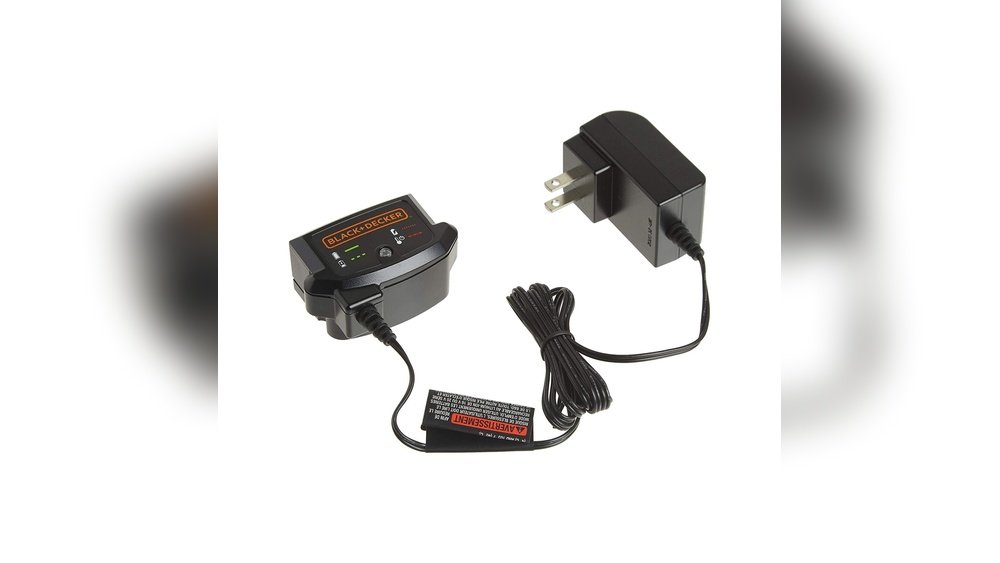
Always use the charger that came with your drill. The original charger matches the battery voltage and current. Using other chargers can harm the battery or cause slow charging. Plug the charger into a power outlet before attaching the battery.
Connecting The Battery Correctly
Remove the battery from the drill before charging. Line up the battery contacts with the charger slots. Push the battery gently until it clicks into place. Check that the battery is secure and not loose. This ensures a good connection for charging.
Charging Time Expectations
Charging usually takes about 3 to 5 hours. New batteries may need longer for the first charge. Avoid charging the battery overnight or for too long. Overcharging can reduce battery life. Watch the charger’s indicator light to know when charging is done.

Credit: www.blackanddecker.com
Charging Safety Tips
Charging your Black and Decker 12V cordless drill safely is very important. Proper charging keeps the battery healthy and extends its life. Follow these safety tips to avoid damage and ensure your drill works well every time.
Avoiding Overcharging
Never leave the drill charging longer than needed. Overcharging can heat the battery and reduce its life. Always unplug the charger once the battery is full. Use the charger that comes with your drill. It matches the battery’s needs perfectly.
Safe Charging Environments
Charge your drill in a cool, dry place. Avoid areas with high heat or moisture. Do not charge near flammable materials. Keep the charger on a stable surface. This prevents accidents and keeps the battery safe during charging.
Troubleshooting Charging Issues
Troubleshooting charging issues is important for keeping your Black and Decker 12V cordless drill ready. Charging problems can stop your work and cause frustration. This guide helps you find and fix common issues fast. It covers battery, charger, and replacement advice. Follow these steps to get your drill powered up again.
Battery Not Charging
Check if the battery fits correctly in the charger. Dirt or dust can block the connection. Clean the contacts gently with a dry cloth. Try charging the battery in a different charger if possible. A battery that stays cold or warm may have a problem. Let it rest at room temperature before charging again. Watch for blinking lights on the charger; they show battery status.
Charger Problems
Inspect the charger for visible damage or broken parts. Make sure the power outlet works by testing with another device. Use the original charger for your Black and Decker drill. Third-party chargers might not match the battery’s needs. Unplug the charger and plug it back in to reset. If the charger heats up too much, stop charging and check again later.
When To Replace The Battery
Battery life drops after many charges. If your drill runs out of power quickly, the battery may be old. Swelling or leaking batteries need immediate replacement. Batteries that do not hold charge after a full cycle should be replaced. Using a weak battery can damage your drill’s motor. Buy a new battery designed for your model for best results.
Maintaining Battery Health
Maintaining the battery health of your Black and Decker 12V cordless drill helps it last longer. Proper care keeps the battery charged and ready for use. Simple steps can protect the battery from damage and improve its performance over time.
Proper Storage Tips
Store the battery in a cool, dry place. Avoid places with high heat or moisture. Remove the battery from the drill if not using it for weeks. Keep the battery away from metal objects to stop short circuits. Store the battery with a partial charge, around 40-60% is best.
Regular Charging Practices
Charge the battery fully before the first use. Do not let the battery drain completely before charging. Use the charger made for your drill model only. Avoid overcharging by removing the battery once fully charged. Regular charging keeps the battery healthy and ready for work.
Frequently Asked Questions
How Long Does It Take To Charge A Black & Decker 12v Drill?
Typically, it takes about 3 to 5 hours to fully charge the battery. Charging time depends on the charger model and battery condition.
Can I Use Any Charger For Black & Decker 12v Drill?
No, always use the original or compatible Black & Decker charger. Using incompatible chargers can damage the battery or reduce performance.
How Do I Know When The 12v Drill Is Fully Charged?
Most chargers have an indicator light that changes color when charging is complete. Check the user manual for specific light signals.
Is It Safe To Leave The Drill Charging Overnight?
It is generally safe if you use the correct charger. However, avoid extended charging to preserve battery life and prevent overheating.
Conclusion
Charging your Black and Decker 12V cordless drill is simple and quick. Always use the original charger for best results. Keep the battery clean and dry to extend its life. Charge the battery fully before using the drill again. Avoid leaving the battery on the charger too long.
Proper charging helps your drill work better and last longer. Follow these easy steps to keep your tool ready for any job. A well-charged drill makes your work easier and faster. Stay safe and enjoy your cordless drill’s power every time.
