


Is your cordless drill battery not holding a charge like it used to? You’re not alone—and the good news is, you don’t always need to buy a new one.
Fixing your cordless drill battery can save you time, money, and frustration. You’ll discover simple, step-by-step solutions to bring your battery back to life. Whether you’re a DIY beginner or a seasoned pro, these easy tips will help you get your drill working like new again.
Keep reading, and you’ll be powering through your projects in no time!
Credit: www.theartofdoingstuff.com
Common Battery Problems
Batteries are the heart of a cordless drill. Common battery problems can stop your drill from working well. These issues affect performance and battery life. Knowing the problems helps fix them faster. It also saves money and time.
Signs Of Battery Failure
Does your drill lose power quickly? The battery may be failing. Watch for slow charging or no charge at all. Overheating during use is another sign. If the drill stops suddenly, check the battery. Swelling or leaking means the battery is bad. Early signs help prevent further damage.
Types Of Cordless Drill Batteries
Most cordless drills use three types of batteries. Nickel-Cadmium (NiCd) batteries are older but reliable. They have memory effect, reducing capacity over time. Nickel-Metal Hydride (NiMH) batteries offer better capacity than NiCd. Lithium-Ion (Li-ion) batteries are popular now. They last longer and charge faster. Knowing your battery type guides the right fix.
Safety Precautions
Always handle batteries with care. Avoid short circuits by keeping terminals clean. Never use damaged or swollen batteries. Charge batteries in a cool, dry place. Use the charger designed for your battery type. Dispose of old batteries properly at recycling centers. Safety keeps you and your tools protected.
Tools And Materials Needed
Fixing a cordless drill battery requires the right tools and materials. Having these ready makes the repair process easier and safer. This section covers the essential items needed for a successful battery fix.
Basic Repair Tools
A small screwdriver set is crucial for opening the battery case. You also need a multimeter to check the battery’s voltage and health. Needle-nose pliers help in handling small parts and wires. A soldering iron is useful for fixing loose connections or replacing cells.
Replacement Parts
Replacement battery cells are often necessary to restore power. Choose cells that match the original battery’s size and voltage. New wiring or connectors may be needed if the old ones are damaged. Make sure all parts fit well to avoid future problems.
Protective Gear
Safety glasses protect your eyes from sparks or debris. Gloves keep your hands safe from sharp edges and chemicals. Work in a well-ventilated area to avoid inhaling fumes. Safety is key during any battery repair task.
Testing The Battery
Testing the battery is the first step to fix a cordless drill battery. It helps find out if the battery still works or needs repair. Testing saves time and money by avoiding unnecessary replacements. Follow simple steps to check your battery’s condition safely and accurately.
Using A Multimeter
A multimeter measures electrical values like voltage and current. Set the multimeter to DC voltage mode. Connect the red probe to the positive terminal of the battery. Touch the black probe to the negative terminal. The multimeter will show the battery’s voltage. This reading helps assess if the battery holds charge.
Checking Battery Voltage
Battery voltage shows its power level. Compare the measured voltage with the battery’s rated voltage. A fully charged battery usually shows slightly higher than its rated voltage. If the voltage is much lower, the battery may be weak or dead. Voltage below 50% of the rated value means the battery needs attention.
Identifying Dead Cells
Batteries have multiple cells inside. One dead cell can reduce the battery’s performance. Use the multimeter to test each cell individually. A dead cell shows very low or zero voltage. Replace or repair cells if you find dead ones. This step helps restore battery life and drill power.

Credit: www.ifixit.com
Cleaning Battery Contacts
Cleaning the battery contacts is a simple step to fix a cordless drill battery. Dirt, dust, and corrosion can block the connection. This stops the battery from working well. Cleaning helps the drill get power again. It also makes the battery last longer.
Removing Corrosion
Corrosion looks like white or green powder on the contacts. Use a small brush or sandpaper to remove it. Be gentle to avoid damage. Clean until the metal shines. This clears the path for electricity to flow.
Using Isopropyl Alcohol
Isopropyl alcohol cleans dirt and grease from contacts. Dip a cotton swab in alcohol and rub the contacts. Let them dry completely before use. This removes oils that stop good contact. Alcohol evaporates fast and leaves no residue.
Preventing Future Build-up
Keep battery contacts clean to avoid problems later. Store batteries in dry places. Avoid moisture and dust. Check contacts often and clean if needed. Good care stops corrosion and keeps your drill ready to work.
Replacing Battery Cells
Replacing battery cells in a cordless drill can bring new life to an old tool. It saves money and reduces waste. The process involves opening the battery pack, finding bad cells, and putting in new ones. Each step is important to ensure the drill works well again.
Opening The Battery Pack
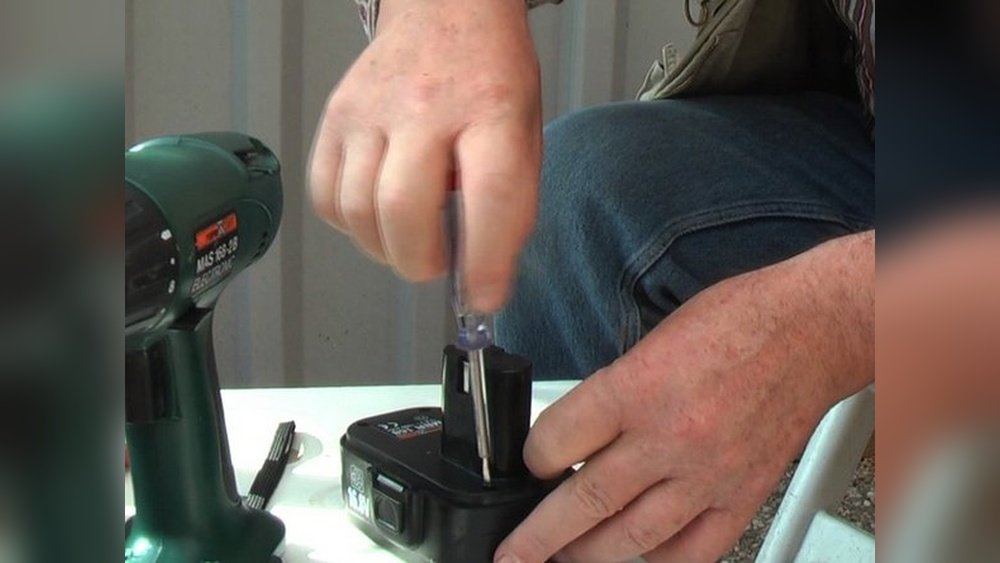
Start by removing the screws or clips holding the battery case. Use a small screwdriver to avoid damage. Carefully separate the two halves of the pack. Inside, you will see several battery cells connected with metal strips. Keep track of how the cells are arranged. This helps when putting everything back together.
Identifying Faulty Cells
Check each cell’s voltage with a multimeter. Cells with much lower voltage are likely bad. Also, look for signs of damage like swelling or leaks. These cells need to be replaced for the battery to work properly. Mark the faulty cells to avoid confusion later.
Soldering New Cells
Use new cells with the same size and voltage as the old ones. Heat the soldering iron and remove the old cells carefully. Solder the new cells in the same position and order. Make sure all connections are tight and clean. Avoid overheating the cells during soldering to prevent damage.
Reconditioning The Battery
Reconditioning the battery can bring new life to a cordless drill. Over time, batteries lose their ability to hold a charge. This process helps restore some power and extend battery life. The methods below guide you through easy steps to improve battery performance.
Deep Discharge Method
Fully drain the battery before recharging it. Use the drill until it stops working. Let the battery rest for a few hours. Then, charge it completely without interruption. This helps reset the battery’s power capacity.
Slow Charging Technique
Charge the battery at a low current. Use a charger with adjustable settings or a trickle charger. Slow charging reduces heat and stress on the battery cells. It improves battery health and prevents damage.
Cycle Charging Process
Charge and discharge the battery several times. Each cycle helps balance the battery cells. It can increase the battery’s overall capacity. Repeat this process 3-5 times for better results.
Maintaining Battery Health
Maintaining the health of your cordless drill battery helps it last longer and work better. Proper care reduces the risk of damage and keeps the battery charged. Simple steps can improve the battery’s life and save money on replacements.
Proper Charging Habits
Charge the battery fully before using the drill. Avoid charging it too long after it is full. Unplug the charger once the battery reaches 100%. Use the charger made for your battery model. Do not use fast chargers unless the battery supports it.
Storage Tips
Store the battery in a cool, dry place. Keep it away from direct sunlight and heat sources. If you won’t use the battery for a while, charge it to about 50%. Check the battery charge every few months and recharge if needed. Avoid storing the battery completely empty.
Avoiding Overheating
Do not use the drill continuously for too long. Allow the battery to cool down between uses. Keep the battery and drill vents clean and clear. Overheating can reduce the battery’s life and cause damage. Stop using the battery if it feels very hot.
When To Replace The Battery
Knowing when to replace your cordless drill battery saves time and money. Batteries wear out over time and lose their ability to hold a charge. Using a weak battery can affect your drill’s performance and slow down your work. Replacing the battery at the right time keeps your tool running smoothly and safely.
Cost Vs. Repair Benefits
Replacing a battery costs less than buying a new drill. Repairs might cost more than a new battery. Sometimes, fixing a battery is not worth the effort. A new battery gives better power and longer life. Consider the price and how much use you get before deciding.
Signs Of Irreparable Damage
Look for swelling, leaking, or corrosion on the battery. These signs mean the battery is unsafe. If the battery won’t charge or dies quickly, it may be broken. Strange smells or heat during charging also show damage. Such batteries should be replaced immediately to avoid risks.
Disposal And Recycling
Do not throw old batteries in the trash. Batteries contain harmful chemicals that pollute the environment. Take them to a recycling center or a store that accepts used batteries. Proper disposal protects nature and keeps harmful materials out of landfills. Check local rules for battery recycling options.

Credit: www.youtube.com
Frequently Asked Questions
How Do I Know If My Cordless Drill Battery Is Dead?
Check if the drill won’t start or hold a charge. A dead battery won’t power your drill. Test with a multimeter for voltage. If voltage is low, the battery likely needs replacement or repair.
Can I Fix A Swollen Cordless Drill Battery?
A swollen battery is unsafe and should not be fixed. Dispose of it properly at a recycling center. Replace the battery with a new one to avoid hazards and damage.
What Causes Cordless Drill Batteries To Lose Charge Quickly?
Batteries lose charge due to age, frequent use, or improper storage. Overcharging and extreme temperatures also reduce battery life. Proper care can extend battery performance and lifespan.
How Can I Revive A Cordless Drill Battery?
Try fully discharging, then fully charging the battery once or twice. Use a battery rejuvenator if available. If this doesn’t work, replacement is usually necessary.
Conclusion
Fixing a cordless drill battery can save time and money. Small steps like cleaning contacts or replacing cells help a lot. Always check for damage before starting any repair. Safety matters—wear gloves and work in a dry place. Regular battery care extends its life and keeps the drill ready.
Try these tips to get your drill working again. No need to buy a new battery right away. Keep your tools powered and ready for your projects. Simple fixes often solve common battery problems.
