


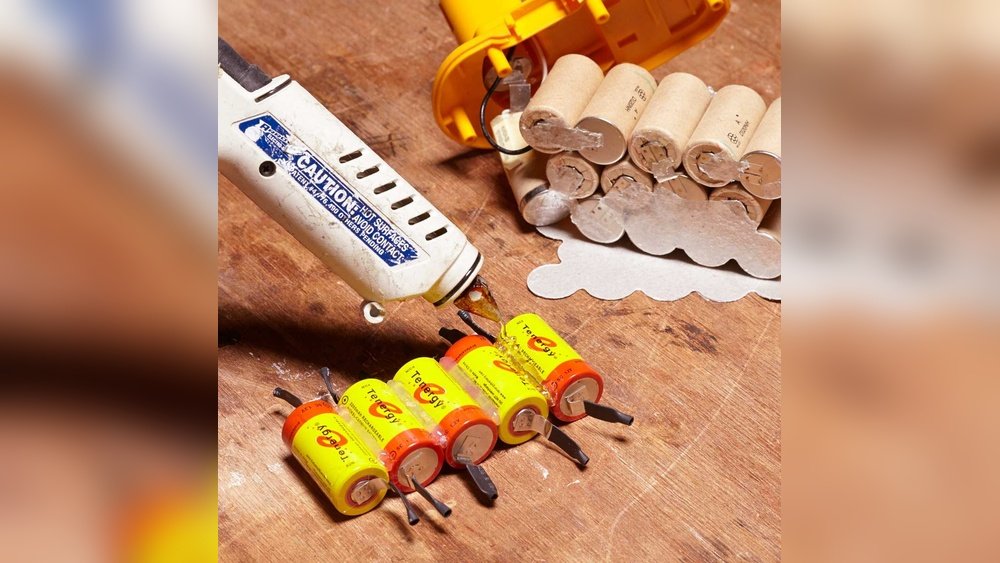
Is your cordless drill losing power faster than it should? You don’t have to buy a new battery or even a new drill just yet.
Rebuilding your cordless drill battery can save you money and get your tool working like new again. You’ll discover simple, step-by-step instructions that anyone can follow, even if you’re not a tech expert. Keep reading, and you’ll learn how to bring your battery back to life, so your drill stays strong and ready for every project.

Credit: www.ifixit.com
Tools And Materials Needed
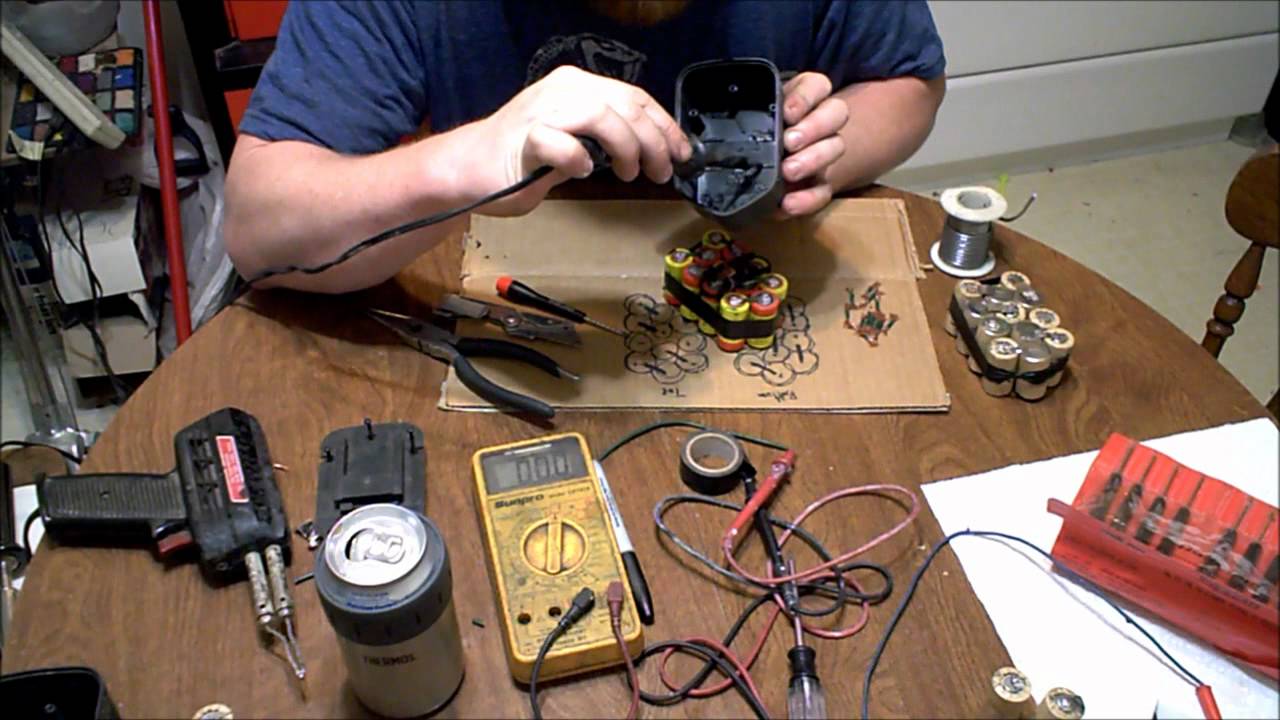
Rebuilding a cordless drill battery requires some specific tools and materials. Having the right items makes the process easier and safer. Preparing these tools before starting helps avoid delays and mistakes.
Gathering quality materials ensures the battery works well after rebuilding. Each tool has a specific role in the repair. Knowing what you need saves time and effort.
Safety Gear
Safety is important when handling batteries. Use safety goggles to protect your eyes. Wear gloves to avoid skin contact with battery chemicals. A mask helps prevent inhaling dust or fumes.
Replacement Battery Cells
Replacement cells are the heart of the rebuild. Choose cells that match the original battery type. Ensure they have the same voltage and capacity. Using quality cells improves battery life.
Multimeter
A multimeter checks the voltage and continuity of cells. It helps identify bad cells and confirm connections. This tool is essential for testing during the rebuild.
Soldering Iron And Solder
A soldering iron joins the battery cells and wires securely. Use solder to make strong electrical connections. Proper soldering avoids loose contacts and improves performance.
Battery Spot Welder
A spot welder attaches metal strips to battery cells. It works better than solder for connecting cells safely. Spot welding reduces heat damage to the cells.
Insulating Tape And Heat Shrink Tubing
Insulating tape protects battery connections from short circuits. Heat shrink tubing covers exposed wires and joints. Both keep the battery safe and stable.
Screwdrivers And Pliers
Screwdrivers open the drill and battery case. Pliers help remove old cells and adjust wires. These tools assist in handling small parts easily.
Credit: www.youtube.com
Safety Precautions
Safety is the top priority before rebuilding a cordless drill battery. Batteries store electrical energy and can be dangerous if handled incorrectly. Taking proper safety steps reduces risks of injury or damage.
Follow simple rules to protect yourself and your tools. Prepare your workspace and use the right equipment. Understand the risks before starting the rebuild process.
Wear Protective Gear
Always wear safety glasses to protect your eyes from sparks or debris. Use gloves to avoid skin contact with battery chemicals. Wear a mask if dust or fumes are present.
Work In A Well-ventilated Area
Choose a space with fresh air circulation. Battery chemicals can release harmful gases. Good ventilation prevents breathing in dangerous fumes.
Handle Battery Cells Carefully
Do not puncture or crush battery cells. Avoid short circuits by keeping metal tools away from terminals. Handle cells gently to prevent leaks or explosions.
Use Proper Tools
Select tools made for electrical work. Insulated screwdrivers and pliers reduce shock risk. Avoid using damaged or inappropriate tools.
Disconnect Power Source
Remove the battery from the drill before starting. Ensure the battery is fully disconnected to stop accidental current flow. Double-check connections to avoid surprises.
Identifying Battery Type
Start by checking the battery label to find its type. Common types include NiCd, NiMH, and Li-ion. Knowing the type helps choose the right steps to rebuild the cordless drill battery safely.
Understanding The Importance Of Battery Type
Identifying the battery type is the first step to rebuild a cordless drill battery. Each battery type has different parts and needs. Using the wrong parts can cause damage or reduce battery life.
Knowing the battery type helps you find the right cells and tools. It also guides you to follow the correct safety steps.
Common Cordless Drill Battery Types
Most cordless drill batteries are either NiCd, NiMH, or Li-ion. NiCd stands for Nickel-Cadmium. It is older and heavier. NiMH means Nickel-Metal Hydride. It holds more power than NiCd.
Li-ion means Lithium-Ion. It is the most popular type today. Li-ion batteries are lighter and last longer. Each type needs different handling when rebuilding.
How To Check Your Battery Type
Look at the label or sticker on your battery pack. It usually shows the battery type and voltage. If no label is visible, open the battery case carefully. Inside, you will see the battery cells and markings.
Match the markings with the common battery types. This step helps you choose the right replacement cells for your drill battery.
Disassembling The Battery Pack
Disassembling the battery pack is the first step to rebuild a cordless drill battery. It requires care and attention. You will take apart the battery to reach the cells inside. This step helps you check each part and remove old cells safely.
Working slowly and using the right tools makes the process easier. Keep your workspace clean and organized. This keeps small parts from getting lost or damaged.
Opening The Battery Case
Start by removing any screws on the battery case. Use a small screwdriver to avoid slipping. Some cases snap open, so gently pry them apart with a plastic tool. Avoid metal tools to prevent damage. Once open, you see the battery cells inside. Handle the case carefully to avoid breaking clips or wires.
Removing Old Cells
Old cells connect with wires or metal strips. Note how they connect before removal. Use pliers to gently detach wires or tabs. Remove each cell carefully to avoid short circuits. Dispose of old cells properly, following local rules. Clean the inside of the case before adding new cells.
Testing Battery Cells
Testing battery cells is a key step in rebuilding a cordless drill battery. It helps find weak or dead cells that lower battery life. Proper testing saves money by replacing only bad cells. It also improves drill performance and safety. This section shows how to check cells correctly.
Using A Multimeter
A multimeter measures the voltage of each battery cell. Set the multimeter to DC voltage mode. Touch the red probe to the positive terminal and the black probe to the negative terminal of the cell. A healthy cell usually reads around 3.6 to 3.7 volts for lithium-ion batteries.
Cells with voltage below 3.0 volts are weak or dead. Test all cells one by one. Write down each voltage reading. This helps compare which cells need replacing.
Selecting Cells To Replace
Focus on cells with low voltage or no voltage at all. These cells reduce the battery’s overall power. Replace cells that have less than 80% of the normal voltage. Also, check for swollen or damaged cells and remove them immediately.
Choose new cells with the same type and capacity as the old ones. Mixing different cells can cause damage and reduce battery life. Use your voltage readings to decide which cells to swap out. This step is important for a strong and safe battery pack.

Credit: www.youtube.com
Choosing Replacement Cells
Choosing replacement cells is a key step in rebuilding a cordless drill battery. Picking the right cells ensures your drill works well and lasts long. Not all cells are the same. Some fit better, last longer, and charge safely. Take time to understand the options before buying.
Understanding Battery Cell Types
Most cordless drills use lithium-ion cells today. These cells hold more power and last longer than older types. NiMH and NiCd cells are less common now. Lithium-ion cells are lighter and charge faster. Make sure replacement cells match your drill’s original type.
Checking Cell Size And Shape
Replacement cells must fit inside your battery pack. Measure the old cells carefully. Common sizes include 18650 and 21700. Using the wrong size can cause poor contact or damage. Always pick cells that fit snugly and connect properly.
Matching Voltage And Capacity
Each cell has a voltage rating and capacity (mAh). Voltage affects the drill’s power. Capacity affects how long it runs. Choose cells with the same voltage as the original. Higher capacity cells can run longer but may not fit well. Balance size and power carefully.
Checking Cell Quality And Brand
Buy cells from known brands or trusted sellers. Low-quality cells may fail quickly or be unsafe. Look for reviews and certifications. Good cells improve safety and performance. Avoid cheap, unknown brands to protect your drill and yourself.
Assembling New Battery Pack
Assembling a new battery pack for your cordless drill is a key step in rebuilding its power source. It involves putting together multiple battery cells to create a pack that fits your drill’s voltage and size needs. Careful assembly ensures the battery works safely and lasts longer.
Each battery cell must be connected correctly to provide the right power output. The arrangement depends on whether you need more voltage or more capacity. Proper connections and solid soldering help avoid power loss and damage.
Connecting Cells In Series Or Parallel
Connecting cells in series increases voltage. You join the positive end of one cell to the negative end of the next. The total voltage is the sum of all cells in series.
Parallel connections increase capacity. You connect all positive ends together and all negative ends together. This keeps the voltage the same but adds up the capacity.
Choose series for higher voltage drills. Choose parallel for longer battery life. Sometimes, a mix of both is used for balance.
Soldering Tips
Use a soldering iron with a fine tip for better control. Heat the connection point, not the cell, to avoid damage.
Apply solder quickly to prevent overheating. Use enough solder to make a strong joint, but not so much that it causes shorts.
Work in a clean, dry area. Keep cells steady to avoid weak connections. Let solder cool naturally before moving the pack.
Reassembling The Battery Case
Carefully place the battery cells back into the case, ensuring they fit snugly. Secure the case with screws, making sure all connections are tight. Double-check the alignment to avoid any loose parts or gaps.
Aligning The Battery Cells
Start by placing the battery cells back into the case carefully. Make sure each cell fits snugly in its slot. Check that all wires connect properly without tension. This step keeps the battery safe and working well.
Securing The Wiring Connections
Next, attach the wiring firmly to the terminals. Use a small screwdriver to tighten any screws. Loose wires can cause the battery to fail or become unsafe. Double-check all connections for a strong hold.
Closing The Battery Case
Place the top cover on the battery case carefully. Ensure it fits evenly without forcing it. Press the case edges to snap them together. This protects the battery inside from dust and damage.
Testing The Reassembled Battery
After closing the case, test the battery before use. Connect it to the drill and turn it on briefly. If the drill runs smoothly, the battery rebuild worked well. If not, reopen the case and check connections again.
Charging And Testing The Rebuilt Battery
Charging and testing the rebuilt battery is a key step in restoring your cordless drill. This process checks the battery’s ability to hold power and work safely. Proper charging prepares the battery for real use. Testing confirms it delivers enough energy for your drill.
Follow careful steps to avoid damage or accidents. Use the right charger for your battery type. Watch the battery closely during charging. Testing includes checking voltage and running the drill to see performance.
Charging The Rebuilt Battery
Place the battery in the charger correctly. Use a charger made for your battery’s brand and type. Charge the battery fully before use. This helps balance the new cells inside. Avoid overcharging; stop charging once full. Keep the battery in a cool, dry place while charging.
Testing Battery Voltage
Use a multimeter to check voltage after charging. The voltage should match the battery’s rated voltage. A low voltage means the battery needs more charging or repair. Test each cell if possible. Balanced cells show similar voltage levels. Uneven voltage signals a problem in the rebuild.
Testing The Battery In The Drill
Insert the battery into the drill. Turn on the drill and run it at low speed first. Check for smooth operation and steady power. Run the drill for a few minutes to test battery life. If the drill stops quickly, the battery may be faulty. Repeat charging and testing if needed.
Troubleshooting Common Issues
Troubleshooting common issues is an important step when rebuilding a cordless drill battery. Some problems are easy to fix. Others need a careful look. Knowing what to check saves time and effort. It helps you avoid buying a new battery.
Below are common problems and how to solve them. Each issue has clear steps for quick fixes. These tips keep your battery working longer.
Checking Battery Contacts And Connections
Dirty or loose contacts cause power loss. Remove the battery from the drill. Look at the metal contacts. Clean them with a dry cloth or fine sandpaper. Make sure connections fit tightly. Loose parts stop the battery from charging or working.
Testing Battery Voltage
Use a multimeter to test the battery voltage. A healthy battery shows the right voltage. If the voltage is too low, the battery may be dead. Sometimes charging the battery fully helps. If voltage stays low, the battery cells might be bad.
Identifying Damaged Battery Cells
Open the battery pack carefully. Look for swollen or leaking cells. Bad cells cause poor performance or no power. Replace damaged cells with new ones of the same type. Avoid mixing old and new cells. This keeps the battery safe and strong.
Testing Battery Charger Functionality
Check if the charger works properly. Use a different charger if possible. A faulty charger stops the battery from charging fully. Inspect charger cables for cuts or damage. Replace the charger if it does not provide power.
Frequently Asked Questions
How Do I Rebuild A Cordless Drill Battery Safely?
To rebuild a cordless drill battery safely, wear protective gear and work in a well-ventilated area. Use proper tools and follow step-by-step guides. Avoid short circuits and handle cells carefully to prevent damage or injury.
What Tools Are Needed To Rebuild A Cordless Drill Battery?
You need a soldering iron, multimeter, replacement cells, heat shrink tubing, and a battery spot welder or wire. These tools help test, replace, and reassemble battery cells efficiently and safely.
Can I Use Any Replacement Cells For My Drill Battery?
No, use replacement cells matching the original battery’s voltage, capacity, and size. Using incorrect cells can damage the drill or reduce battery performance. Always choose high-quality, compatible cells for the best results.
How Long Does It Take To Rebuild A Cordless Drill Battery?
Rebuilding a cordless drill battery typically takes 1 to 2 hours. Time varies based on your experience, battery type, and tools available. Proper care ensures the battery functions like new after rebuilding.
Conclusion
Rebuilding a cordless drill battery saves money and extends tool life. The process is simple and can be done at home with basic tools. Take safety seriously and follow each step carefully. Testing the battery ensures it works well before use.
Regular maintenance helps keep batteries in good condition longer. Try rebuilding your battery to get more use from your drill. Small effort brings better results and less waste. Keep your cordless drill ready for any project ahead.
