


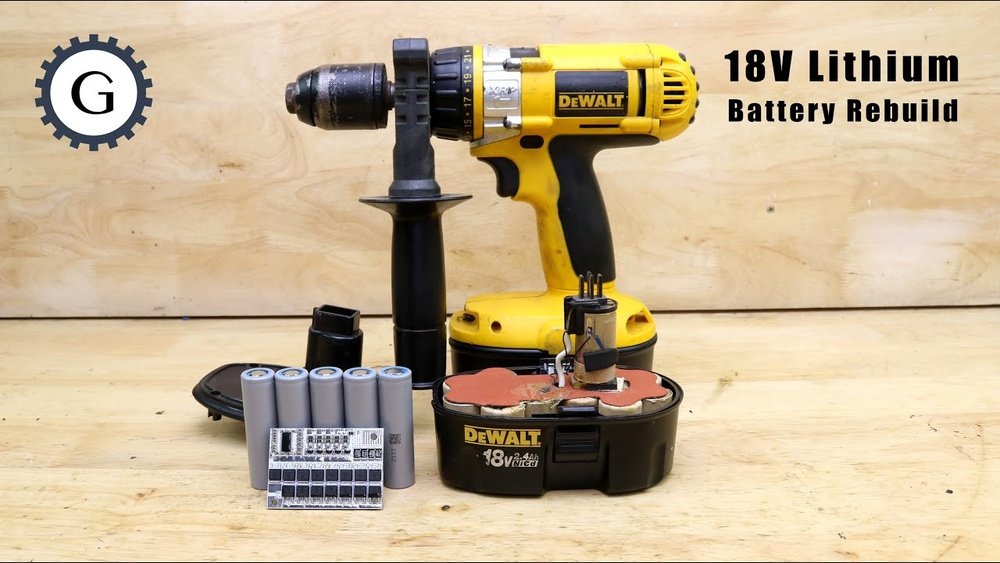
Is your Dewalt cordless drill not working like it used to? Before you think about buying a new one, what if you could bring it back to life with your own hands?
Rebuilding your drill can save you money and give you a sense of accomplishment. In this guide, you’ll discover simple, step-by-step instructions to fix and rebuild your Dewalt cordless drill. By the end, you’ll feel confident in handling the repair yourself and get your drill working like new again.
Ready to take control and restore your tool? Let’s dive in!

Credit: batteryrepair.wordpress.com
Tools And Materials Needed
To rebuild a Dewalt cordless drill, gather the right tools and materials first. Having everything ready makes the process smooth and safe.
Each tool plays a key role in fixing different parts of the drill. Using the correct materials ensures the drill works well after repair.
Basic Hand Tools
Start with screwdrivers, both Phillips and flathead. A small wrench or pliers helps with nuts and bolts. Tweezers can assist in handling tiny parts.
Replacement Parts
Battery cells, brushes, and gears may need replacement. Use parts made for Dewalt drills to keep compatibility. Check the drill model number to find the right pieces.
Cleaning Supplies
Rubbing alcohol and cotton swabs clean dirt and old grease. A soft brush removes dust from small areas. Clean parts improve the drill’s performance.
Lubricants
Use light machine oil or grease for moving parts. Proper lubrication reduces wear and noise. Avoid using too much oil to prevent mess.
Safety Gear
Wear safety glasses to protect your eyes. Gloves keep your hands safe from sharp edges. Working safely prevents accidents during repair.
Safety Precautions
Working with power tools needs care. Safety is the first step to rebuild a Dewalt cordless drill. Protect yourself and others around you. Simple safety rules keep accidents away.
Wear Protective Gear
Always wear safety glasses to protect your eyes. Use gloves to avoid cuts and scrapes. Ear protection helps when noise is loud. Dress in tight clothes to prevent catching in parts.
Work In A Clean Area
Keep your workspace tidy and bright. Remove clutter to avoid tripping or losing parts. A clean space helps you focus on the task. Good lighting shows small details clearly.
Disconnect The Battery
Remove the battery before starting any work. This stops the drill from turning on by mistake. Check that no power is left before opening the drill. Safety first means no surprises.
Use The Right Tools
Choose tools made for the drill parts. Wrong tools can damage pieces or cause injury. Use screwdrivers that fit screws well. Proper tools make the job easier and safer.
Handle Parts With Care
Some parts are sharp or heavy. Hold them firmly to avoid drops. Place small parts in a container. This prevents loss and keeps your area neat.
Disassembling The Drill
Disassembling a Dewalt cordless drill is the first step in rebuilding it. This process allows you to see inside the drill and find any broken parts. Take your time and follow each step carefully. Use the right tools to avoid damage.
Removing The Battery
First, take out the battery from the drill. Press the release buttons on both sides of the battery. Pull the battery straight out. Do not force it. A loose battery can cause electric shocks or damage.
Unscrewing The Housing
Look for all the screws on the drill’s outer case. Use a screwdriver that fits well. Unscrew each screw and keep them safe. Set the screws aside in order so you don’t lose them. The housing will come apart once all screws are out.
Separating Internal Components
Carefully open the drill’s housing to see inside. Note how the parts fit together. Gently pull apart the motor, gears, and switches. Avoid pulling wires or forcing parts. Keep track of each piece to make reassembly easier.
Inspecting Parts For Damage
Inspecting parts for damage is a key step in rebuilding a Dewalt cordless drill. This process helps find worn or broken pieces. Fixing these parts ensures the drill works well and lasts longer.
Careful inspection saves time and money by avoiding future problems. Focus on the motor, gears, and battery contacts. These parts often show signs of damage first.
Checking The Motor
Start by removing the drill casing to see the motor. Look for burnt smells or black marks. These signs show the motor might be damaged. Spin the motor shaft by hand. It should move smoothly without noise. If it feels rough or stuck, the motor needs repair or replacement.
Examining The Gears
Next, check the gears inside the drill. Gears transfer power from the motor to the drill bit. Look for cracked, chipped, or worn teeth. Worn gears cause slipping and reduce drill power. Clean any dirt or grease buildup. Replace any gear that looks damaged or worn out.
Assessing The Battery Contacts
Battery contacts connect the power source to the drill. Inspect these metal parts for corrosion or dirt. Dirty contacts stop electricity flow and reduce drill performance. Clean contacts with a soft brush or fine sandpaper. Replace contacts if they are bent or broken.
Cleaning Components
Cleaning the components of your Dewalt cordless drill is a key step in rebuilding it. Dirt and debris can cause parts to wear out faster. Clean parts help the drill work smoothly and last longer. Take your time and be careful with each piece.
Cleaning The Motor
Start by removing dust and grime from the motor. Use a soft brush to clear dirt from the motor’s surface. Avoid using water or liquids on the motor. A dry cloth can wipe off any loose particles. Keep the motor free from buildup for better performance.
Removing Dust From Gears
Gears can get clogged with dust and grease. Use a small brush to clean between the teeth. A toothpick can help remove stuck debris. Avoid forcing the gears, as this can cause damage. Clean gears turn smoothly and reduce wear.
Wiping Electrical Contacts
Electrical contacts should be clean to ensure good power flow. Use a cotton swab dipped in rubbing alcohol to wipe contacts gently. Do not soak the contacts; a light wipe is enough. Clean contacts prevent connection problems and improve drill function.

Credit: www.youtube.com
Replacing Worn Or Broken Parts
Replacing worn or broken parts is key to restoring your Dewalt cordless drill. Over time, gears, motor brushes, and other components wear out. Fixing these parts can bring your drill back to life. This process saves money and extends the tool’s lifespan.
Finding Compatible Replacement Parts
Start by identifying the exact model of your Dewalt drill. Use the model number to find matching parts. Check Dewalt’s official website or trusted tool part stores. Avoid generic parts, as they may not fit properly. Choose parts designed specifically for your drill model.
Installing New Gears
Remove the drill casing to access the internal gears. Carefully take out the old gears without damaging nearby parts. Clean the area before placing new gears. Align the new gears correctly to ensure smooth movement. Secure them firmly but avoid over-tightening screws.
Replacing The Motor Brushes
Motor brushes wear out and cause poor drill performance. Locate the brush holders near the motor. Gently remove the old brushes and check the springs. Insert new brushes of the same size and type. Test the drill after replacement to confirm it runs well.
Lubricating Moving Parts
Lubricating moving parts is key to rebuilding a Dewalt cordless drill. It helps reduce friction and wear. Proper lubrication ensures smooth operation and longer tool life. Without it, parts can grind and break quickly.
Applying the right lubricant in the right places keeps your drill running quietly and efficiently. It also prevents rust and corrosion on metal components. Use a lubricant made for power tools for best results.
Choosing The Right Lubricant
Pick a lubricant that is light and non-greasy. Avoid thick oils that attract dust and dirt. Silicone or lithium-based grease works well for drills. Check the product label to confirm it suits metal gears and plastic parts.
Lubricating The Gearbox
Open the drill housing carefully to access the gearbox. Apply a thin layer of grease on the gears and bearings. Rotate the gears by hand to spread the lubricant evenly. Avoid over-lubricating, which can cause buildup and mess.
Oiling The Chuck Mechanism
The chuck needs light oil to move smoothly. Use a few drops of light machine oil on the chuck jaws and springs. Open and close the chuck several times to distribute the oil. This keeps the chuck gripping tight and prevents sticking.
Maintaining The Motor Bearings
Motor bearings also need lubrication to reduce noise and friction. Use a small amount of oil on each bearing. Spin the motor shaft gently to spread the oil. Properly lubricated bearings extend motor life and improve performance.

Credit: www.battrx.com
Reassembling The Drill
Reassembling the drill is the final step in rebuilding your Dewalt cordless drill. It requires patience and care to ensure all parts fit correctly. Taking your time helps avoid damage and ensures the drill works properly.
Follow each step closely to put everything back in the right place. A well-assembled drill feels solid and runs smoothly. Let’s go through the key parts of reassembly.
Reconnecting Internal Components
Start by reconnecting the wires and small parts inside the drill. Match each wire to its original place. Use the photos or notes you took earlier as a guide.
Gently push connectors until they click. Avoid pulling or forcing parts. Check that the motor and trigger switch connect properly. Proper connections ensure your drill runs without problems.
Securing The Housing
Next, put the drill’s two halves together carefully. Align the screw holes before pressing the housing closed. Make sure no wires get pinched or stuck inside.
Use a screwdriver to tighten all screws firmly. Do not overtighten, or the plastic could crack. The housing should feel tight and secure with no gaps.
Reinstalling The Battery
Finally, slide the battery back into its slot. It should click into place easily. If it feels loose, check for obstructions or misalignment.
Test the drill by pressing the trigger. It should start smoothly and run without strange noises. Your drill is ready for use again.
Testing The Rebuilt Drill
Testing the rebuilt Dewalt cordless drill is essential to ensure it works properly. This step confirms that all parts are assembled correctly and the drill is safe to use. Careful testing helps avoid damage or injury during future projects.
Start by powering on the drill. Observe its behavior closely. Next, check the drill’s main functions. Finally, troubleshoot any issues that appear. This process helps restore the drill to full working condition.
Powering On
Insert a fully charged battery into the drill. Hold the drill firmly. Press the power trigger gently. The motor should start smoothly without unusual sounds. If the drill does not power on, recheck the battery connection and wiring. Ensure the switch is installed correctly. A quick power test shows if basic assembly is correct.
Checking Functionality
Test the drill’s speed settings by pressing the trigger at different levels. The drill should respond immediately and change speed smoothly. Try reversing the drill’s rotation using the direction switch. Check the chuck by attaching a drill bit. Tighten and loosen the chuck to confirm it works well. Listen for any grinding or strange noises during operation. These checks confirm that the mechanical and electrical parts function properly.
Troubleshooting Common Issues
If the drill does not start, verify the battery charge and connections. Loose wires or faulty switches can cause power failure. If the drill runs but feels weak, check the motor brushes. Worn brushes may need replacement. Strange noises often come from misaligned gears or debris inside the housing. Tighten all screws and clean the internal parts carefully. Addressing these common problems improves drill performance and safety.
Maintenance Tips For Longevity
Keeping your Dewalt cordless drill working well takes regular care. Simple maintenance steps can extend its life. These tips help the drill run smoothly and avoid early breakdowns.
Clean The Drill Regularly
Dirt and dust can block air vents and damage parts. Use a soft brush or cloth to clean the drill after use. Avoid water or harsh chemicals. Clean the chuck to keep it gripping tightly.
Check And Replace The Battery
Battery health affects drill performance. Charge the battery fully before storing. Avoid leaving it dead for long times. Replace old batteries to keep the drill strong and reliable.
Lubricate Moving Parts
Parts inside the drill need lubrication to reduce wear. Apply a small amount of machine oil to gears and chuck. Do this every few months or after heavy use. Avoid over-lubricating to prevent dirt buildup.
Tighten Screws And Fasteners
Vibrations can loosen screws over time. Check all screws and fasteners regularly. Tighten any loose parts with a screwdriver. This keeps the drill safe and stable during work.
Store The Drill Properly
Keep the drill in a dry, cool place. Avoid extreme temperatures and moisture. Use a case or toolbox to protect it from dust and damage. Proper storage helps keep the drill ready for use.
Frequently Asked Questions
How Do I Disassemble A Dewalt Cordless Drill?
Start by removing the battery for safety. Unscrew the casing screws carefully. Separate the two halves gently to avoid damaging internal parts. Keep track of all screws and components for reassembly.
What Tools Are Needed To Rebuild A Dewalt Drill?
You’ll need screwdrivers, pliers, a multimeter, and replacement parts. Optional tools include cleaning brushes and lubricant. Ensure you have a clean workspace and good lighting for efficiency.
How Can I Test The Motor Of A Dewalt Drill?
Use a multimeter to check motor windings for continuity. Spin the motor manually to detect any stiffness or grinding. Replace the motor if it shows signs of damage or doesn’t run smoothly.
What Are Common Issues When Rebuilding Dewalt Drills?
Common problems include worn brushes, damaged gears, and faulty switches. Battery contacts may corrode and require cleaning. Identifying these early helps ensure a successful rebuild.
Conclusion
Rebuilding a Dewalt cordless drill can save you money and extend its life. Follow each step carefully for best results. Take your time and use the right tools. Small fixes can make your drill work like new again. Stay patient, and don’t rush the process.
This project helps you learn and gain confidence. Keep your drill ready for many future jobs. Simple repairs make a big difference in the long run. Give it a try and see the results yourself.
