


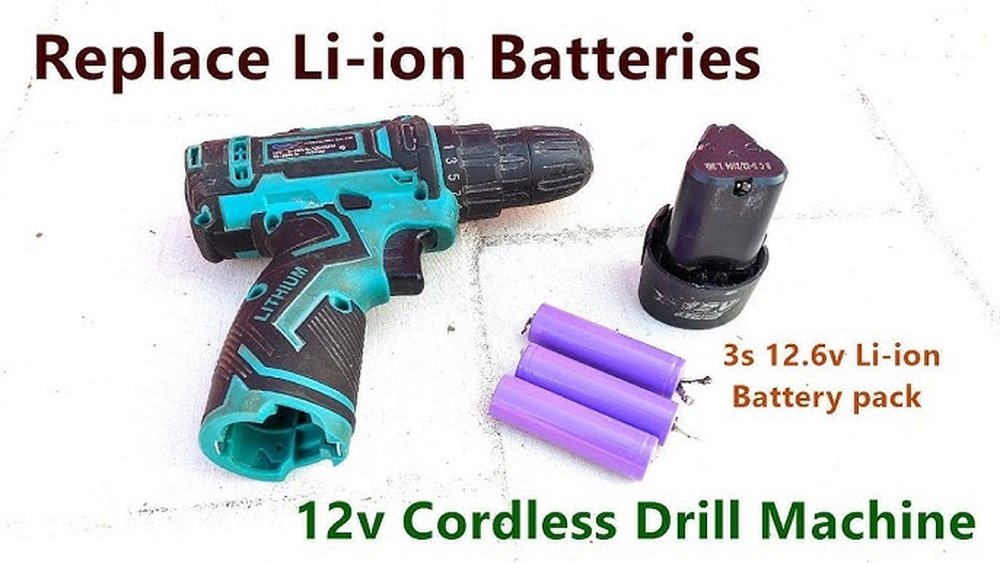
Is your cordless drill losing power faster than it should? You might think the battery is dead and needs replacing, but what if you could bring it back to life instead?
Imagine saving money and avoiding the hassle of buying a new battery. In this guide, you’ll discover simple, effective ways to rejuvenate your cordless drill battery. Keep reading, and you’ll learn how to get more life out of your battery—making your drill work like new again.
Ready to power up your tools and keep your projects moving? Let’s dive in!
Signs Of A Weak Battery
Knowing the signs of a weak battery helps keep your cordless drill working well. Batteries lose power over time. Spotting early problems can save money and effort. Watch for these common signs. They tell you when the battery needs attention or replacement.
Reduced Run Time
Your drill runs out of power faster than before. Tasks take longer to finish. The battery may not hold charge like it used to. This means less work done per charge. Reduced run time is often the first sign of a weak battery.
Slow Charging
The battery takes much longer to charge. Charging may feel like it never completes. This can happen when the battery cells start to wear out. Slow charging means the battery is losing efficiency.
Overheating Issues
The battery gets very hot during use or charging. Excess heat can harm the battery’s life. Overheating may cause safety risks too. This issue often shows that the battery is failing inside.

Credit: www.ifixit.com
Safety Precautions Before Starting
Before you start rejuvenating a battery for your cordless drill, safety comes first. Batteries contain chemicals and store electricity. Mishandling them can cause harm or damage. Taking the right precautions protects you and your tools.
Follow these simple safety steps to work safely and avoid accidents. Always prepare your workspace and equipment carefully. Safety helps the process go smoothly and keeps you safe.
Wear Protective Gear
Wear safety glasses to protect your eyes from sparks or chemicals. Use gloves to keep your hands safe from acid leaks or sharp parts. Long sleeves protect your arms from accidental contact. Safety gear reduces the risk of injury during battery work.
Work In A Ventilated Area
Perform battery work in a place with fresh air. Ventilation prevents harmful gases from building up. Avoid closed rooms or small spaces. Open windows or work outside if possible. Good airflow keeps the air clean and safe to breathe.
Handle Batteries With Care
Do not drop or shake the battery. Handle it gently to avoid damage or leaks. Keep batteries away from metal objects to prevent short circuits. Check for cracks or leaks before starting. Treat batteries like fragile and dangerous items.
Tools And Materials Needed
To rejuvenate a cordless drill battery, gather the right tools and materials. These help check the battery’s condition and clean it properly. Preparing well makes the process smoother and safer.
Multimeter
A multimeter measures the battery’s voltage and health. It shows if the battery holds a charge or needs repair. Using a multimeter helps avoid wasting time on dead batteries.
Battery Charger
A good charger is essential to recharge the battery after cleaning. Use the charger designed for your drill’s battery type. This keeps the battery safe and helps restore power efficiently.
Cleaning Supplies
Cleaning supplies remove dirt and corrosion from battery contacts. Use a soft cloth, rubbing alcohol, and a small brush. Clean contacts improve the flow of electricity and boost battery life.
Step-by-step Battery Rejuvenation
Rejuvenating a cordless drill battery brings new life to your tool. It saves money and reduces waste. Follow these simple steps carefully. Each step improves battery performance and extends its life.
Cleaning Battery Contacts
Start by removing the battery from the drill. Use a dry cloth or fine sandpaper. Gently clean the metal contacts on the battery and drill. Dirt and rust block power flow. Clean contacts help the battery charge and work better.
Discharging The Battery Completely
Drain the battery fully before recharging. Use the drill until it stops working. This resets the battery’s charge cycle. It helps balance the battery cells inside. Avoid partial discharge, as it can reduce battery health.
Recharging Properly
Place the battery in the charger after complete discharge. Use the original charger for best results. Charge the battery fully without interruption. Do not remove it early or leave it too long. Proper charging improves battery capacity and life.
Using A Battery Refresher Device
A battery refresher device can restore old batteries. It sends pulses to break down crystal buildup inside. This improves the battery’s ability to hold charge. Follow the device instructions carefully. Use it only if other steps do not help.
Advanced Techniques
Advanced techniques help bring old cordless drill batteries back to life. These methods need some skill and tools. They can save you money by extending battery life. Handle batteries carefully to avoid damage or injury.
Replacing Individual Cells
Battery packs have many small cells inside. Some cells may fail while others still work. Find the bad cells by testing each with a multimeter. Remove the faulty cells carefully. Replace them with new cells of the same type and size. Reassemble the pack and test the battery. This method restores capacity and power to the battery.
Balancing Battery Packs
Cells in a battery pack can lose balance over time. Unbalanced cells reduce battery efficiency and life. Use a battery balancer or charger with balancing features. It charges each cell to the same voltage level. This prevents weak cells from draining the pack. Balanced packs perform better and last longer. Regular balancing keeps your cordless drill running strong.
Credit: www.reddit.com
Maintenance Tips To Extend Battery Life
Keeping your cordless drill battery healthy is key to long-term use. Simple care steps can help your battery last longer and work better. These maintenance tips are easy to follow and save money over time.
Proper Storage Practices
Store the battery in a cool, dry place. Avoid damp or dusty areas. Remove the battery from the drill if not used for weeks. Keep it away from metal objects to prevent short circuits. Store batteries at about 40-60% charge for best results.
Regular Charging Cycles
Charge the battery before it completely dies. Regular charging keeps the battery cells active. Avoid leaving the battery plugged in after full charge. Use the charger that comes with the drill. Frequent partial charges are better than deep discharges.
Avoiding Extreme Temperatures
Do not expose the battery to very hot or cold conditions. Extreme heat speeds up battery wear. Cold temperatures reduce battery power temporarily. Use the drill and battery at room temperature when possible. Store batteries indoors during winter and summer.
When To Replace The Battery
Knowing when to replace your cordless drill battery saves time and money. Batteries lose power over time and stop holding charge well. Sometimes, no amount of rejuvenation can fix an old battery. Recognizing the right time to replace it keeps your tool working strong.
Signs Beyond Repair
Battery won’t charge fully or drains fast. It feels hot or swells during use or charging. Drill runs weaker despite full charge. Battery leaks or shows corrosion. These signs mean the battery is damaged. Repair or recharge won’t help anymore. Safety risks increase with damaged batteries.
Cost Comparison
New batteries cost less than frequent recharges or repairs. Buying a new battery restores full power and runtime. Repair kits and tools may cost more than a new battery. Consider the drill’s age and battery price. Replacing the battery often gives better value. Keep your drill ready and efficient with a new battery.

Credit: www.youtube.com
Frequently Asked Questions
How Can I Tell If My Cordless Drill Battery Needs Rejuvenation?
If your battery drains quickly or won’t hold charge, it likely needs rejuvenation. Diminished power or slow charging also indicate issues.
What Are The Safest Methods To Rejuvenate A Cordless Drill Battery?
Use deep discharge cycles and slow recharging for NiCd or NiMH batteries. Avoid overheating and follow manufacturer guidelines to prevent damage.
Can Rejuvenating A Battery Extend Its Overall Lifespan?
Yes, proper rejuvenation can restore battery capacity and improve performance. It can add months or even years to the battery’s usability.
How Often Should I Rejuvenate My Cordless Drill Battery?
Rejuvenate your battery every 3 to 6 months if used regularly. This maintains optimal performance and prevents memory effect in NiCd batteries.
Conclusion
Rejuvenating a cordless drill battery saves money and time. Regular care keeps the battery working longer. Simple steps can improve battery life effectively. Avoid letting the battery fully drain often. Store the battery in a cool, dry place. Small efforts make a big difference in performance.
Try these tips to get the best results. Keep your drill ready for any job ahead. A healthy battery means less frustration and more work done. Take care today, and enjoy better power tomorrow.
