


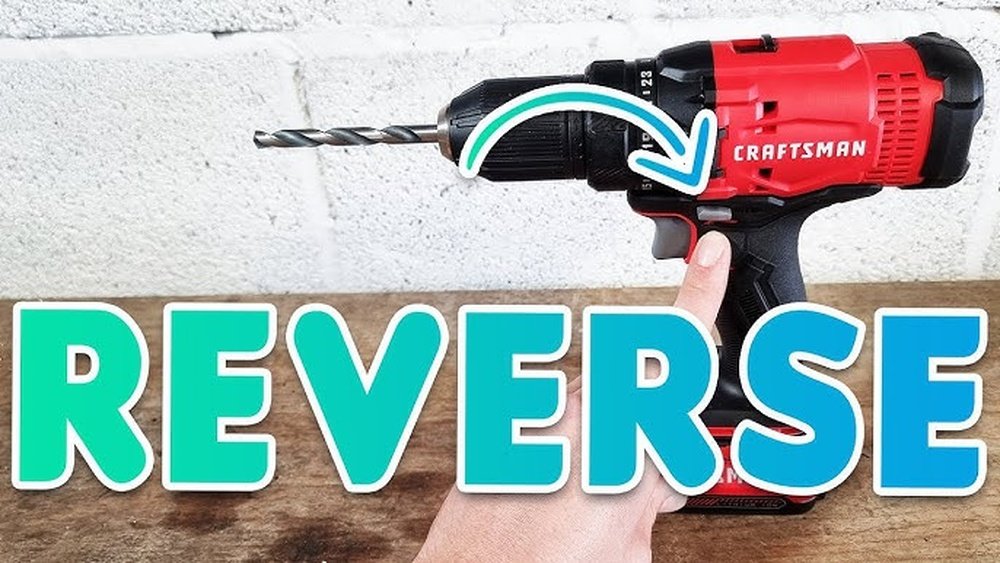
If you’ve ever found yourself stuck with a Craftsman cordless drill that won’t reverse, you know how frustrating it can be. Whether you’re trying to loosen a tight screw or back out a drill bit, knowing how to reverse your drill quickly can save you time and hassle.
In this guide, you’ll learn simple, clear steps to get your drill spinning the right way in no time. Keep reading, and you’ll never have to struggle with your cordless drill again.
Basic Parts Of A Craftsman Cordless Drill
A Craftsman cordless drill has several main parts. Each part plays a key role in the drill’s function. Knowing these parts helps you use and reverse the drill correctly. This section explains the basic parts of a Craftsman cordless drill.
Battery And Charger
The battery powers the drill without a cord. It fits into the handle’s base. The charger restores power to the battery. Always use the correct charger for safety.
Chuck And Drill Bits
The chuck holds the drill bits tightly. It spins the bit to drill holes or drive screws. Different drill bits fit in the chuck for various jobs. Make sure the bit is secure before starting.
Forward/reverse Switch
This switch controls the drill’s rotation direction. Push it one way to drill forward. Push it the other way to reverse the drill. The reverse helps remove screws or back out drill bits.
Trigger And Speed Control
The trigger turns the drill on and off. Press it to start drilling. The harder you press, the faster the drill spins. This speed control helps with delicate or tough tasks.

Credit: www.northerntool.com
When To Use Reverse Mode
Reverse mode on a Craftsman cordless drill is useful in many tasks. It changes the drill’s rotation direction. This helps solve problems and makes work easier. Knowing when to use reverse mode saves time and effort.
Removing Screws
Reverse mode helps remove screws quickly. Turn the drill switch to reverse. This makes the screw turn out smoothly. It prevents damage to the screw head. Use this mode when unscrewing parts or fixing mistakes.
Clearing Jammed Bits
Drill bits can get stuck in wood or metal. Reverse mode helps free jammed bits fast. It turns the bit backward to release it. This avoids breaking the bit or drill motor. Use reverse mode to protect your tools and workpiece.
Backing Out Drill Bits
Sometimes drill bits go too deep or bind in material. Reverse mode pulls the bit out carefully. It stops damage to the bit and surface. Use this mode to remove bits safely after drilling holes. It keeps your tools in good shape.
Steps To Reverse The Drill
Reversing a Craftsman cordless drill is simple. It helps when you need to remove screws or back out drill bits. Follow these clear steps to switch the drill’s direction safely and quickly.
Locate The Forward/reverse Switch
First, find the forward/reverse switch on your drill. Usually, it is near the trigger or on the side. This switch controls the drill’s spinning direction.
Slide The Switch To Reverse
Push the switch gently to the reverse position. You will feel a click or see a change in the indicator. This sets the drill to spin the opposite way.
Test The Drill Direction
Press the trigger lightly to check the drill’s rotation. The bit should turn counterclockwise. This confirms the drill is now in reverse mode.
Adjust Speed As Needed
Control the drill speed using the trigger pressure. Slow speed offers more control for delicate tasks. Increase speed for faster screw removal or bit changes.

Credit: www.youtube.com
Safety Tips While Reversing
Reversing a Craftsman cordless drill needs careful attention. Safety is very important to avoid injuries. Follow these simple safety tips to protect yourself and others around you. Stay alert and work smart for the best results.
Wear Protective Gear
Always wear safety glasses to protect your eyes from flying debris. Use gloves to keep your hands safe from sharp edges and slips. Wear closed-toe shoes to protect your feet in case the drill or bits fall.
Ensure A Firm Grip
Hold the drill firmly with both hands. A steady grip prevents the drill from slipping or twisting unexpectedly. Keep your hands dry and free of oil to maintain control.
Keep Work Area Clear
Remove all clutter around your work zone. A clean area helps prevent accidents and allows freedom of movement. Make sure pets and children stay away while you work.
Troubleshooting Reverse Mode Issues
Troubleshooting reverse mode issues on a Craftsman cordless drill can save time and avoid frustration. Reverse mode helps remove screws or back out drill bits. When it does not work, the drill loses some of its main functions. Simple checks can often fix the problem quickly. The following sections cover common issues and easy solutions.
Switch Not Moving
The reverse switch might be stuck or jammed. Dirt or debris can block its movement. Use a small brush or compressed air to clean around the switch. Try moving the switch gently back and forth. If it still won’t move, the switch could be broken. Replacing the switch may be necessary for proper function.
Drill Not Reversing
The drill may run only in forward mode. This issue often points to internal mechanical failure. The reverse gear inside could be worn or damaged. Listen for unusual noises when trying reverse. If the drill does not change direction, it might need professional repair. Avoid forcing the drill to prevent further damage.
Battery Or Motor Problems
Low battery power can affect reverse mode performance. Check the battery charge level first. A weak battery might not provide enough power for reverse. Also, the motor could have problems causing poor response. Overheating or worn motor brushes reduce efficiency. Test with a fully charged battery. Replace the battery or motor parts if needed.

Credit: www.lowes.com
Maintenance For Smooth Operation
Maintaining your Craftsman cordless drill helps keep it working well for a long time. Regular care prevents problems and ensures smooth operation. Simple steps can make a big difference in how your drill performs and lasts.
Regular Cleaning
Dust and dirt can build up on your drill. Wipe the drill with a dry cloth after each use. Use a small brush to clean tight spots around the chuck and vents. Keeping the drill clean stops parts from sticking or wearing out.
Lubricating Moving Parts
Moving parts need oil to work smoothly. Apply a few drops of light machine oil to the chuck and gears. Avoid over-oiling, which can attract dirt. Regular lubrication reduces friction and helps your drill run quietly and efficiently.
Battery Care
Take good care of the drill battery. Charge it fully before first use and avoid letting it drain completely. Store batteries in a cool, dry place. Clean battery contacts gently with a dry cloth to keep a good connection. Proper battery care extends its life and power.
Frequently Asked Questions
How Do I Reverse A Craftsman Cordless Drill?
To reverse a Craftsman cordless drill, locate the direction switch near the trigger. Push it to the opposite side to change the drill’s rotation from forward to reverse.
What Is The Purpose Of Reversing A Cordless Drill?
Reversing a cordless drill helps in removing screws or backing out drill bits stuck in materials. It provides better control and versatility during tasks.
Can Reversing Damage My Craftsman Cordless Drill?
No, reversing your Craftsman cordless drill is safe when done correctly. Always switch direction while the drill is off or running slowly to avoid damage.
How Do I Know If My Drill Is In Reverse Mode?
When the direction switch is pushed to the reverse side, the drill bit will spin counterclockwise. Test it gently to confirm the reverse rotation before use.
Conclusion
Reversing a Craftsman cordless drill is simple and quick. Just follow the steps carefully. Use the switch near the trigger to change direction. This helps with removing screws or backing out drill bits. Practice a few times to get comfortable.
Always keep safety in mind while working. Now, you can handle your drill with more control and confidence. Give it a try on your next project.
