


Have you ever been stuck with a stubborn screw or bolt that just won’t budge? Knowing how to reverse an impact driver can save you time, effort, and frustration.
Whether you’re fixing something around the house or working on a big project, mastering this simple skill puts control right in your hands. You’ll discover easy steps to switch your impact driver to reverse mode quickly and safely. Keep reading—soon you’ll be turning screws the right way without any hassle.
Impact Driver Basics
Understanding the basics of an impact driver helps you use it safely and effectively. This tool is different from a regular drill. It combines fast rotation with strong bursts of force to drive screws and bolts.
Knowing what an impact driver is and its common uses helps you decide when to choose it over other tools. This knowledge also makes reversing the tool easier and safer.
What Is An Impact Driver
An impact driver is a power tool. It uses quick rotational force and strong impacts. This helps to drive screws and fasteners into tough materials. The tool looks like a drill but works differently.
Inside, it has a hammer and anvil mechanism. This creates the impact action. The bursts help loosen or tighten screws without stripping them. The tool is compact and easy to handle.
Common Uses And Benefits
Impact drivers are great for driving long screws and bolts. They work well on wood, metal, and concrete. Builders and DIYers use them for construction and repair projects.
The tool saves time and effort. It reduces hand strain compared to manual screwdrivers. The impacts prevent screws from slipping. It also works well in tight spaces.
Impact drivers use less battery power than drills. This means longer work time without charging. They are reliable tools for many home and professional tasks.

Credit: kelloggsupplyco.com
When To Reverse An Impact Driver
Knowing when to reverse an impact driver is important for safe and effective use. Reversing helps remove screws, bolts, and stuck fasteners. It also helps clear jams and fix mistakes during work. Using the reverse function at the right time prevents damage to your materials and tool.
Signs You Need To Reverse
The driver stops turning forward but the fastener stays stuck. The tool makes a grinding noise. The screw or bolt spins without tightening. You want to remove a screw or bolt. The bit slips out of the fastener head.
Safety Precautions
Always turn off the impact driver before changing direction. Keep your hands away from moving parts. Wear safety glasses to protect your eyes. Use the correct bit size and type. Check that the fastener is secure before reversing. Avoid forcing the tool to prevent damage.
Locating The Reverse Switch
Locating the reverse switch on an impact driver is simple. This switch allows you to change the rotation direction. You use it to remove screws or back out fasteners. Finding the switch quickly helps you work faster and safer.
Types Of Reverse Switches
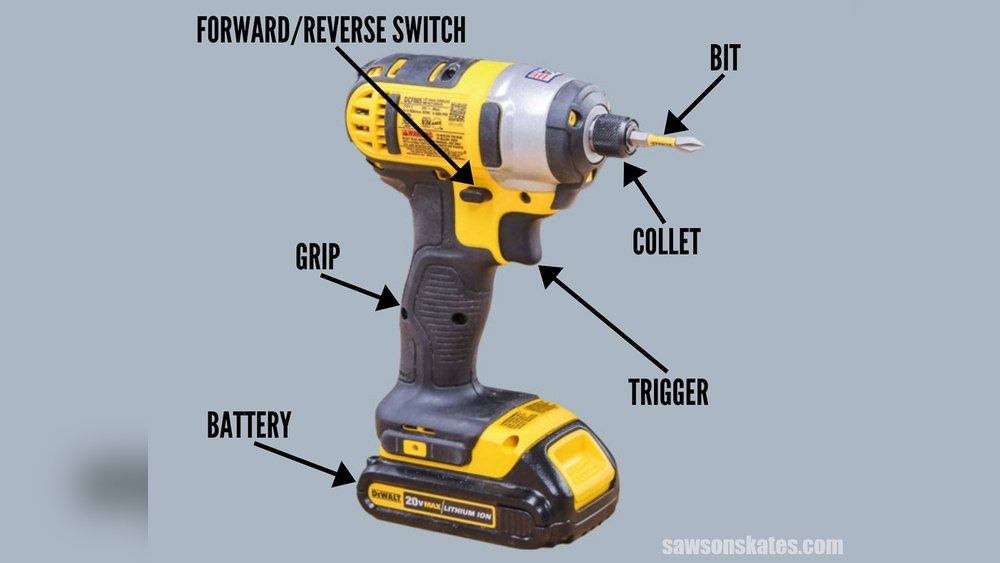
Impact drivers have different types of reverse switches. Some have a small lever near the trigger. Others use a sliding button above the handle. A few models feature a dial or toggle switch. The design depends on the brand and model.
Most switches are easy to reach with your thumb. They move left or right to change direction. Some switch designs click into place. This helps you know when the driver is set to reverse.
How To Identify The Switch
Look close to the trigger area for the reverse switch. It usually sits on the side or top of the handle. Check for a small lever or slider you can move. The switch often has arrows pointing left and right.
Try moving the switch gently to see if it changes the driver’s rotation. If the motor spins backward, you found the reverse switch. Practice using it a few times before starting your work.

Credit: www.amazon.sa
Steps To Reverse The Impact Driver
Reversing an impact driver is simple and useful for many tasks. It helps to remove screws or bolts quickly. Follow these clear steps to reverse your impact driver safely and correctly.
Turning Off And Unplugging
First, turn off the impact driver. Remove the battery or unplug it from the power source. This step keeps you safe from accidental starts. Always check that the tool is completely off before changing settings.
Switching To Reverse Mode
Find the direction switch near the trigger. Slide or push it to the reverse position. This switch changes the rotation direction of the driver. Make sure it clicks into place to avoid slipping back.
Testing The Reverse Function
Hold the driver firmly. Press the trigger lightly to test the reverse mode. The bit should spin backward. If it spins forward, switch the direction again. Test on a scrap piece to avoid damage.
Troubleshooting Reverse Issues
Troubleshooting reverse issues with an impact driver can save time and frustration. Many users face problems when the tool won’t switch to reverse mode or stops working backward. These issues often have simple fixes that anyone can try at home.
Understanding the common problems helps find the right solution fast. Sometimes the cause is easy to spot, like a stuck switch or low battery. Other times, the problem might need more attention or a professional check.
Common Problems And Fixes
The reverse switch may get stuck or jammed. Gently move the switch back and forth to free it. Dirt and debris can block the switch; clean it carefully with a dry cloth.
Battery power affects reverse operation. A weak battery might not deliver enough power to run the motor backward. Replace or recharge the battery to see if that fixes the issue.
The motor or internal parts can wear out over time. Strange noises or no movement in reverse could mean internal damage. Check for loose parts or broken components inside the tool.
When To Seek Professional Help
Persistent problems after basic fixes need expert attention. If the driver still won’t reverse, it may have a broken motor or electrical fault. Avoid opening the tool yourself as it can cause further damage.
Take the impact driver to a certified repair center. Professionals can diagnose and fix complex issues safely. Regular maintenance by experts also keeps the tool working well longer.

Credit: www.reddit.com
Maintenance Tips For Impact Drivers
Keeping your impact driver in good shape helps it work better and last longer. Simple maintenance steps protect the tool from damage and wear. Regular care saves money by avoiding costly repairs or replacements.
Regular Cleaning
Dust and dirt can harm your impact driver’s parts. After each use, wipe the tool with a clean cloth. Use a small brush to remove debris from vents and crevices. Avoid water or harsh cleaners. Clean tools run cooler and perform better.
Lubrication And Storage
Lubricate moving parts to reduce friction and wear. Apply a small amount of oil to the chuck and other metal parts. Store the impact driver in a dry, cool place. Keep it away from moisture and extreme temperatures. Proper storage prevents rust and damage.
Frequently Asked Questions
How Do I Reverse An Impact Driver Safely?
To reverse an impact driver, locate the forward/reverse switch near the trigger. Slide it to the reverse position. Always ensure the tool is off before switching. This prevents accidents and protects the motor from damage. Use reverse mode to remove screws or bolts efficiently.
Can I Reverse An Impact Driver While In Use?
No, avoid switching directions while the impact driver is running. Stop the tool completely before changing the direction. Switching mid-operation can damage the motor and gearbox. Always release the trigger and wait a moment before reversing the rotation.
Why Won’t My Impact Driver Reverse?
If your impact driver won’t reverse, check the forward/reverse switch. It might be stuck or broken. Also, inspect the battery charge and connections. A faulty switch or low power can prevent reversing. If issues persist, consult a technician for repair.
What Is The Difference Between Forward And Reverse On Impact Drivers?
Forward drives screws in, while reverse removes them. The forward mode spins the bit clockwise. Reverse mode spins counterclockwise. This allows easy installation and removal of fasteners. Correct use extends tool life and improves work efficiency.
Conclusion
Reversing an impact driver is simple once you know the steps. Always check the switch direction before starting your work. This helps avoid damage to screws or tools. Practice a few times to feel comfortable with the controls. Use the reverse mode to remove screws easily and safely.
Keep your tool clean and maintained for best results. Follow these tips to work smarter and finish your tasks faster.
