


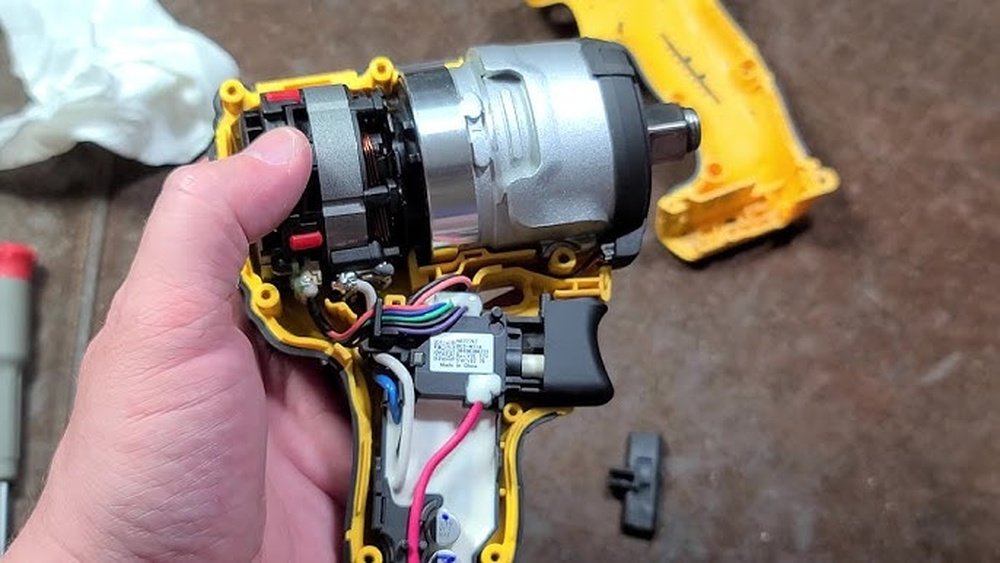
If you’ve ever wondered how to take apart a Dewalt impact driver, you’re in the right place. Whether you want to fix a problem, clean it inside, or replace a part, knowing the right steps can save you time and money.
But it’s easy to get confused or damage your tool if you don’t follow the right process. In this guide, you’ll learn exactly how to carefully disassemble your Dewalt impact driver, step by step. By the end, you’ll feel confident handling your tool like a pro—and avoid costly mistakes.
Ready to get started? Let’s dive in.

Credit: www.ereplacementparts.com
Tools Needed
Taking apart a Dewalt impact driver requires the right tools. Without them, you risk damaging parts or hurting yourself. Gather everything before starting. This makes the process smoother and safer.
Below are the must-have tools and safety gear. Each plays a key role in your task. Prepare well to protect both your driver and yourself.
Essential Hand Tools
Start with a set of screwdrivers. Both Phillips and flathead types work best. A small set of hex keys or Allen wrenches is important too. These fit many screws inside the driver.
Use needle-nose pliers for gripping small parts. A plastic pry tool helps open the casing without scratches. A clean cloth is useful for wiping dirt and dust away.
Keep a small container handy. It stores tiny screws and prevents losing them. These simple tools cover most of the work needed.
Safety Gear
Wear safety glasses to protect your eyes from dust and debris. Gloves offer hand protection from sharp edges. Choose gloves that allow good finger movement.
A dust mask is helpful if dust or particles build up. Working in a well-lit area lowers the chance of mistakes. Safety gear keeps you safe and focused during the job.
Preparing The Workspace
Preparing your workspace is the first step to safely take apart a Dewalt impact driver. A good workspace helps keep parts safe and tools easy to find. It also makes the process smoother and less stressful.
Clean And Organized Area
Start with a clean surface free of dust and clutter. Use a flat table or bench to work on. Keep a small container nearby to hold screws and small parts. Organize your tools in one place. This prevents losing pieces and saves time.
Proper Lighting
Good lighting helps you see small screws and details clearly. Use a bright lamp or work light. Natural daylight is also helpful. Avoid shadows that can hide parts. Clear visibility reduces mistakes and speeds up the work.
Removing The Battery
Removing the battery is the first step in taking apart a Dewalt impact driver. It ensures safety and prevents damage to the tool. This process is simple but important. Follow the right steps to avoid any problems.
Safety Precautions
Before starting, wear safety gloves to protect your hands. Make sure the impact driver is turned off. Keep the work area clean and dry. Avoid touching metal parts to prevent electric shock. Handle the battery carefully to avoid dropping it.
Battery Detachment
Locate the battery release buttons on the sides of the battery pack. Press both buttons firmly at the same time. While pressing, pull the battery away from the impact driver. Do this slowly to avoid damage to the connectors. Set the battery aside on a flat surface. Never force the battery out if it feels stuck. Check for any dirt or debris blocking the release mechanism. Clean it before trying again.
Disassembling The Outer Housing
Disassembling the outer housing of a Dewalt impact driver is the first key step in its repair or maintenance. This part protects the internal components and needs careful handling during removal. Taking apart the housing helps you access the motor, gears, and other important parts inside.
Handle the tool gently to avoid breaking any clips or plastic parts. Use the right tools to make the process smooth. Follow each step in order for the best results.
Locating Screws
Start by turning the impact driver upside down. Look closely along the handle and body for small screws. These screws hold the housing together. Some may be hidden under labels or rubber covers. Use a small screwdriver to remove all visible screws. Keep them safe to avoid losing any.
Separating Housing Parts
After removing the screws, gently pull the two halves of the housing apart. Use a plastic pry tool if needed. Avoid using metal tools that can damage the plastic. Slowly work around the edges to loosen any clips. Once free, separate the housing carefully to reveal the inside parts.
Taking Out The Motor Assembly
Taking out the motor assembly from a Dewalt impact driver is a key step in repair or maintenance. The motor powers the tool and needs careful handling. This section explains how to safely remove the motor assembly.
Start by preparing your workspace. Make sure the tool is off and unplugged. Wear safety gloves to protect your hands. Keep small parts organized to avoid losing them.
Disconnecting Wires
First, identify the wires connected to the motor. They usually have connectors or solder points. Use a small screwdriver or pliers to gently disconnect them. Avoid pulling on the wires directly to prevent damage.
Note the wire positions or take a photo. This helps during reassembly. Handle wires carefully to keep them intact.
Removing Motor Components
Next, remove screws or clips holding the motor in place. Use the correct screwdriver size to avoid stripping screws. Gently lift the motor assembly from the housing.
Check for any additional parts attached to the motor. Remove these carefully and keep them safe. Inspect the motor for dirt or damage before proceeding.

Credit: www.ifixit.com
Accessing The Gearbox
Accessing the gearbox is a key step in taking apart a Dewalt impact driver. The gearbox holds the gears that transfer power to the driver bit. Careful handling is important to avoid damage. Prepare a clean workspace before starting.
Remove the outer casing carefully to expose the gearbox. Keep track of all screws and parts for reassembly. The gearbox is secured with several screws that need removal next.
Removing Gearbox Screws
Locate all screws holding the gearbox in place. Use a suitable screwdriver to avoid stripping the heads. Turn each screw counterclockwise until fully loose. Store the screws in a small container to prevent loss. Gently lift the gearbox cover once screws are out.
Extracting Gears
Inside, you will see multiple gears arranged closely. Note their positions for easy reassembly later. Carefully pull out each gear by hand or with tweezers. Avoid forcing any gear to prevent damage. Clean gears if needed before putting them aside safely.
Inspecting Internal Parts
After taking apart your Dewalt impact driver, the next step is to inspect its internal parts. This helps find issues that affect its performance. Careful inspection prevents future problems and extends tool life.
Focus on each component closely. Look for signs of wear, damage, or dirt. Clean and fix parts as needed. Proper care keeps your impact driver working smoothly.
Checking For Wear And Damage
Start by examining the gears inside the driver. Look for chips, cracks, or worn teeth. Check the motor brushes for wear. They should not be too short or broken. Inspect the bearings for smooth rotation. Any roughness means they need replacement. Also, check the springs and screws for damage or rust. Replace any parts that look weak or broken.
Cleaning Components
Use a soft brush or cloth to remove dust and debris. Clean the gears carefully, removing old grease and dirt. Wipe the motor and inside casing to keep them free of grime. Avoid water or harsh chemicals that can damage parts. Use a small amount of machine oil on moving parts. This helps parts move smoothly and prevents rust. Clean parts improve tool performance and prevent breakdowns.
Reassembling The Impact Driver
Reassembling your Dewalt impact driver requires care and patience. Each part must fit correctly to ensure the tool works well. Take your time to place parts back in the right order. This will help avoid damage and keep the driver running smoothly.
Reinstalling Gears
Start by placing the gears back into the housing. Align them carefully with the shafts and slots. Check that the teeth mesh smoothly without forcing anything. Proper gear placement is key to good performance. Rotate the gears by hand to test their movement.
Securing Motor And Housing
Next, position the motor inside the housing. Make sure the wires are tucked safely to avoid pinching. Align the motor mounting holes with the housing screws. Tighten the screws evenly to hold the motor firm. Close the housing carefully, ensuring all parts fit snugly. Avoid gaps or misalignment that can cause problems later.
Testing Functionality
Testing functionality is a key step after taking apart your Dewalt impact driver. It helps ensure everything works right before you fully reassemble. This step checks the driver’s power and response. It saves time and avoids damage later.
Reattaching Battery
Start by placing the battery back into the driver. Make sure it clicks firmly in place. A loose battery can cause power loss or failure. Check the battery connection for any dust or dirt. Clean if needed with a dry cloth. A good connection is essential for proper function.
Operational Checks
Press the trigger gently to test the motor. Listen for smooth and steady sounds. No strange noises or grinding should be present. Try the forward and reverse settings to confirm both work. Check the LED light if your model has one. It should turn on without flickering. Test the torque by running the driver on a screw or bolt. Ensure it drives smoothly and stops properly. These checks confirm your impact driver is ready to use.

Credit: www.youtube.com
Frequently Asked Questions
How Do I Safely Disassemble A Dewalt Impact Driver?
First, remove the battery to avoid power risks. Use the correct screwdriver to remove screws. Keep parts organized to ease reassembly. Handle internal components gently to prevent damage.
What Tools Are Needed To Take Apart A Dewalt Driver?
You need a Phillips screwdriver, a flathead screwdriver, and pliers. A small brush helps clean internal parts. Having a magnetic tray keeps screws secure during disassembly.
Can I Repair Common Issues Inside A Dewalt Impact Driver?
Yes, you can fix worn brushes, loose wiring, or jammed gears. Inspect parts carefully and replace damaged components. Always test the driver after reassembly to ensure proper function.
How Do I Clean Internal Parts Of A Dewalt Impact Driver?
Use a soft brush or compressed air to remove dust. Avoid liquids that can cause electrical damage. Clean contacts gently with a dry cloth for better conductivity.
Conclusion
Taking apart a Dewalt impact driver is easier than it seems. Follow each step slowly and carefully. Keep track of all parts to avoid losing them. Use the right tools to protect the driver and yourself. Regular cleaning and checking help the tool last longer.
Always work in a clean, well-lit place. With patience and care, you can do it yourself. This saves money and helps you understand your tool better. Give it a try next time your driver needs fixing.
