


Is your cordless drill suddenly losing power or not working at all? Before rushing to buy a new battery or a whole new drill, you need to know how to test your cordless drill battery properly.
This simple step can save you time, money, and frustration. You’ll discover easy and effective ways to check your battery’s health. By the end, you’ll feel confident in deciding whether your battery needs a recharge, repair, or replacement. Ready to bring your drill back to life?
Let’s get started!
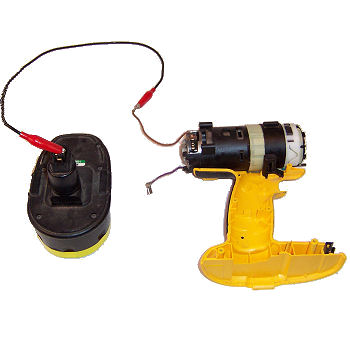
Credit: www.ereplacementparts.com
Signs Of A Weak Battery
Knowing the signs of a weak battery helps keep your cordless drill working well. Batteries wear out over time. They lose power and become less reliable. Spotting these signs early can save time and money. It also prevents work delays.
Reduced Run Time
A weak battery drains faster than before. Your drill stops working sooner than usual. You may need to recharge more often. This drop in run time means the battery holds less charge. It’s a clear sign the battery is losing strength.
Slow Charging
The battery takes much longer to reach full charge. A good battery should charge quickly. Slow charging means the battery cells are weak. It may also indicate damage inside the battery. This can affect how well your drill performs.
Overheating Issues
The battery gets hot during use or charging. Heat can damage battery cells. Overheating is not normal and signals a problem. It can lead to permanent battery failure. Watch out for warmth beyond usual levels.

Credit: www.youtube.com
Tools Needed For Testing
Testing a cordless drill battery requires a few basic tools. These tools help check the battery’s health and performance. Having the right tools makes the process easier and safer. Here are the main tools needed for testing your drill battery.
Multimeter
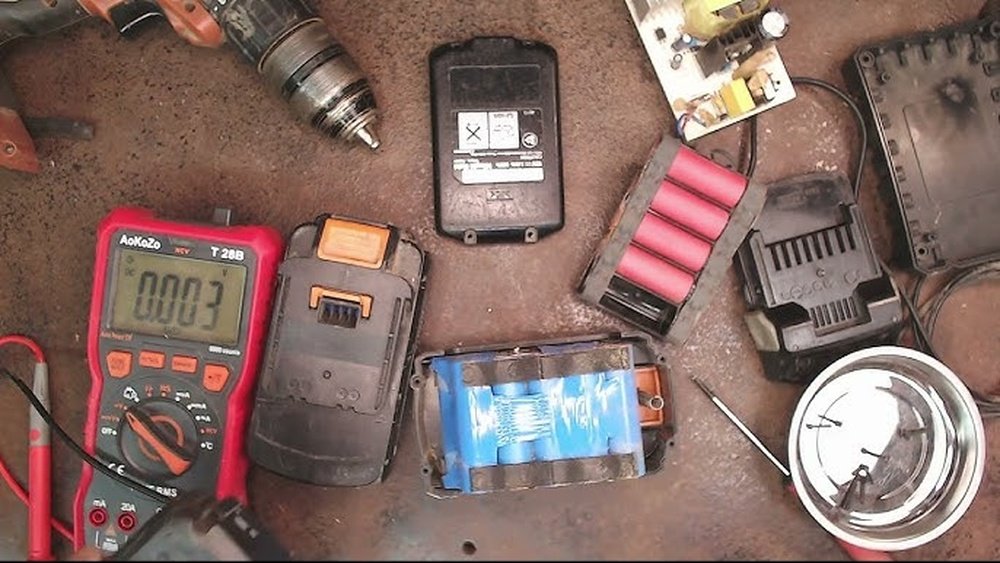
A multimeter measures voltage and current in the battery. It shows if the battery holds a proper charge. You can spot weak or dead cells with this tool. A digital multimeter is simple to use and widely available.
Battery Charger
A battery charger is essential to fully charge the battery before testing. It ensures accurate voltage readings. Use the charger designed for your drill’s battery type. Avoid cheap or incompatible chargers to prevent damage.
Safety Gear
Wear safety glasses and gloves when testing batteries. Batteries may leak or spark during checks. Safety gear protects your eyes and skin from harm. Always handle batteries with care and caution.
Checking Battery Voltage
Checking the battery voltage is a key step in testing a cordless drill battery. Voltage shows the battery’s current power level. A low voltage means the battery needs charging or replacing. Using a multimeter is a simple way to measure voltage accurately. This helps you know if the battery is still good or not.
Setting Up The Multimeter
Turn on your multimeter and set it to measure DC voltage. Choose a range that covers the battery’s voltage, usually 20 volts. Make sure the probes are connected correctly: red to positive, black to negative. This setup ensures you get accurate readings without damaging the device.
Measuring Voltage
Hold the red probe on the battery’s positive terminal. Place the black probe on the negative terminal. Keep steady contact to avoid fluctuating readings. Read the number shown on the multimeter display. This number shows the battery’s current voltage level.
Interpreting Results
Compare the voltage reading to the battery’s rated voltage. A fully charged battery usually shows close to this rating. A reading below 80% means the battery is weak. If the voltage is very low, the battery may be dead. Use this info to decide on charging or replacing the battery.

Credit: www.workprotool.com
Performing A Load Test
Performing a load test on a cordless drill battery checks how well the battery works under real conditions. It shows if the battery can hold power while driving screws or drilling holes. This test is more accurate than just checking the battery’s voltage.
Load testing helps find problems like weak cells or poor connections inside the battery. It also tells if the battery needs replacement or repair.
Why Load Testing Matters
Load testing measures battery performance under pressure. It reveals if the battery delivers enough power during use. This test helps avoid surprises like the drill stopping suddenly.
It also prevents damage to your tool from a failing battery. Knowing battery health saves time and money on repairs.
Step-by-step Load Test
First, fully charge the battery. Use the drill at a normal speed to drive screws or drill holes. Watch the battery indicator carefully.
If the drill slows down or stops quickly, note the time it took. Use a multimeter to check the battery voltage during use. Compare these numbers to the battery’s rated specs.
Analyzing Load Test Outcomes
If the battery keeps steady power, it is healthy. If power drops fast or voltage falls below specs, the battery is weak.
A weak battery may need replacing or reconditioning. Consistent power means longer work time and better drill performance.
Using A Battery Tester
Using a battery tester is a simple way to check your cordless drill’s battery health. It helps you know if the battery holds enough charge. This tool saves time and effort by showing the battery’s condition clearly. Let’s explore the types of testers, how to use them, and their accuracy.
Types Of Battery Testers
There are several types of battery testers. The most common ones include load testers, multimeters, and smart testers. Load testers check battery voltage under real use. Multimeters measure voltage but do not apply load. Smart testers give detailed information like battery capacity and health. Choose a tester based on your needs and budget.
How To Use One
Start by turning off your cordless drill. Remove the battery from the tool. Connect the tester’s probes to the battery terminals. Follow the tester’s instructions to start the test. Wait for the results, which usually appear within seconds. Read the voltage or capacity number to judge battery condition. If needed, repeat the test for accuracy.
Accuracy And Limitations
Battery testers provide quick insights but have limits. Load testers give more accurate results than simple voltage checks. Multimeters can mislead since voltage alone is not enough. Smart testers offer the best data but can be costly. No tester can guarantee 100% accuracy. Always combine tester results with your own battery experience.
Tips To Extend Battery Life
Extending the life of your cordless drill battery saves money and keeps your tools ready. Simple habits can make a big difference. Follow these tips to keep your battery healthy and working longer.
Proper Charging Habits
Charge the battery only when it is low. Avoid charging it after every small use. Do not leave the battery on the charger for days. Unplug once fully charged. Use the charger that came with your drill. Fast charging can heat the battery, which reduces life. Slow, steady charging is best.
Storage Best Practices
Store the battery in a cool, dry place. Keep it away from dust and moisture. Remove the battery from the drill if not used for a long time. Store batteries at about half charge. This prevents damage during storage. Check the battery monthly and recharge if needed.
Avoiding Extreme Temperatures
Heat and cold harm battery performance. Avoid leaving your drill or battery in direct sunlight. Do not store it in freezing places. High heat can cause the battery to swell. Cold makes it lose power quickly. Keep the battery in room temperature for best results.
Frequently Asked Questions
How Do I Check A Cordless Drill Battery Charge?
To check your drill battery charge, use a battery tester or multimeter. Measure voltage against the battery’s rated voltage. A low reading means recharge or replace the battery.
What Tools Are Needed To Test A Drill Battery?
You need a multimeter or battery tester to check voltage. A charger is also useful to fully charge the battery before testing.
How To Know If A Cordless Drill Battery Is Bad?
If the battery won’t hold charge or powers the drill briefly, it’s likely bad. Also, swelling or overheating indicates battery failure.
Can I Test A Drill Battery Without A Charger?
Yes, use a multimeter to check voltage without charging. However, testing after a full charge gives more accurate results.
Conclusion
Testing a cordless drill battery is simple and important. Check the charge level often to avoid surprises. Use a multimeter or battery tester for accurate results. Keep batteries clean and dry to help them last longer. Regular tests save time and money by spotting problems early.
A good battery means your drill works well every time. Stay safe and keep your tools ready for any job.
