


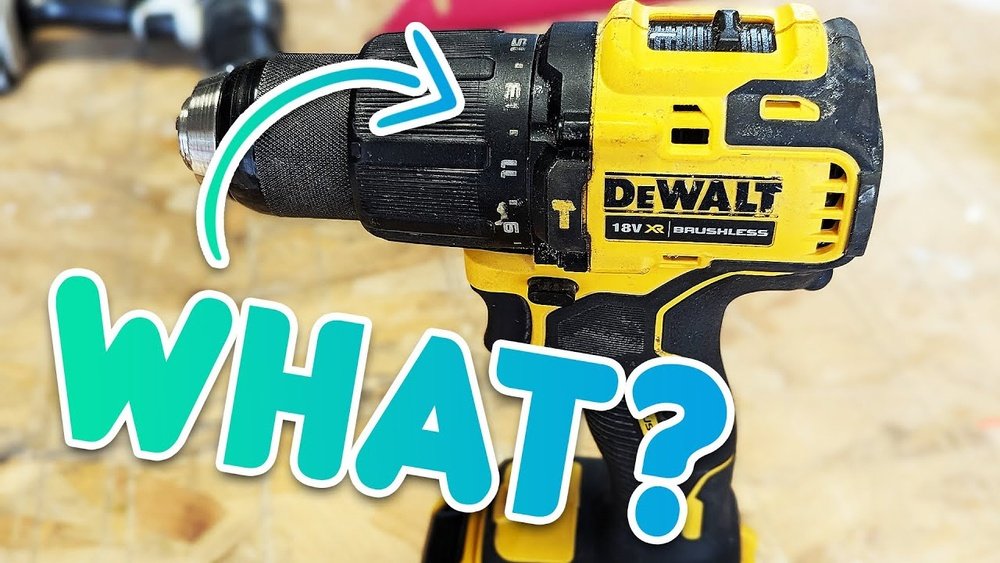
Have you ever picked up a cordless drill and wondered what all those numbers on it actually mean? You’re not alone.
Those digits and settings might seem confusing at first, but they hold the key to using your drill like a pro. Understanding these numbers can save you time, prevent damage, and make your projects smoother. Keep reading, and you’ll soon unlock the secrets behind your drill’s numbers—and discover how to get the most out of your tool every time you use it.

Credit: www.toolcrafthub.com
Basic Parts Of A Cordless Drill
A cordless drill has several key parts that work together to make drilling easy. Knowing these parts helps you understand the numbers and settings on your drill. This knowledge improves your control and results.
Each part has a unique function. They affect how the drill operates and what it can do. Learning about these parts is the first step to using your drill well.
Drill Chuck
The drill chuck holds the drill bit in place. It can be tightened or loosened by hand or with a key. This part allows you to change bits quickly. It also keeps the bit steady while drilling.
Torque Settings
Torque settings control how much force the drill uses. Higher torque helps drill into hard materials. Lower torque prevents overdriving screws or damaging soft materials. Adjusting torque makes your work more precise.
Speed Control
Speed control changes how fast the drill bit spins. Slow speeds work well for driving screws. Faster speeds are better for drilling holes. Some drills have two speed modes for more control.
Battery Indicator
The battery indicator shows how much power is left. It helps you know when to recharge the battery. This feature prevents the drill from stopping suddenly during work. A good battery life improves your efficiency.
Decoding Torque Numbers
The torque numbers on a cordless drill can seem confusing. They tell you how much twisting force the drill can apply. Understanding these numbers helps you use the drill better and avoid damage to screws or materials.
Let’s break down what torque means and how to pick the right setting for your project.
What Torque Measures
Torque measures the twisting force the drill applies to a screw or bolt. It shows how hard the drill can turn.
Higher torque means more power to drive screws into tough materials. Lower torque is better for delicate tasks that need control.
Torque Settings Range
Most cordless drills have multiple torque settings. These range from low to high numbers.
Low numbers give gentle force to avoid stripping screws. High numbers provide strong force for thick wood or metal.
You can adjust the torque by turning a ring near the drill’s chuck. This helps match the force to your task.
Choosing The Right Torque
Pick a low torque for soft materials like plastic or drywall. This stops screws from breaking or sinking too deep.
Use medium torque for wood and general household projects. It balances power and control well.
Choose high torque for hard materials like metal or dense wood. This setting drives screws deeply and securely.
Understanding Speed Numbers
Understanding the speed numbers on a cordless drill helps you use it better. These numbers tell you how fast the drill spins. Speed affects how well the drill works on different materials. Using the right speed can make your work easier and faster.
Rpm Explained
RPM means revolutions per minute. It shows how many times the drill bit spins in one minute. Higher RPM means faster spinning. Lower RPM means slower spinning. Different tasks need different RPM speeds for best results.
Low Vs High Speed
Low speed is good for heavy jobs like drilling into metal or hard wood. It gives more power and control. High speed works well for light jobs like drilling into soft wood or screwing. It cuts through material quickly but with less power.
Speed Settings Impact
Choosing the right speed setting protects your drill and work material. Using too high speed can burn out the drill bit or damage the material. Too low speed may make the job take longer. Adjust speed based on the task and material hardness for best results.
Battery And Power Ratings
Understanding the battery and power ratings on a cordless drill helps you choose the right tool. These numbers tell you about the drill’s strength and how long it will work before needing a recharge. Knowing these details makes your work easier and more efficient.
Voltage Numbers
The voltage number shows the power level of the drill’s battery. Higher voltage means more power for tough jobs. A 12-volt drill works well for light tasks. A 20-volt or higher drill handles heavy-duty work better. Voltage affects how fast and strong the drill spins.
Ampere-hour (ah) Rating
The ampere-hour rating measures the battery’s capacity. It tells how long the battery can power the drill. A higher Ah rating means longer run time. For example, a 2.0 Ah battery lasts less than a 4.0 Ah battery. This number helps you pick a drill that fits your work time.
Battery Life Indicators
Battery life indicators show how much charge remains. These indicators can be lights or digital displays. They help prevent surprises during work. Knowing the battery level lets you plan charging breaks. This feature keeps your projects moving smoothly.
Interpreting Clutch Settings
The clutch on a cordless drill controls how much torque the drill uses. It stops the drill from turning the screw too tight or stripping it. Learning to read the clutch settings helps you use the drill better and avoid damage. This section explains what the numbers on the clutch mean and how to use them.
Clutch Number Scale
The numbers on the clutch range from low to high. Low numbers mean less torque, or turning force. High numbers mean more torque. Each number lets you control how hard the drill will push before it stops spinning. Lower numbers are good for soft materials. Higher numbers work for harder materials.
Preventing Overdriving
Overdriving means pushing a screw too deep or stripping its head. The clutch stops this by slipping once the set torque is reached. Set the clutch low to avoid overdriving in delicate work. This protects both the screw and the material. It also helps you get a clean, professional finish.
Adjusting For Different Materials
Different materials need different torque settings. Soft wood needs less torque, so use a low clutch number. Hard wood or metal needs more torque, so set the clutch higher. Adjust the clutch number each time you switch materials. This keeps your work safe and your screws tight.
Additional Numbers On Drill Labels
Besides power and speed, cordless drills have other numbers on their labels. These numbers provide extra information about the tool. They help users identify the drill’s exact type and quality. Understanding these numbers makes it easier to choose the right drill.
Model Numbers
Model numbers are unique codes for each drill version. They help to distinguish between different styles and features. These numbers make it easy to find manuals and parts. They also help when looking for reviews or customer support.
Certification Marks
Certification marks show the drill meets safety and quality rules. These marks come from official testing groups. They ensure the tool is safe to use. Seeing these marks gives confidence in the product’s reliability.
Manufacturer Codes
Manufacturer codes identify the company that made the drill. These codes can include factory location or production date. They help track the drill’s origin and quality control. Knowing this information can be useful for warranty or repairs.
Tips For Using Numbers To Improve Performance
Understanding the numbers on a cordless drill helps you use it better. These numbers show settings like torque and speed. Using the right numbers can make your work easier and faster. It also helps protect the drill and your materials.
Here are some tips to use these numbers for better drill performance and safety.
Matching Torque And Speed To Tasks
Use low torque for small screws to avoid damage. High torque suits bigger bolts and tough materials. Adjust speed to control the drill’s power. Slow speed works for drilling metal or hard wood. Fast speed fits soft wood or quick screwing. Match settings to the task for best results.
Maintaining Optimal Settings
Check your drill’s settings before starting any job. Keep torque and speed within the recommended range. Avoid using the highest torque all the time. It wears out the drill battery and parts faster. Change settings based on the material and screw size. This keeps the drill running longer and saves energy.
Safety Considerations
Use the right numbers to prevent accidents. Too high torque can strip screws or break the drill bit. High speed can cause loss of control. Always start with lower settings and increase if needed. Wear safety gear like goggles and gloves. Safe use extends drill life and protects you.

Credit: www.popularmechanics.com

Credit: www.youtube.com
Frequently Asked Questions
What Do The Numbers On A Cordless Drill Mean?
The numbers represent torque settings, controlling the drill’s twisting force. Higher numbers mean more torque for tougher jobs. Lower numbers prevent overdriving screws or damaging materials. Adjusting these helps match the drill’s power to your task.
How To Use Torque Settings On A Cordless Drill?
Select a torque number based on your task’s need. Use low settings for delicate tasks like driving small screws. Choose high settings for drilling or driving large screws. This prevents stripping or breaking screws and protects your work surface.
Why Is Torque Important In Cordless Drills?
Torque determines how much force the drill applies. Proper torque ensures efficient drilling and screw driving. Too much torque can damage materials or strip screws. Too little torque results in incomplete fastening. Adjusting torque improves precision and tool performance.
What Is The Difference Between Drill Speed And Torque Numbers?
Speed numbers refer to drill rotation speed (RPM). Torque numbers indicate twisting force applied by the drill. High speed is best for drilling, high torque for driving screws. Both settings work together for optimal drilling results.
Conclusion
Understanding the numbers on a cordless drill helps you use it better. These numbers show the drill’s speed and power. Choosing the right setting protects your tools and work. Adjusting the numbers makes drilling easier and safer. Now, you can pick the best speed for any job.
Remember, practice helps you get comfortable with your drill. Use the numbers to work smarter, not harder. Keep this guide handy next time you drill. Simple steps lead to great results.
