


Have you ever picked up a drill driver and wondered what makes it spin so powerfully and precisely? Understanding how a drill driver works can change the way you use it, making your projects faster and easier.
Whether you’re fixing something at home or tackling a big DIY job, knowing the inner workings gives you more control and confidence. Keep reading, and you’ll discover the simple secrets behind this handy tool—secrets that can boost your skills and save you time on every task.
Credit: www.wonkeedonkeetools.co.uk
Drill Driver Basics
A drill driver is a useful tool for many tasks. It helps you drill holes and drive screws quickly. Understanding the basics can make your work easier and safer. This section explains the main parts and types of drill drivers. You will learn how each part works together and what kind fits your needs.
Core Components
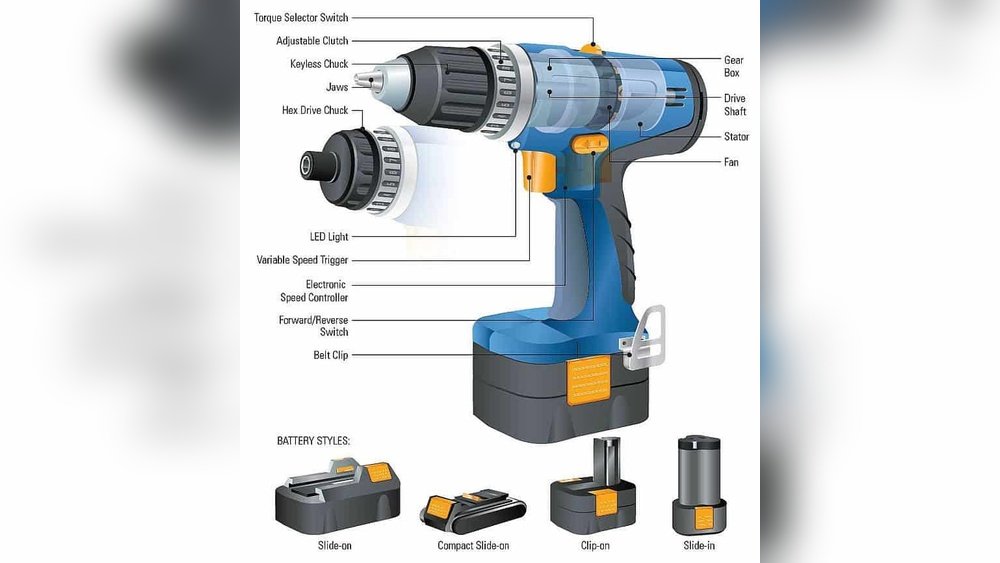
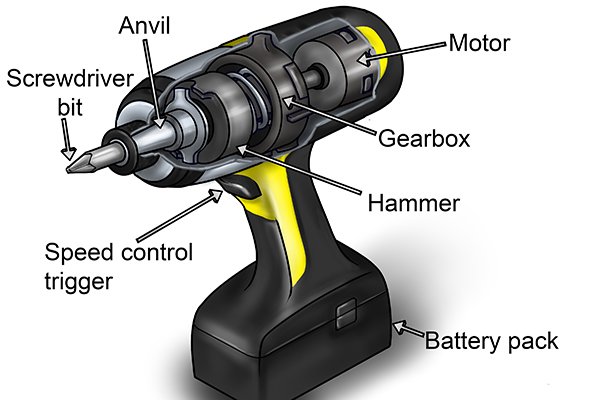
A drill driver has several key parts. The motor powers the tool, turning the drill bit or screw. The chuck holds the bit tightly in place. It can open and close to fit different sizes. The trigger controls the speed and starts the motor. The handle provides a firm grip for control. Some models include a clutch to adjust torque. This stops overdriving screws and protects the material.
Types Of Drill Drivers
There are two main types of drill drivers: corded and cordless. Corded models plug into power outlets. They offer constant power but limit movement. Cordless drill drivers run on batteries. They give freedom to move anywhere without cords. Battery life varies depending on use and model. Some cordless drills have brushless motors. These last longer and work more efficiently. Choose a drill driver based on your work and preferences.
Power Source Options
Drill drivers need power to work. This power comes from different sources. Choosing the right power source affects how you use the drill. Two main types exist: corded and cordless models. Each has its own advantages and limits. Understanding these options helps you pick the best drill for your needs.
Corded Models
Corded drill drivers plug directly into an electric outlet. This gives them constant power. They do not run out of energy during use. They are usually lighter than cordless ones. Their power is steady, making them great for long jobs. The cord limits movement but offers reliable strength. Ideal for heavy tasks and long hours of work.
Cordless Models
Cordless drills use batteries as their power source. They offer freedom to move anywhere. No cord means no need for an outlet nearby. Battery life limits how long you can work. Modern batteries recharge quickly and last longer than before. Cordless models are lighter and easier to carry. Perfect for quick jobs and places without power access.
Motor Mechanics
The motor inside a drill driver is the heart of its power. It changes electrical energy into mechanical force. This force spins the drill bit to bore holes or drive screws. Understanding motor mechanics helps you see how drills perform their tasks efficiently.
The motor’s design affects speed, torque, and battery life. Different types of motors offer distinct benefits and drawbacks. Let’s explore how electric motors work and compare two common motor types.
Electric Motor Function
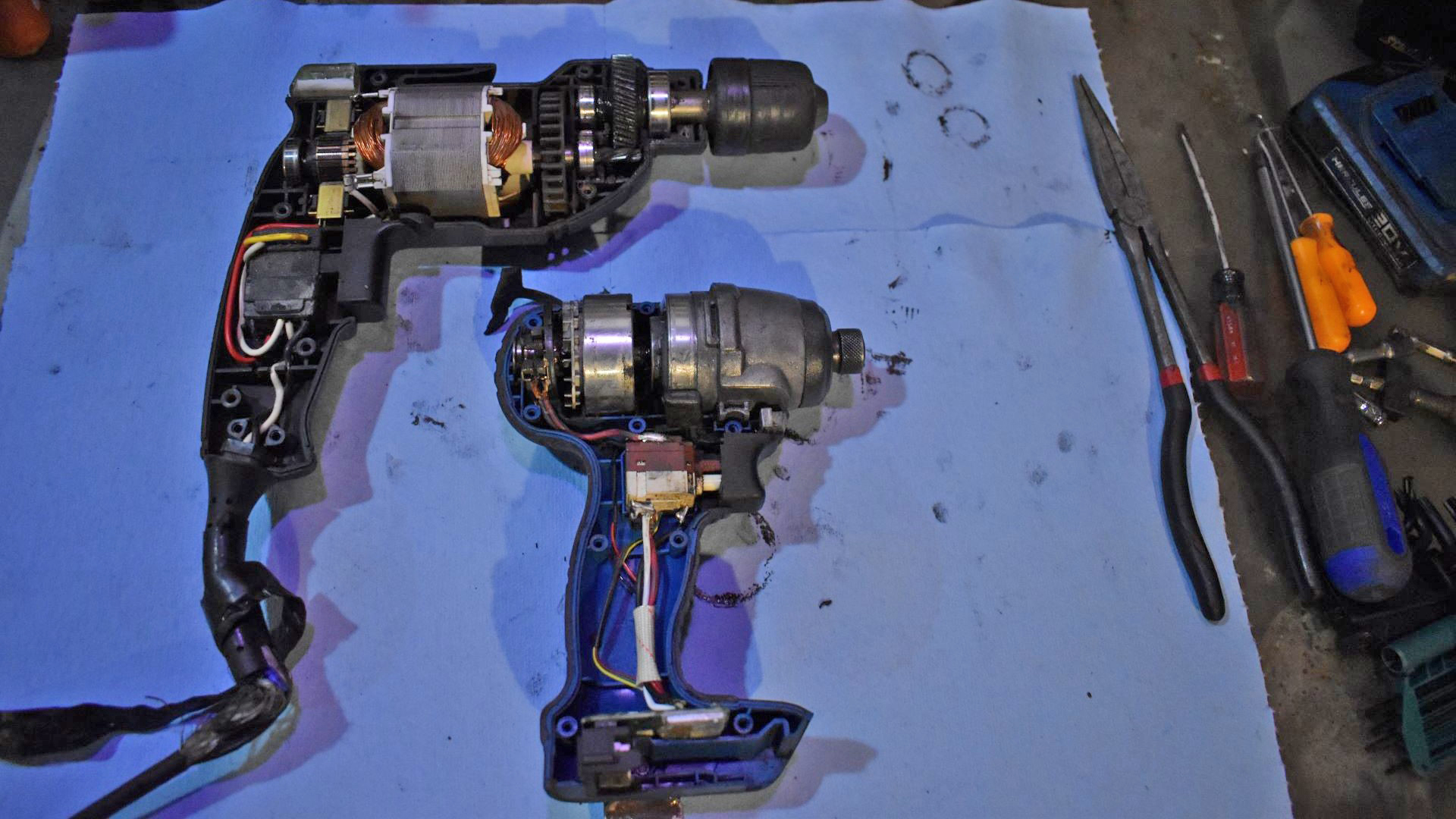
An electric motor uses electricity to create motion. Inside, magnets and coils work together. Electricity flows through the coil, creating a magnetic field. This field pushes against permanent magnets. The pushing causes the motor’s shaft to spin. This spinning shaft turns the drill bit.
The faster the motor spins, the faster the drill bit turns. Torque is the twisting force the motor produces. It helps the drill bit cut through materials. The motor’s power depends on how much current it uses and its design.
Brushless Vs Brushed Motors
Brushes are small parts that transfer electricity inside traditional motors. Brushed motors use these brushes to make the shaft spin. They are simple and cost less. But brushes wear out and need replacement over time.
Brushless motors do not use brushes. Instead, they use electronic controls to spin the shaft. This design lasts longer and runs cooler. Brushless motors also save battery power and provide more torque. They often cost more but offer better performance and durability.

Credit: www.youtube.com
Gear System Role
The gear system in a drill driver plays a key role in its performance. It controls the tool’s speed and power. The gears adjust how fast the drill bit spins and how much force it delivers. This balance helps the drill work well on different materials and tasks.
Understanding the gear system helps you use the drill driver better. It also shows why some drills work faster or stronger than others. The gear system is inside the drill’s body and connects the motor to the drill bit.
Speed Control
The gear system changes the drill’s speed by shifting gears. Lower gears slow down the drill bit but increase power. Higher gears make the drill spin faster but with less force. This switch lets you match the speed to the job.
Slow speed works well for tough materials like metal. Fast speed is good for soft materials like wood. The gear system gives you control over these speeds easily.
Torque Management
Torque means the drill’s twisting force. The gear system controls torque by adjusting gear ratios. Lower gears increase torque for hard drilling jobs. Higher gears reduce torque for light tasks.
Good torque management stops the drill bit from slipping. It also prevents damage to screws and materials. The gear system helps the drill driver deliver just the right amount of torque every time.
Chuck And Bit Interaction
The chuck and bit interaction is essential for a drill driver’s function. It allows the drill to grip and spin different bits. This grip lets the drill work on many materials like wood, metal, or plastic.
The chuck is the part that holds the bit firmly. It tightens around the bit’s base to keep it steady. This prevents the bit from slipping during use. A secure chuck makes drilling safer and more precise.
How The Chuck Holds Bits
The chuck uses jaws to hold the bit. These jaws move inward when you tighten the chuck. They grip the bit’s shank, the smooth part at the base. Some chucks use a key to tighten, while others are keyless.
Keyless chucks twist by hand to lock the bit. Keyed chucks need a special tool to tighten or loosen. Both types ensure the bit stays in place during drilling. The strength of the chuck’s grip depends on the material and design.
Bit Types And Uses
Bits come in many shapes and sizes. Each type suits specific tasks and materials. A twist bit is common for drilling holes in wood or metal. Spade bits work well for large holes in wood.
Masonry bits have a strong tip for drilling into brick or stone. Screwdriver bits help drive screws into various surfaces. Choosing the right bit improves work quality and tool life.
Trigger And Control Features
The trigger and control features of a drill driver are essential for its operation. They help you manage speed and direction easily. These features give you full control over your work. Understanding them makes using a drill safer and more effective.
Variable Speed Trigger
The variable speed trigger controls how fast the drill spins. Pressing lightly makes the drill turn slowly. Pressing harder increases the speed. This helps with delicate tasks that need slow drilling. It also works for fast drilling when you press fully.
Speed control helps prevent damage to materials. It also improves precision and control. You can start drilling slowly and speed up as needed. This feature is important for different types of jobs.
Forward And Reverse Controls
Forward and reverse controls change the drill’s rotation direction. Forward mode drives screws in or drills holes. Reverse mode helps remove screws or back out drill bits. This switch is usually near the trigger.
Easy access to these controls makes work faster. You can quickly switch directions without stopping. This feature adds convenience and saves time on the job. It also helps when a drill bit gets stuck.
Safety Mechanisms
Drill drivers include safety features to protect users during work. These mechanisms reduce risks and improve control. They help prevent damage to the tool and injury to the user.
Overload Protection
Overload protection stops the drill driver from working too hard. It senses when the motor gets too hot or strained. Then, it slows down or shuts off the tool. This prevents damage to the motor and avoids accidents. Overload protection extends the life of the drill driver. It also gives users peace of mind during tough jobs.
Ergonomic Design
Ergonomic design helps users hold the drill driver comfortably. The tool fits well in the hand, reducing strain. Soft grips and balanced weight make it easier to control. This lowers the chance of slipping or losing grip. Ergonomic tools reduce fatigue during long use. They improve safety and accuracy on every task.
Maintenance Tips
Proper maintenance keeps your drill driver working well for a long time. Small habits protect the tool and improve its performance. Regular care helps avoid problems and saves money on repairs. Focus on cleaning and battery care to keep the drill ready for any task.
Cleaning The Tool
Remove dust and dirt after each use. Use a soft brush or cloth to clean the drill. Avoid water or harsh chemicals that can damage parts. Clean the vents to prevent overheating. Check the chuck for debris and wipe it clean. A clean tool runs smoothly and lasts longer.
Battery Care
Charge the battery fully before the first use. Avoid letting the battery drain completely. Store batteries in a cool, dry place. Remove the battery from the drill if not in use for days. Use the charger made for your battery type only. Proper battery care extends its life and keeps power strong.
Credit: www.thedrive.com
Frequently Asked Questions
What Is A Drill Driver Used For?
A drill driver combines drilling and screw-driving functions. It’s ideal for wood, metal, and plastic tasks. This tool saves time by eliminating the need to switch tools. It offers adjustable speed and torque for precision.
How Does The Chuck Of A Drill Driver Work?
The chuck holds drill bits tightly in place. It uses a three-jaw mechanism that clamps around the bit. Tightening the chuck secures the bit for safe operation. This ensures bits don’t slip during drilling or driving.
What Powers A Cordless Drill Driver?
Cordless drill drivers run on rechargeable lithium-ion batteries. These batteries provide portability and convenience without cords. They deliver consistent power for most household and professional tasks. Battery life varies with usage and tool model.
How Do You Adjust Torque On A Drill Driver?
Torque adjustment controls the twisting force applied. It prevents overdriving or stripping screws. Most drill drivers have a clutch ring with numbered settings. Choose a lower setting for delicate work and higher for tough materials.
Conclusion
A drill driver makes drilling and screwing tasks easier and faster. It uses a motor to turn bits at different speeds. You can adjust the torque to match the job. This tool saves effort and improves precision. Knowing how it works helps you use it safely.
Choose the right drill bit for each material. Regular care keeps your drill driver working well. Simple steps lead to better results every time. Understanding your tool builds confidence and skill. Give your projects a smoother, quicker finish.
