


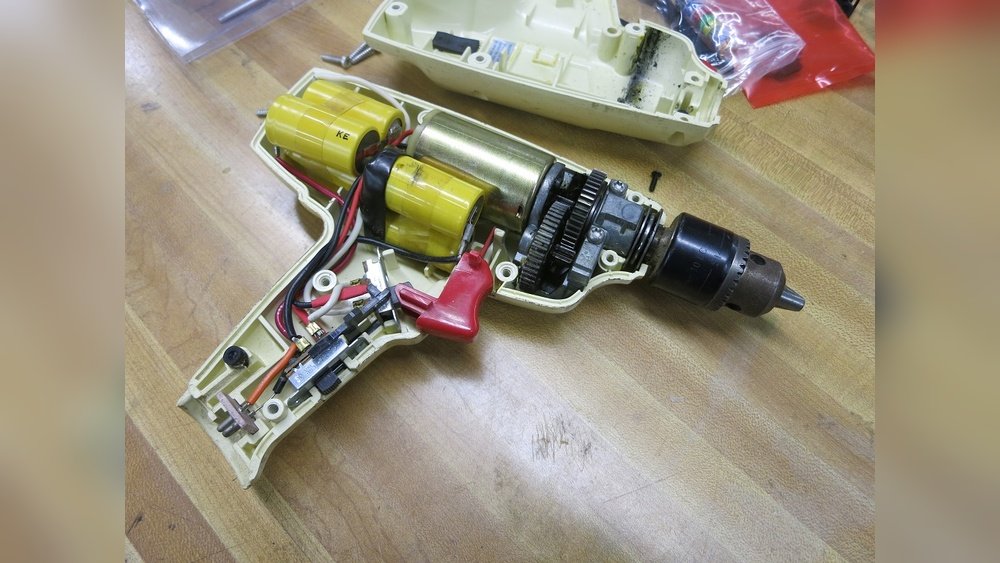
Do you have an old cordless drill sitting unused because it won’t power on? You’re not alone.
Many people struggle with getting their trusty tools back to life without buying a new one. What if you could bring your drill back to full strength with simple steps? Imagine saving money and avoiding the hassle of replacement. You’ll discover easy and effective ways to power your old cordless drill again.
Keep reading, and you’ll be ready to tackle your next project with confidence.
Identifying Drill Battery Types
Knowing your drill’s battery type helps you power it right. Old cordless drills use different batteries. Each type needs a special charger and care. Identifying the battery type is the first step to keep your drill running well.
Common Battery Chemistries
Most old cordless drills use three main battery types. Nickel-Cadmium (NiCd) is common in older models. NiCd batteries are tough but can lose charge fast. Nickel-Metal Hydride (NiMH) is lighter and holds charge longer. Lithium-Ion (Li-ion) is newer and charges fast. Li-ion batteries last longer and weigh less. Check your battery label to find its chemistry type.
Battery Age And Condition
Battery age affects how well your drill works. Old batteries hold less power and drain quickly. Look for cracks, leaks, or corrosion on the battery. These signs mean the battery might be unsafe. Test the battery with a charger to see if it still holds power. Replace batteries that do not charge properly or lose power fast.
Testing The Battery Charge
Testing the battery charge is the first step to power an old cordless drill. It helps you understand if the battery still holds enough power to work. This step saves time and avoids unnecessary battery replacements.
Checking the battery charge lets you see if the battery needs recharging or replacing. It also helps to find out if the drill will run properly or stop suddenly. This simple test can extend the life of your drill and keep it ready for use.
Using A Multimeter
A multimeter measures the battery voltage accurately. Set the multimeter to DC voltage mode. Connect the red probe to the battery’s positive terminal.
Touch the black probe to the negative terminal. Read the voltage shown on the screen. Compare the reading to the battery’s rated voltage.
If the voltage is much lower, the battery may be weak or dead. A fully charged battery usually shows close to its rated voltage. This test gives a clear idea about the battery’s health.
Signs Of Battery Failure
Look for physical changes in the battery like swelling or leaks. These signs mean the battery is damaged and unsafe to use. A battery that won’t hold a charge also shows failure.
If the drill stops working soon after charging, the battery might be failing. Another sign is overheating during use or charging. Replace the battery if you notice these problems to avoid damage to your drill.
Charging Techniques For Old Batteries
Old cordless drill batteries need special care to keep them working well. Charging these batteries properly extends their life and boosts drill performance. Using the right charging techniques helps avoid damage and keeps the battery ready for use. Understanding these methods is key to powering your old cordless drill efficiently.
Standard Charging Methods
Most old cordless drill batteries charge using a simple plug-in charger. Place the battery in its charger and connect it to power. The charger stops charging when the battery is full. This method is easy and safe for most batteries.
Check the charger’s indicator light to know when charging is complete. Avoid overcharging by removing the battery promptly. Overcharging can reduce battery life and cause overheating. Standard charging suits regular use and keeps the battery healthy.
Trickle Charging Benefits
Trickle charging delivers a low, steady current to the battery. It keeps the battery full without overcharging or overheating. This method is useful for old batteries that lose charge quickly.
Trickle charging helps maintain battery capacity over time. It prevents deep discharge, which can harm the battery. Using trickle charging can extend the battery’s useful life. This gentle charging method is ideal for batteries stored for long periods.

Credit: www.reddit.com
Reviving Dead Batteries
Old cordless drills often stop working due to dead batteries. These batteries can sometimes be brought back to life. Reviving dead batteries saves money and reduces waste. It also extends the life of your drill.
Understanding how to revive batteries is key. Different battery types need different care. NiCd and NiMH batteries are common in older drills. Both can be revived with proper techniques.
Jump-starting Nicd Batteries
NiCd batteries often lose charge due to crystal buildup inside. This buildup blocks current flow, causing the battery to die. Jump-starting helps break down these crystals.
To jump-start, use a higher voltage charger briefly. Apply the charger for a few seconds, then disconnect. Repeat this process several times. This can restore battery capacity.
Be careful not to overcharge or heat the battery. Overheating can damage the battery permanently. Always monitor the battery temperature during this process.
Reconditioning Nimh Batteries
NiMH batteries lose capacity due to memory effect. This happens when they are not fully discharged before charging. Reconditioning clears this effect and restores power.
Start by fully discharging the battery. Use the drill until the battery is empty. Then charge it fully without interruption. Repeat this cycle 3 to 5 times.
This process helps realign the battery’s cells. It improves battery life and performance. Avoid overcharging, as it can harm the battery.
Battery Maintenance Tips
Battery maintenance is key to powering an old cordless drill effectively. Proper care extends battery life and keeps the drill ready to use. Small habits can prevent common battery problems. Keep the battery healthy to avoid frequent replacements.
Proper Storage Practices
Store the battery in a cool, dry place. Avoid places with high heat or cold. Extreme temperatures damage battery cells and reduce power. Remove the battery from the drill before storing. Keep it away from metal objects that can cause short circuits. Charge the battery halfway before long storage. This keeps the cells balanced and healthy.
Avoiding Overcharging
Do not leave the battery on the charger too long. Overcharging heats the battery and shortens its life. Use a charger with an automatic shut-off feature. Unplug the charger once the battery is full. Charge in a well-ventilated area to prevent overheating. Follow the battery and charger instructions carefully.

Credit: www.instructables.com
Replacing Old Batteries
Replacing old batteries is the best way to power an old cordless drill again. Over time, batteries lose their ability to hold a charge. This can make your drill weak or stop working completely. New batteries restore power and make your drill work like new. Careful choice and correct installation are important. This section explains how to find compatible replacements and install new battery packs easily.
Finding Compatible Replacements
Check your drill’s model number or battery type first. This information is usually on the battery or inside the battery compartment. Choose batteries that match the voltage and size of the original. Using wrong batteries can damage the drill or reduce performance. Buy from trusted brands or official dealers to ensure quality. Look for batteries with good reviews and warranty. Avoid very cheap or unbranded options. They may fail quickly or not fit well.
Installing New Battery Packs
Turn off the drill before removing the old battery. Press the release button or lever to slide out the pack. Align the new battery with the terminals inside the compartment. Slide it in firmly until it clicks or locks in place. Test the drill by turning it on and checking the power. Charge the new battery fully before first use for best results. Store spare batteries in a cool, dry place to keep them healthy. Proper installation makes sure your drill runs smoothly and lasts longer.
Alternative Power Solutions
Old cordless drills often lose power because their batteries fail. Finding new batteries can be hard or expensive. Alternative power solutions help keep these drills working without buying a new one. These methods use modern technology to give your drill new life. They are simple and cost-effective ways to power your drill.
Using External Battery Packs
External battery packs offer a flexible power source for old drills. These packs come with standard connectors that fit many drill models. You can connect the pack directly to the drill’s battery terminals. This method supplies steady power and extends drill use time. Choose packs with the right voltage to avoid damage. Many external packs include USB ports for charging other devices. This makes them useful beyond just powering your drill.
Adapting With Universal Chargers
Universal chargers are designed to work with different battery types. They can charge old drill batteries even if the original charger is lost. These chargers adjust voltage and current automatically for safe charging. Using a universal charger can bring dead batteries back to life. Make sure to select a charger compatible with your battery’s chemistry. This option saves money and reduces electronic waste by reusing old batteries.

Credit: www.instructables.com
Frequently Asked Questions
How Can I Charge An Old Cordless Drill Battery?
Use a compatible charger designed for your drill’s battery type. Avoid using modern chargers that may damage the battery. If the battery is removable, check for voltage and charge specifications. For non-removable batteries, consider professional servicing or replacement.
Is It Safe To Use Third-party Chargers For Old Drills?
Third-party chargers can be safe if they match voltage and current specs. Using incompatible chargers risks battery damage or fire hazards. Always verify charger compatibility with the drill model before use. When in doubt, choose original or manufacturer-recommended chargers.
Can I Power An Old Cordless Drill With A New Battery?
Yes, you can replace the old battery with a new compatible one. Ensure the new battery matches the drill’s voltage and connector type. This improves performance and extends drill life. Check manufacturer guidelines for recommended battery models.
What If My Old Drill Battery No Longer Holds Charge?
If the battery won’t hold charge, it may be dead or damaged. Try reconditioning by fully discharging and recharging it a few times. If unsuccessful, replace the battery with a new or refurbished one. Proper battery care extends lifespan.
Conclusion
Powering an old cordless drill can be simple and cost-effective. Using the right batteries or adapters keeps your drill working well. Always check the drill’s voltage and battery type before buying replacements. Proper care extends the life of your tool.
Remember, safety matters when handling electrical parts. With patience and the right steps, your old drill can serve you for years. Keep these tips in mind to maintain your drill’s power and performance. Small efforts can bring big results in tool maintenance.
