


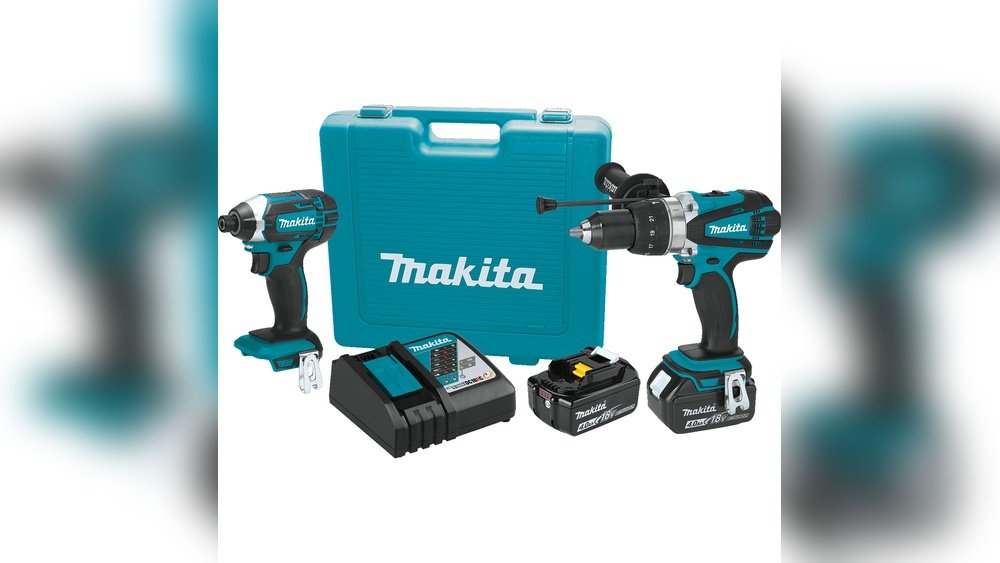
If you’ve just got your hands on a Makita cordless drill, you might be wondering how to get the most out of it. Whether you’re tackling simple home repairs or ambitious DIY projects, knowing how to use your drill properly can save you time, effort, and frustration.
This guide will walk you through the steps to use your Makita cordless drill safely and efficiently, so you can feel confident every time you pick it up. Ready to unlock the full power of your drill? Let’s dive in.
Choosing The Right Makita Drill
Choosing the right Makita cordless drill is important for your projects. A suitable drill makes work easier and faster. It depends on the type of tasks you plan to do. Understanding the different options helps you pick the best one for your needs. This section explains key points to consider when selecting a Makita drill.
Types Of Makita Cordless Drills
Makita offers various cordless drills for different jobs. The most common types are drill drivers, impact drivers, and hammer drills. Drill drivers are good for drilling holes and driving screws. Impact drivers provide more torque for tougher jobs. Hammer drills can drill into hard materials like concrete. Choose the type that fits your usual projects.
Battery Options And Compatibility
Makita drills use lithium-ion batteries. These batteries are lightweight and last long. Different drills use batteries with different voltages, such as 12V, 18V, or 40V. Higher voltage means more power and longer runtime. Check if the battery fits other Makita tools you own. Compatible batteries save money and charging time.
Key Features To Consider
Look for features like speed settings, torque control, and LED lights. Variable speed settings let you control drilling speed. Torque control prevents over-tightening screws. LED lights improve visibility in dark areas. Consider the drill’s weight and grip comfort. These features make the drill easier and safer to use.
Preparing Your Drill For Use
Preparing your Makita cordless drill for use is a simple process. It ensures the drill works well and safely. Following these steps helps you get the best results on any project. Start with the basics before you drill any holes or drive screws.
Charging The Battery
Begin by fully charging the drill’s battery. Insert the battery into the charger correctly. The charger light shows when the battery is charging. Wait until the light indicates the battery is full. A full charge gives the drill longer run time and more power.
Attaching The Drill Bit
Choose the right drill bit for your task. Open the drill’s chuck by turning it counterclockwise. Insert the drill bit into the chuck. Tighten the chuck by turning it clockwise. Make sure the bit is secure and straight. Loose bits can cause poor drilling and accidents.
Adjusting The Torque Settings
Set the torque to match your project needs. Use low torque for small screws and delicate materials. High torque works better for large screws and hard surfaces. Turn the torque ring on the drill to choose the setting. Proper torque protects your work and the drill bit.
Basic Operating Techniques
Understanding the basic operating techniques of a Makita cordless drill is essential for safe and effective use. These techniques help you handle the drill with confidence. They also improve your control and accuracy during tasks. Follow these simple steps to get started and work efficiently.
Holding The Drill Correctly
Hold the drill with your dominant hand on the handle. Place your index finger on the trigger. Use your other hand to support the front of the drill. This grip keeps the drill steady. It also reduces vibration and helps guide the drill bit straight.
Starting And Stopping The Drill
Press the trigger gently to start the drill. Gradually increase pressure to reach the desired speed. Release the trigger slowly to stop the drill. Avoid sudden starts and stops to prevent damage. Always wait for the drill bit to stop spinning before setting it down.
Controlling Speed And Pressure
Adjust the speed using the variable trigger or speed dial. Lower speeds work best for drilling into hard materials. Higher speeds suit soft materials and screws. Apply steady pressure without forcing the drill. Let the tool do the work to avoid slipping or breaking the bit.

Credit: www.youtube.com
Drilling Into Different Materials
Drilling into different materials requires different techniques and care. Each material reacts differently to the drill bit and speed. Using the right approach helps you drill clean holes and avoid damage. Your Makita cordless drill works well with wood, metal, and masonry. Understanding how to use it on each material improves your results and tool life.
Wood Drilling Tips
Use a sharp wood drill bit for clean holes. Start drilling at a low speed to avoid splintering. Keep the drill straight to make smooth, straight holes. For deep holes, pull the bit out often to remove sawdust. Use clamps to hold the wood steady and protect your hands.
Metal Drilling Tips
Choose a high-speed steel or cobalt drill bit for metal. Mark the drilling spot with a center punch to prevent slipping. Use a slow speed and steady pressure to avoid overheating the bit. Apply cutting oil or lubricant to reduce heat and wear. Let the drill bit cool down if it gets too hot.
Masonry Drilling Tips
Use a carbide-tipped masonry bit for concrete or brick. Set the drill to hammer mode if your Makita has this feature. Start with a slow speed until the bit grips the surface. Keep the drill straight and apply firm pressure. Clear the dust from the hole frequently for better drilling.
Using Additional Drill Functions
Using additional functions on your Makita cordless drill can make your work easier and more precise. These features help you handle different tasks with just one tool. Understanding how to use them will save time and improve results.
Hammer Mode Usage
Hammer mode is for drilling into hard surfaces like concrete or brick. The drill combines rotation with a hammering action. This helps break the material while drilling. Switch to hammer mode by turning the drill’s mode selector. Use steady pressure but do not push too hard. Let the drill do the work to avoid damage.
Reversing The Drill
Reversing the drill is useful for removing screws or backing out drill bits. Find the forward/reverse switch near the trigger. Push it to the reverse side to spin the bit backward. Always stop the drill before changing direction. This prevents wear on the motor and gears.
Using The Clutch Settings
The clutch controls how much torque the drill uses. Adjust the clutch to avoid stripping screws or overdriving. Turn the clutch collar to select a setting. Lower numbers mean less torque, good for small screws. Higher numbers give more power for tough jobs. Practice on scrap material to find the right setting.
Safety Tips And Maintenance
Using a Makita cordless drill safely and keeping it well-maintained helps it last longer. Following simple safety tips protects you and your tool. Regular care ensures the drill works at its best every time. Learn how to wear protective gear, clean the drill, and store the battery properly.
Protective Gear Recommendations
Always wear safety glasses to protect your eyes. Gloves help avoid cuts and scrapes. Ear protection reduces noise impact on your hearing. Wear sturdy shoes to protect your feet. Avoid loose clothes that might get caught in the drill. These steps keep you safe while working.
Routine Cleaning And Care
Clean the drill after each use. Remove dust and debris from vents and chuck. Use a soft brush or cloth for cleaning. Check the drill for loose parts or damage. Tighten screws if needed. Proper care prevents problems and keeps the drill running smoothly.
Battery Storage And Handling
Store batteries in a cool, dry place. Avoid direct sunlight and heat sources. Remove the battery from the drill when not in use. Charge batteries only with the Makita charger. Do not overcharge or let batteries drain completely. Proper handling extends battery life and keeps it safe.
Troubleshooting Common Issues
Troubleshooting common issues with your Makita cordless drill helps keep your work smooth. Simple problems can stop your drill from working properly. Knowing how to fix these issues saves time and frustration. Below are easy steps to solve typical problems.
Drill Not Starting
Check the battery is fully charged. Sometimes the drill won’t start because the battery is low. Make sure the battery clicks firmly into place. Press the trigger fully. Dirt or dust can block the switch. Clean around the trigger with a dry cloth. If the drill still won’t start, try another battery to rule out battery problems.
Battery Not Charging
Inspect the charger for any damage. Ensure the charger is plugged into a working outlet. Remove dust or dirt from the battery contacts. Use a soft cloth to clean the metal parts on the battery and charger. Let the battery cool down if it feels hot. Charging may stop if the battery is too warm. Replace the battery if it will not hold a charge after several attempts.
Drill Bit Slipping
Tighten the chuck by hand. The drill bit may slip if the chuck is loose. Use the drill’s chuck key or your hand to secure the bit tightly. Check the drill bit for damage or wear. Replace worn bits to avoid slipping. Use the correct bit size for your drill. Slipping can happen if the bit is too small for the chuck.

Credit: www.amazon.com

Credit: www.youtube.com
Frequently Asked Questions
How Do I Start Using A Makita Cordless Drill?
First, fully charge the battery. Insert it into the drill until it clicks. Adjust the torque setting as needed. Select the drill bit and secure it in the chuck. Finally, press the trigger to start drilling.
What Safety Tips Should I Follow With Makita Drills?
Always wear safety goggles and gloves. Keep hair and loose clothing away from the drill. Use the correct drill bit for your material. Maintain a firm grip and avoid over-tightening the chuck.
How Can I Extend My Makita Drill’s Battery Life?
Charge the battery fully before use. Avoid completely draining the battery regularly. Store the battery in a cool, dry place. Use the drill at recommended speeds to prevent overheating.
What Maintenance Does A Makita Cordless Drill Need?
Clean the drill after each use. Remove dust and debris from vents and chuck. Check and tighten screws regularly. Store it in a protective case to prevent damage.
Conclusion
Using a Makita cordless drill is simple and practical. Charge the battery fully before starting work. Choose the right drill bit for your task. Hold the drill firmly and apply steady pressure. Control the speed depending on the material you drill.
Always wear safety glasses for protection. Keep the drill clean and store it safely after use. Practice regularly to feel more comfortable and confident. This tool will help you complete projects faster and easier. Enjoy your work and take pride in your results.
