


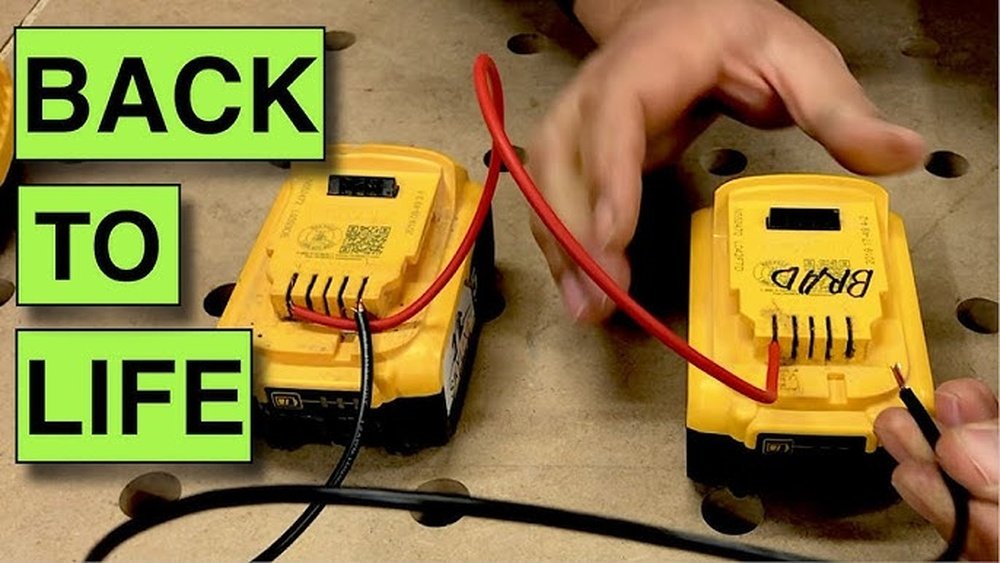
Is your cordless drill battery not holding a charge like it used to? You’re not alone.
Over time, these batteries can lose their power, leaving your drill useless right when you need it most. But what if you could bring that battery back to life with a simple process called “zapping”? You’ll learn exactly how to zap a cordless drill battery safely and effectively.
Keep reading, and you’ll discover easy steps to restore your battery’s energy and get your drill working like new again. Don’t let a weak battery slow you down—let’s fix it together.
Credit: notitlerequired.wordpress.com
Why Batteries Lose Power
Batteries lose power over time and use. They store energy to run cordless drills. But sometimes, they stop holding a full charge. This can be frustrating during work or projects.
Several reasons cause batteries to drain faster than normal. Knowing these helps you fix or zap the battery. Zapping can bring some life back to old batteries. Understanding the root causes prevents damage and extends battery life.
Common Causes Of Battery Drain
Leaving the battery unused for a long time causes drain. Batteries slowly lose charge when not in use. High temperatures also damage battery cells inside. Overcharging or charging too fast harms battery health. Using the wrong charger leads to quick power loss. Frequent deep discharges wear down the battery’s capacity.
Signs Your Battery Needs Zapping
The drill runs for a short time only. Battery shows a quick drop from full to empty. Charging seems longer than usual without full charge. The battery feels hot after charging or use. Power output drops, making the drill weaker. These signs mean the battery cells are unbalanced or stuck. Zapping helps reset the battery and improve power again.
Credit: www.youtube.com
Tools Needed For Zapping
Zapping a cordless drill battery requires some specific tools. These tools help safely restore the battery’s charge and improve its performance. Preparing the right equipment is important before starting the process.
Having the correct tools ensures the zapping process is effective and safe. Each tool has a role in checking, connecting, or protecting during the battery restoration.
Essential Equipment List
- Multimeter – Measures battery voltage and health.
- Jumper cables or thick wires – Used to connect battery terminals.
- 12-volt power source – Often a car battery or power supply.
- Insulated pliers – Helps handle wires safely.
- Battery charger – For charging after zapping.
Safety Gear To Use
- Safety goggles – Protect eyes from sparks or acid.
- Rubber gloves – Prevent electric shock and chemical burns.
- Long sleeves – Protect skin from battery acid.
- Well-ventilated area – Avoid harmful gas buildup.
- Fire extinguisher nearby – For emergencies.
Preparing The Battery
Preparing the cordless drill battery properly is important before zapping it. This step keeps you safe and helps the battery work well. You need to handle the battery carefully and check it closely for any problems.
Removing The Battery Safely
Turn off the drill before removing the battery. Press the release buttons or levers on the battery pack. Pull the battery out gently. Avoid using force to prevent damage. Keep the battery away from metal objects. Store it in a dry, cool place while working on it.
Inspecting For Damage
Look at the battery case for cracks or leaks. Check for swollen or bulging areas on the battery. Inspect the contacts for rust or dirt. Clean contacts with a dry cloth if needed. Do not use a damaged battery. Damaged batteries can be dangerous and should be replaced.
Step-by-step Zapping Process
Zapping a cordless drill battery can revive its charge and extend its life. This process needs care and attention. Follow each step closely for the best results. The zapping process involves setting up, executing, and watching the battery’s response. Each part is key to success.
Setting Up The Charger
Choose a charger that fits your battery type. Check the charger’s voltage matches the battery. Connect the charger to a power outlet. Attach the battery firmly to the charger. Make sure all connections are secure and clean. Avoid loose contacts or damaged wires. Safety first: never work with wet hands or near water.
Executing The Zapping Technique
Turn on the charger and let it run briefly. Then, switch it off for a few seconds. Repeat this on-off cycle several times. This process helps break down battery crystals. It gently forces the battery to refresh its charge. Avoid long, continuous charging during this step. Keep the battery cool and watch for unusual heat.
Monitoring Battery Response
Watch the battery’s temperature as you zap it. A slight warmth is normal, but no overheating. Check if the battery holds charge longer. Test the drill with the battery after zapping. If performance improves, the process worked. If not, consider other solutions or replacement. Stop zapping if the battery shows damage or leaks.
Aftercare For Your Battery
Proper care after zapping your cordless drill battery helps it last longer. Good aftercare keeps the battery healthy and ready for use. Small steps make a big difference in battery life.
Charging And Discharging Tips
Charge the battery fully before using it again. Avoid letting the battery drain completely each time. Partial discharge and recharge cycles improve battery health. Use the charger made for your drill only. Do not overcharge; unplug once fully charged. Charging in cool places prevents overheating and damage.
Storage Recommendations
Store the battery in a dry, cool place. Avoid leaving the battery in direct sunlight. Keep the battery away from metal objects. Store it at about 40-60% charge for long-term storage. Check and recharge the battery every few months. Proper storage slows down battery aging and capacity loss.
Preventing Future Battery Issues
Taking care of your cordless drill battery helps it last longer. Avoiding future battery problems saves time and money. Simple habits can keep your battery healthy and strong.
Best Practices For Battery Use
Charge the battery fully before the first use. Avoid letting the battery drain completely. Store the battery in a cool, dry place. Remove the battery from the drill when not in use. Use the charger made for your battery type. Avoid exposing the battery to extreme heat or cold. Clean battery contacts regularly to maintain a good connection.
When To Replace Your Battery
Replace the battery if it does not hold a charge. Watch for signs like slow charging or quick draining. Swollen or leaking batteries must be replaced immediately. If the drill performance drops despite charging, check the battery. Always buy a replacement from a trusted brand. Using an old or damaged battery can harm your drill.

Credit: www.amazon.com
Frequently Asked Questions
How Do I Zap A Cordless Drill Battery Safely?
To zap a cordless drill battery safely, use a controlled discharge method. Avoid short-circuiting or overheating. Use a proper resistor or a battery zapper tool. Always wear protective gear and follow manufacturer instructions to prevent damage or injury.
What Tools Are Needed To Zap A Cordless Drill Battery?
You need a resistor or a battery zapper device, insulated wires, and a multimeter. Protective gloves and safety glasses are also important. These tools help safely discharge and reset the battery without causing harm or damage.
Can Zapping Revive A Dead Cordless Drill Battery?
Yes, zapping can sometimes revive a deeply discharged or stuck battery. It helps break internal chemical buildup and restores voltage. However, it doesn’t fix physical damage or aged batteries. Success varies based on battery condition.
How Long Should I Zap A Cordless Drill Battery?
Zapping usually takes between 10 to 30 seconds. Prolonged zapping can cause overheating or damage. Monitor the battery temperature and stop if it becomes hot. Always follow recommended zap durations for your specific battery type.
Conclusion
Zapping a cordless drill battery can bring it back to life. Follow safety steps carefully to avoid damage or injury. Use the right tools and work in a clean space. Remember, not all batteries respond well to zapping. This method can save money and extend battery use.
Try it only if the battery won’t charge normally. Keep your drill ready for any project ahead. Simple care can keep your tools working longer. Give your battery a quick boost with this easy fix.
