


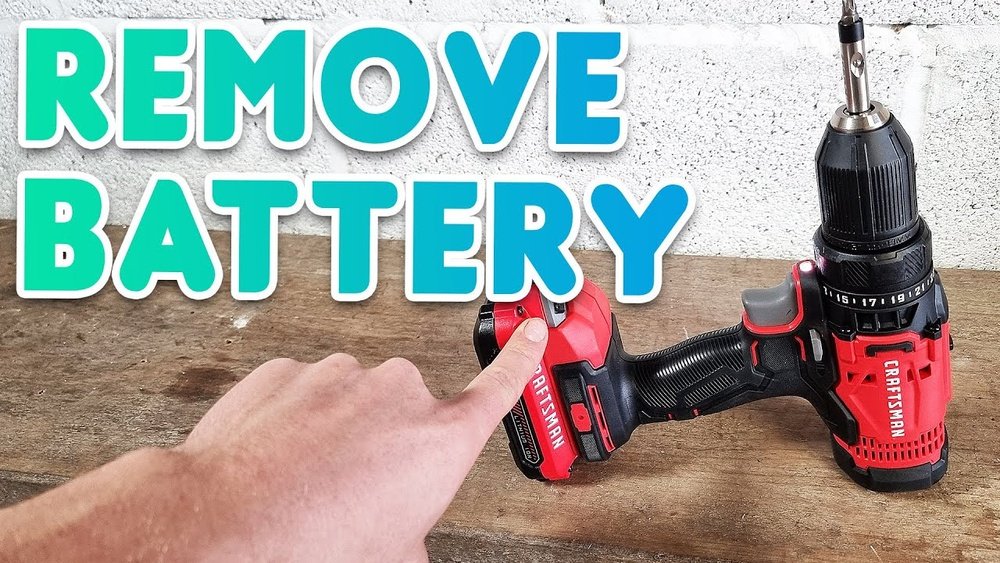
If you’ve ever struggled to remove the battery from your cordless drill, you’re not alone. It might seem tricky at first, but once you know the simple steps, it becomes quick and easy.
In this guide, you’ll learn exactly how to take the battery out safely and without any hassle. Whether you need to replace it, charge it, or store your drill, mastering this small task will save you time and frustration. Keep reading to make your cordless drill work better for you!
Safety First
Safety is the top priority when removing the battery from a cordless drill. Taking simple precautions protects you from accidents and injury. Before you start, prepare your space and equipment to work safely.
Following clear safety steps makes the process smooth and risk-free. Keep your focus and avoid rushing.
Wear Protective Gear
Put on safety glasses to protect your eyes from sparks or debris. Gloves help keep your hands safe from sharp edges or battery chemicals. Dress in close-fitting clothes to avoid getting caught in moving parts. These small steps prevent common injuries.
Work In A Clean Area
Choose a tidy, flat surface with good light. Clear away clutter that could cause slips or distractions. Keep the drill and battery away from liquids. A clean workspace helps you focus and reduces the chance of mistakes.

Credit: pinkpowerdrill.com
Identify Your Drill Type
Knowing your cordless drill type is the first step to remove its battery safely. Different drills have different battery styles and release methods. Understanding these differences helps you avoid damage and ensures quick battery removal.
Start by checking the battery model. This gives clues about how the battery fits the drill. Then, find the release mechanism to unlock the battery.
Check Battery Model
Look closely at the battery attached to the drill. Most batteries have a label with the model number and voltage. This information tells you the battery type, such as lithium-ion or nickel-cadmium.
Knowing the battery type helps you find the right removal steps. Some batteries slide out, while others snap into place. Identifying the model also guides you in buying the correct replacement if needed.
Locate Release Mechanism
Every cordless drill has a release mechanism to remove the battery. This can be a button, lever, or latch near the battery compartment.
Check both sides of the drill base. Press or slide the release mechanism to free the battery. Some drills need you to press two buttons at once. Others require pulling the battery downward after unlocking.
Understanding the release mechanism prevents damage to your drill and battery. Take your time and gently test the release parts until the battery comes off smoothly.
Remove Slide-in Batteries
Removing a slide-in battery from a cordless drill is quick and easy. Knowing how to do this helps keep your tool ready for use or charging. Follow these simple steps to safely remove the battery without damaging the drill or battery.
Most slide-in batteries lock into place to prevent falling out. Releasing this lock is the first step to removing the battery.
Press Release Button
Look for a small button or latch on the battery pack. This button holds the battery firmly in the drill. Press the button firmly to unlock the battery. You may need to hold the button down while pulling out the battery. The button lets you release the battery safely without force.
Slide Battery Out
After pressing the release button, grip the battery firmly. Slide the battery straight out from the drill. Pull it in the direction it slides in during installation. Do not twist or bend the battery. Sliding it out smoothly prevents damage to the battery or drill contacts.
Once removed, place the battery on a safe surface. Avoid dropping or exposing it to extreme heat. Removing the battery correctly helps extend its life and keeps your drill working well.

Credit: www.youtube.com
Remove Clip-on Batteries
Removing clip-on batteries from a cordless drill is simple and safe. These batteries attach firmly but come off easily with the right steps. This guide breaks down the process into clear actions.
Press Side Clips
Locate the side clips on the battery. They hold the battery in place. Use your thumb and fingers to press both clips inward. This action unlocks the battery from the drill body.
Pull Battery Away
After pressing the clips, gently pull the battery away from the drill. Pull straight out to avoid damage. The battery should slide off smoothly once the clips release.
Troubleshooting Stuck Batteries
Sometimes, the battery of a cordless drill gets stuck. This can stop your work and cause frustration. Knowing how to fix this problem saves time and effort. Simple methods often work well to free the battery safely. Follow these easy steps to handle a stuck battery without damage.
Apply Gentle Pressure
Start by holding the drill firmly. Use your thumb to push the battery release button. While pressing, pull the battery straight out. Avoid twisting or using too much force. Gentle pressure helps the battery slide free. If it does not move, try pushing and pulling slowly. Patience is key to avoid breaking parts.
Use Lubricant Carefully
If gentle pressure fails, use a small amount of lubricant. Choose a spray that does not conduct electricity. Spray lightly around the battery edges. Let the lubricant sit for a minute. Try removing the battery again with gentle pressure. Wipe off any extra lubricant to keep the drill clean. Avoid soaking the battery or drill with oil. This method can loosen stuck parts safely.

Credit: www.ifixit.com
Battery Maintenance Tips
Proper battery care extends your cordless drill’s life. It keeps the drill working well and safe. Follow easy steps to maintain your drill’s battery.
Clean Battery Contacts
Dirty contacts cause poor power flow. Use a dry cloth or soft brush to clean them. Avoid water or liquid cleaners. Check contacts regularly to keep a strong connection.
Store Batteries Properly
Store batteries in a cool, dry place. Avoid direct sunlight and heat sources. Remove batteries from the drill if not used for a long time. Keep them away from metal objects to prevent short circuits.
Frequently Asked Questions
How Do I Safely Remove A Cordless Drill Battery?
First, ensure the drill is off. Locate the release buttons on the battery. Press both buttons simultaneously and pull the battery away gently. Avoid forcing the battery to prevent damage to the drill or battery pack. Always handle with care to ensure safety.
What Tools Are Needed To Remove A Cordless Drill Battery?
No additional tools are required to remove a cordless drill battery. The battery is designed to be removed by hand. Simply press the release buttons and slide the battery out. This design allows quick and easy battery replacement for convenience during work.
Can I Remove The Battery While The Drill Is Charging?
No, never remove the battery while charging. It can cause electrical shocks or damage the battery. Always unplug the charger first. Wait for the battery to cool down before removal. This practice ensures safety and prolongs battery life.
Why Won’t My Cordless Drill Battery Release?
The release buttons may be stuck or dirty. Clean the area around the buttons gently. Apply slight pressure on both buttons simultaneously. If stuck, check for damage or debris blocking the mechanism. Consult the drill’s manual or professional help if it still won’t release.
Conclusion
Removing the battery from a cordless drill is simple and quick. Press the release button or slide the latch to free the battery. Always take care to hold the drill steady while doing this. Doing so keeps your drill safe and ready for use.
Regularly removing the battery helps prevent damage and extends its life. Now you can easily change or charge your battery without trouble. Practice this a few times to feel confident and comfortable. Safe handling makes your work easier and more efficient every time.
