


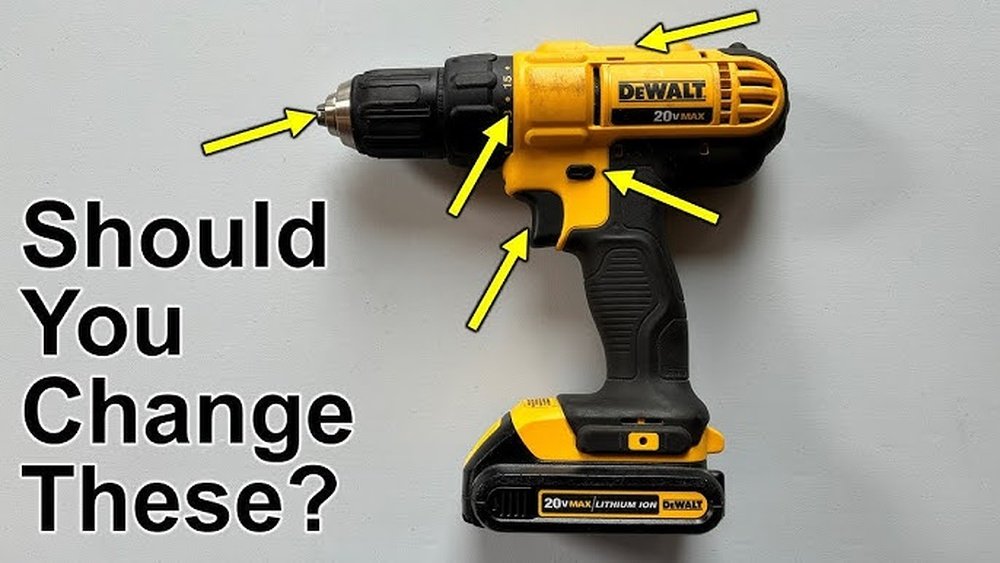
Are you struggling to get the perfect grip or speed from your cordless drill? Knowing how to adjust your drill correctly can make every project easier and faster.
Whether you’re tightening screws or drilling into tough materials, the right settings can save you time and prevent damage. In this guide, you’ll learn simple steps to adjust your cordless drill like a pro—so you can work smarter, not harder.
Keep reading to unlock the full potential of your tool and tackle your next project with confidence.
Choosing The Right Drill Settings
Choosing the right drill settings helps you work faster and safer. Each project needs different power and speed. Adjusting settings correctly stops damage to the drill or work surface. It also saves battery life. Understanding these settings makes your work clean and precise.
Selecting Torque Levels
Torque controls how much force the drill uses. Low torque is best for soft materials like wood or plastic. High torque helps drill through hard materials like metal or concrete. Choose a torque level that matches your task. Too much torque can strip screws or damage materials.
Adjusting Speed Settings
Speed controls how fast the drill spins. Use low speed for drilling large holes or driving screws. High speed works well for small holes or light tasks. Many drills have two-speed options. Switch between speeds for better control and efficiency.
Using Clutch For Precision
The clutch stops the drill when the screw is tight. It prevents overdriving or breaking screws. Set the clutch to a low level for delicate jobs. Increase it for tougher tasks. This feature helps maintain control and protects your work.

Credit: www.popularmechanics.com
Preparing The Drill For Use
Preparing a cordless drill for use is the first step to work safely and effectively. This process ensures the drill is ready and prevents damage or accidents. Follow simple steps to get the drill set up properly before starting your project.
Installing And Securing The Bit
Choose the correct drill bit for your task. Insert the bit into the drill chuck. Turn the chuck clockwise to tighten it firmly. Make sure the bit does not wobble or slip. A secure bit improves precision and safety.
Checking Battery Charge
Check the battery level before using the drill. A fully charged battery gives better power and longer use. Insert the battery pack into the drill until it clicks. Avoid using the drill if the battery is low to prevent damage.
Ensuring Safety Features Are Active
Verify the drill’s safety features work properly. Check the trigger lock to avoid accidental starts. Inspect the drill for any visible damage or loose parts. Using safety features helps prevent injuries during operation.
Adjusting For Different Materials
Adjusting a cordless drill for different materials is important for better results. Each material needs specific settings to avoid damage and improve drilling quality. This section explains how to set your drill for wood, metal, plastic, and drywall.
Settings For Wood
Wood is soft and easy to drill. Use a medium speed setting for smooth holes. Set the torque to a low or medium level to prevent splitting. Choose a drill bit made for wood for clean cuts.
Settings For Metal
Metal is hard and needs slower speeds. Use a low speed setting to avoid overheating the bit. Increase the torque to a medium or high level for better power. Use a metal drill bit and apply steady pressure.
Settings For Plastic And Drywall
Plastic and drywall are soft but can crack easily. Use a low speed to avoid melting or breaking. Set torque to low to prevent damage. Pick drill bits designed for these materials for best results.

Credit: www.youtube.com
Mastering Drill Control Techniques
Controlling a cordless drill well improves your work quality and safety. Small adjustments in how you hold and use the drill make a big difference. This section shows simple ways to control your drill better.
Maintaining Steady Pressure
Keep your hand firm but not too tight on the drill. Press the drill gently against the material. Too much force can damage the drill or the surface. Too little pressure slows the drilling. Find a balance. Steady pressure helps the drill bit cut smoothly.
Controlling Drill Angle
Hold the drill straight to the surface unless the task needs an angle. Angled drilling is useful for certain projects but harder to control. Use your wrist and arm to keep the drill steady. A wrong angle can make the hole uneven or damage the material. Check your angle before starting.
Starting And Stopping Smoothly
Start the drill at a low speed. This helps the bit grip the surface without slipping. Gradually increase speed once the hole begins. Stop the drill slowly to avoid sudden jolts. Smooth starts and stops protect your work and drill bit.
Troubleshooting Common Issues
Troubleshooting common issues with a cordless drill helps you work smoothly. Many small problems can stop your project. Fixing these issues quickly saves time and effort. This section guides you through common problems and easy fixes. You will learn how to adjust your drill for better performance.
Overdriving Screws
Overdriving screws happens when the drill pushes too hard. It can strip the screw head or damage the material. To stop this, lower the drill’s torque setting. Use the clutch to control the power. Start with a low setting and increase if needed. Keep the drill steady and straight to avoid slipping.
Drill Bit Slipping
Drill bit slipping happens when the bit does not hold tight. This causes poor drilling and can damage the bit. Check the chuck and tighten it well. Use the right size bit for your project. Clean the chuck if dirt or debris is inside. Replace worn or damaged bits to improve grip.
Battery Performance Tips
Battery problems affect drill power and runtime. Charge the battery fully before use. Avoid letting the battery drain completely. Store batteries in a cool, dry place. Remove the battery from the drill if not in use. Use the charger that comes with your drill for best results.
Maintenance For Optimal Performance
Maintaining your cordless drill keeps it working well for a long time. Regular care helps avoid breakdowns and saves money on repairs. Simple steps like cleaning, battery care, and inspection keep the drill safe and efficient. Follow these tips to ensure your drill performs at its best.
Cleaning And Lubrication
Dust and dirt can clog your drill’s moving parts. Wipe the drill with a dry cloth after every use. Use a small brush to clean hard-to-reach areas. Lubricate the chuck and gears with light oil to reduce friction. Avoid using too much oil, as it can attract more dust.
Battery Care
Charge the battery fully before the first use. Store batteries in a cool, dry place away from heat. Avoid letting the battery drain completely before charging. Remove the battery from the drill if not used for a long time. Use the charger that came with your drill to protect battery life.
Regular Inspection
Check screws and bolts to ensure they are tight. Inspect the drill for any cracks or damage. Test the trigger and speed settings for smooth operation. Replace worn-out parts immediately to avoid bigger problems. Regular checks keep your drill safe and reliable during work.

Credit: www.popularmechanics.com
Frequently Asked Questions
How Do I Adjust The Torque On A Cordless Drill?
To adjust torque, rotate the clutch ring near the drill’s chuck. Higher numbers increase torque for tougher materials. Lower settings prevent overdriving screws in soft materials. Adjusting torque ensures better control and prevents damage to both screws and work surfaces.
What Is The Best Speed Setting For Drilling?
Use low speed for drilling into metal or hard materials. High speed works best on wood and soft materials. Many cordless drills have variable speed triggers to control this. Adjust speed based on material hardness for cleaner, precise holes.
How To Change Drill Bits On A Cordless Drill?
Hold the drill firmly and rotate the chuck counterclockwise. Remove the old bit carefully. Insert the new bit fully into the chuck. Tighten the chuck clockwise by hand or using the drill’s key. Ensure the bit is secure before use.
Can I Adjust The Drill’s Direction Easily?
Yes, most cordless drills have a forward/reverse switch near the trigger. Push it to one side for forward drilling, the other for reversing. This helps in driving or removing screws and bits without extra tools.
Conclusion
Adjusting a cordless drill is simple with the right steps. Check the torque settings to match your project. Change the drill speed to fit the material you work on. Tighten or loosen the chuck to hold drill bits securely. Practice these tips to improve your drilling skills quickly.
A well-adjusted drill saves time and effort. Keep your drill ready for any task by adjusting it properly. Small changes make a big difference in your work results.
