


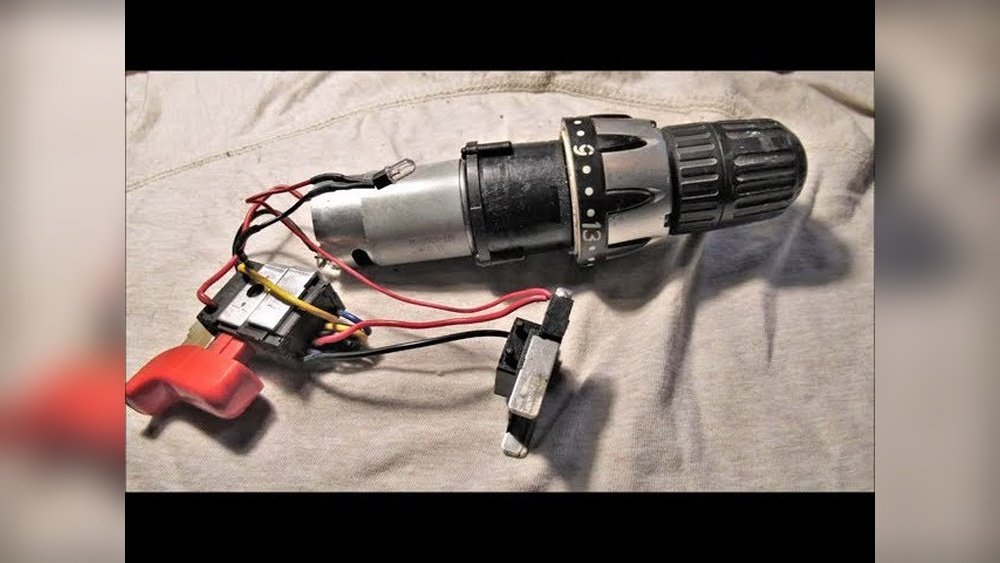
Are you looking to fix or clean your cordless drill but don’t know where to start? Learning how to disassemble a cordless drill can save you time and money.
It might seem tricky at first, but with the right steps, you can do it safely and easily. In this guide, you’ll discover simple, clear instructions that will help you take your drill apart without damaging it. Keep reading—you’ll be surprised at how straightforward it can be!

Credit: newscrewdriver.com
Tools Needed
Disassembling a cordless drill needs the right tools. Having the correct tools makes the job safer and easier. It helps you avoid damage to the drill parts. This section lists the essential tools needed to take apart a cordless drill.
Screwdrivers
Screwdrivers are the most important tool for this task. A set with different sizes and types is best. Phillips and flathead screwdrivers work for most screws. Precision screwdrivers help with smaller screws inside the drill.
Pliers
Pliers help hold small parts and pull wires. Needle-nose pliers are useful to reach tight spots. They can also help remove stubborn parts gently.
Socket Wrench Set
Some cordless drills have nuts that need a socket wrench. A set with various sizes covers different nut sizes. This tool helps loosen or tighten nuts easily.
Plastic Pry Tools
Plastic pry tools protect the drill’s casing. They help open the drill without scratching or cracking it. Use these tools to separate plastic parts carefully.
Magnetic Tray
A magnetic tray keeps screws and small parts safe. It stops them from getting lost during disassembly. This simple tool saves time and frustration.

Credit: www.youtube.com
Safety Precautions
Safety is the top priority before starting to disassemble a cordless drill. Small parts and electrical components can cause injury if handled carelessly. Taking proper precautions protects you and your tool.
Follow these safety steps to work carefully and avoid damage.
Turn Off And Remove The Battery
Always remove the battery from the drill before opening it. This stops any accidental power flow. Without power, the drill cannot start or cause shocks.
Wear Protective Gear
Use safety glasses to protect your eyes from dust and small parts. Gloves can protect your hands from sharp edges inside the drill.
Work In A Clean And Organized Space
Clear your work area from clutter. Use a flat surface with good lighting. Keep screws and parts in small containers to avoid losing them.
Use The Right Tools
Select screwdrivers and tools that fit well. Using wrong tools can damage screws or the drill itself. Proper tools make the disassembly easier and safer.
Handle Internal Parts Carefully
Inside the drill, parts are delicate. Avoid pulling wires or forcing parts apart. Gentle movements prevent breaking components or causing short circuits.
Removing The Battery
Removing the battery is the first step in disassembling a cordless drill. It is important for safety and to avoid damage. The battery holds electrical power that can cause shocks or short circuits. Always take the battery out before handling other parts of the drill.
The process is simple and fast. Most cordless drills have a battery pack that slides or clicks into place. Knowing how to remove it correctly makes the disassembly smoother. Follow the steps below to remove the battery safely and easily.
Locate The Battery Release Button
Look for a button or latch near the battery pack. This button releases the battery from the drill body. It is usually easy to spot and press. Pressing this button unlocks the battery for removal.
Press And Hold The Release Button
Use your thumb or finger to press the release button firmly. Hold it down to unlock the battery. This keeps the battery from staying stuck to the drill. Do not force the battery out without pressing the button.
Slide The Battery Out Of The Drill
While holding the release button, pull the battery pack away from the drill. Slide it out smoothly in the opposite direction of the drill body. If it feels stuck, check the release button again. The battery should come out easily once unlocked.

Credit: www.ifixit.com
Detaching The Chuck
Detaching the chuck is a key step in disassembling a cordless drill. The chuck holds the drill bit tightly. Removing it lets you access other parts for repair or cleaning.
This process needs care and the right tools. The chuck can be tight and hard to move. Follow these steps to remove it safely and easily.
Prepare The Drill For Chuck Removal
First, remove the drill battery. This stops the drill from starting by accident. Next, open the chuck jaws fully. Turn the chuck by hand to loosen its grip on any bit.
Loosen The Chuck Screw
Look inside the chuck for a small screw. This screw holds the chuck in place. Use a screwdriver to turn it counterclockwise. Remove the screw completely before moving to the next step.
Use The Chuck Key Or Wrench
Insert the chuck key into the chuck holes. Turn the key counterclockwise to loosen the chuck. If your drill has no chuck key, use a wrench to hold the chuck. Twist the drill body to unscrew the chuck.
Remove The Chuck From The Drill
After loosening, pull the chuck away from the drill. Sometimes a gentle tap with a rubber mallet helps. Avoid using too much force to prevent damage.
Unscrewing The Housing
Unscrewing the housing is the first step to open your cordless drill safely. It holds all the parts together. Removing the screws lets you access the internal components for repair or cleaning.
Use the right screwdriver to avoid stripping the screws. Most cordless drills use Phillips or Torx screws. Check your drill to find the correct type before starting.
Gathering The Right Tools
Prepare a screwdriver set with different heads. A magnetic screwdriver helps keep screws from falling. Have a small container ready to hold the screws safely.
Locating All Housing Screws
Look carefully around the drill for all screws. Some screws hide under labels or rubber grips. Remove these covers gently to find hidden screws.
Removing The Screws Carefully
Turn screws counterclockwise to loosen them. Apply steady pressure to avoid slipping. Place each screw in the container to keep them organized.
Separating The Housing Parts
After all screws are out, gently pull the housing apart. Use a plastic pry tool if needed to avoid damage. Keep parts steady to prevent losing small pieces.
Separating Internal Components
Separating the internal components of a cordless drill requires care and attention. It involves taking apart the main parts that make the drill work. Each piece has a job that helps the drill function properly. Removing these parts step-by-step helps in fixing or cleaning the drill.
Removing The Motor
The motor is the heart of the drill. It turns electrical energy into motion. To remove it, first unscrew the screws holding the motor in place. Gently lift the motor out without pulling on the wires. Keep the motor steady to avoid damage. Set it aside on a clean surface.
Detaching The Gearbox
The gearbox controls the drill’s speed and power. It connects the motor to the drill bit. Unscrew the gearbox from its housing carefully. It may be tight, so use steady pressure. Avoid forcing it out to prevent breaking parts. Place the gearbox near the motor for easy access.
Disconnecting The Wiring
The wiring links the battery to the motor and switch. Disconnect the wires by gently pulling on the connectors. Do not pull the wires directly. Note the wire positions to reconnect later. Keep the wires organized to avoid confusion. Handle the wiring carefully to prevent damage.
Cleaning And Inspecting Parts
Cleaning and inspecting parts is an important step after disassembling a cordless drill. Dirt, dust, and debris can build up inside the tool. This affects its performance and lifespan. Proper cleaning ensures the drill works smoothly. Checking each part helps spot damage or wear early. This prevents bigger problems later.
Use a soft brush or cloth to remove loose dirt. Avoid harsh chemicals that can damage plastic or rubber parts. Small crevices and moving parts need special attention. A clean drill is easier to reassemble and lasts longer.
Cleaning The Chuck And Jaws
The chuck holds drill bits firmly. Dirt inside can cause it to stick or slip. Wipe the chuck outside with a dry cloth. Use a small brush to clean inside the jaws. Remove any dust or metal shavings. Light oil on the jaws helps them move smoothly.
Inspecting The Motor And Brushes
The motor powers the drill. Check the brushes for wear or damage. Worn brushes reduce power and can cause sparking. Replace brushes if they look thin or cracked. Remove dust from the motor using compressed air. Keep the motor clean to prevent overheating.
Cleaning The Battery Contacts
Battery contacts transfer power to the drill. Dirty contacts cause poor connection or power loss. Use a soft cloth to wipe the contacts on both battery and drill. Lightly sanding contacts with fine sandpaper removes corrosion. Clean contacts improve battery life and drill performance.
Checking The Gears And Bearings
Gears and bearings transfer power inside the drill. Look for signs of wear, cracks, or missing teeth on gears. Bearings should spin freely without noise. Apply light grease to gears and bearings before reassembling. Proper lubrication prevents friction and extends drill life.
Tips For Reassembly
Reassembling a cordless drill needs care and focus. Mistakes can cause the drill to stop working properly. Follow simple steps to make reassembly easier and safer.
Keep parts organized. Use small containers or trays to hold screws and pieces. This avoids losing parts and saves time.
Organize Parts Before Starting
Lay all parts out in order of removal. Group similar screws together. This helps to remember where each part goes.
Use Clear Labels Or Notes
Write short notes or use labels on parts. This makes it easy to identify parts during reassembly. It avoids confusion and errors.
Follow Photos Or Diagrams
Take pictures before disassembly. Use these photos to guide you during reassembly. Diagrams from the manual also help.
Tighten Screws Gently
Do not over-tighten screws. Tighten them just enough to hold parts firmly. Over-tightening can strip threads or damage plastic parts.
Check Each Step Carefully
After fitting each part, check if it moves correctly. Confirm the drill’s parts fit snugly and smoothly. This avoids rework later.
Frequently Asked Questions
How Do I Safely Disassemble A Cordless Drill?
First, remove the battery to avoid electric shock. Use the correct screwdriver to unscrew all screws. Handle small parts carefully and keep them organized. Follow the manufacturer’s manual for guidance to prevent damage.
What Tools Are Needed To Disassemble A Cordless Drill?
You typically need a Phillips screwdriver, flathead screwdriver, and sometimes a Torx driver. A plastic pry tool helps separate casing without damage. A small container is useful to keep screws and parts secure during disassembly.
Can I Repair My Cordless Drill After Disassembly?
Yes, you can repair common issues like replacing brushes or cleaning contacts. Identifying broken parts during disassembly helps in ordering replacements. Reassemble carefully to ensure proper function. If unsure, consult a professional to avoid further damage.
How Do I Avoid Damaging Parts During Drill Disassembly?
Work on a clean, flat surface with good lighting. Use proper tools matching screw types to prevent stripping. Avoid forcing parts apart; look for hidden screws or clips. Keep track of all components to ensure easy reassembly.
Conclusion
Disassembling a cordless drill can seem tricky at first. Take your time and follow each step carefully. Keep track of small parts and screws to avoid losing them. Use the right tools to make the process easier. Remember to work in a clean, well-lit space.
Doing this helps you fix or clean your drill safely. Practice makes the task easier over time. Now, you can feel more confident handling your drill. Simple steps lead to great results. Try it yourself and see how it goes.
