


Is your cordless drill losing power just when you need it most? You’re not alone.
Over time, batteries can drain and seem like they’re done for good. But what if you could bring them back to life and get your drill running strong again? You’ll discover simple, effective ways to re-energize your cordless drill batteries.
Keep reading, and you’ll save money, avoid frustration, and get back to tackling your projects with confidence.
Signs Of A Weak Battery
Recognizing signs of a weak cordless drill battery helps you save time and money. Batteries wear out with use and age. Early signs show your battery needs attention or re-energizing. Watch for these common symptoms to keep your drill working well.
Reduced Run Time
The drill stops working sooner than usual. It holds less charge after each use. You may need to recharge the battery multiple times. This drop in run time means the battery is weakening.
Slower Drill Speed
The drill spins slower under normal load. Tasks take longer to complete. The battery cannot supply enough power for full speed. This slowdown shows the battery’s energy is fading.
Battery Overheating
The battery feels hot during or after use. Overheating can damage the battery further. It may cause safety risks or shorten battery life. Heat is a clear warning sign of a weak battery.
Credit: www.mecampbell.com
Proper Charging Techniques
Proper charging techniques play a key role in keeping your cordless drill batteries healthy. Charging the battery the right way helps it last longer and perform better. Poor charging habits can reduce battery life and cause damage.
Follow simple steps to charge your battery safely and efficiently. Use the right tools and create the best environment for charging. These practices help restore energy in your drill batteries.
Using The Correct Charger
Always use the charger made for your specific drill battery. Chargers vary by brand and battery type. Using a wrong charger can harm the battery or stop it from charging fully. Check the voltage and model match before plugging in. A proper charger controls the charging speed and stops when the battery is full.
Avoiding Overcharging
Do not leave your battery on the charger too long. Overcharging heats the battery and lowers its capacity. Remove the battery once it reaches full charge. Some chargers have an automatic cut-off feature. If yours does not, monitor charging time closely. Avoid charging overnight or for many hours straight.
Charging In Optimal Conditions
Charge your battery in a cool, dry place. Extreme heat or cold slows charging and damages cells. Room temperature around 20°C (68°F) is best. Keep the battery away from direct sunlight or damp areas. Good airflow helps prevent overheating during charging. Proper conditions improve battery health and charging speed.
Battery Maintenance Tips
Battery maintenance is key to keep your cordless drill working well. Good care helps batteries last longer. It also keeps their power strong. Simple steps can protect your battery and save money.
Follow these tips to keep your drill batteries healthy and ready to use.
Regular Cleaning
Clean the battery and drill contacts often. Dirt and dust block power flow. Use a dry cloth or soft brush to remove grime. Avoid water or liquid cleaners. Clean contacts keep charging fast and steady.
Storing Batteries Correctly
Store batteries in a cool, dry place. Avoid hot or very cold spots. Extreme temperatures harm battery life. Keep batteries away from metal objects. Store them partially charged, around 40-60%. This helps keep their strength over time.
Avoiding Deep Discharge
Do not let batteries run completely empty. Deep discharge damages battery cells. Charge the battery as soon as power gets low. Frequent shallow charges are better than full drain. This practice keeps batteries healthy and ready.
Credit: www.youtube.com
Quick Boost Methods
Quick boost methods help bring cordless drill batteries back to life fast. These techniques give your battery a short burst of power. They work best when you need to use your drill right away. Both methods are simple and save time.
Jumpstarting With Another Battery
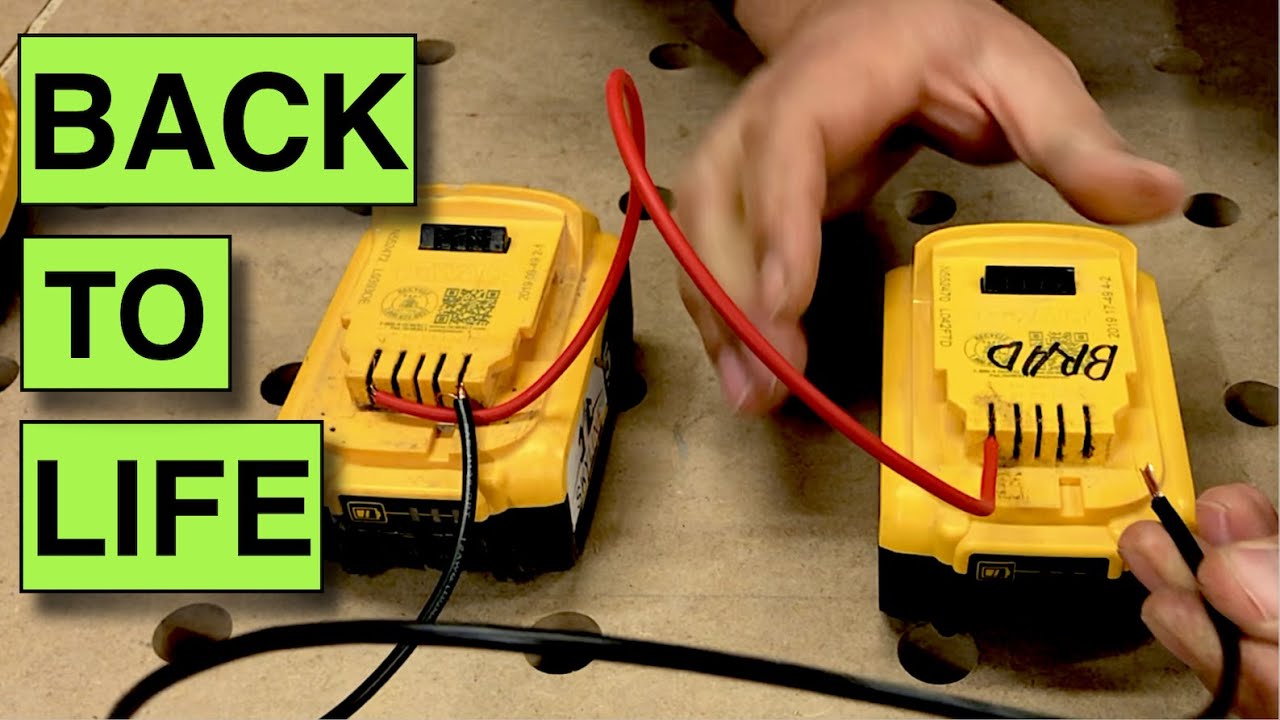
Jumpstarting uses a fully charged battery to give power to a dead one. Place both batteries close but do not touch. Connect the positive terminals first, then the negative. Let the charge flow for a few minutes. This can add enough power to start your drill. Always check your drill’s manual before jumpstarting.
Using A Battery Reconditioning Charger
A reconditioning charger restores battery health by cycling its charge. Plug the charger in and attach the battery. It will slowly charge, then discharge, and charge again. This process breaks down crystal build-up inside the battery. It helps the battery hold a better charge for longer. Use this method regularly for best results.
When To Replace Your Battery
Knowing when to replace your cordless drill battery saves time and money. Batteries lose power over time and stop holding charge well. Using a weak battery can slow your work and damage tools. Watch for clear signs your battery is beyond repair. Weigh the cost of a new battery against the benefits.
Signs Of Permanent Damage
Battery won’t charge fully or loses power fast. It heats up quickly during use or charging. Battery case looks swollen or cracked. Drill runs slower than usual or stops suddenly. Charger shows error lights when connected. These signs mean the battery is damaged for good.
Cost Vs. Benefit Analysis
New batteries cost less than buying a new drill. Repairing old batteries is often expensive and unreliable. A fresh battery gives longer work time and better performance. Old batteries may cause tool damage or safety risks. Calculate repair or replacement costs before deciding. Choose the option that saves money and improves tool life.
Credit: www.youtube.com
Frequently Asked Questions
How Can I Revive A Dead Cordless Drill Battery?
To revive a dead battery, fully discharge it first. Then, recharge it slowly using the correct charger. This process can help restore some capacity in NiMH or NiCd batteries.
What Is The Best Way To Maintain Drill Battery Life?
Store batteries in a cool, dry place. Avoid full discharges and recharge them regularly. Proper maintenance extends battery lifespan and improves performance.
Can Freezing Cordless Drill Batteries Help Recharge Them?
Freezing batteries is not recommended. It can damage the cells and reduce battery efficiency. Proper charging and storage are safer methods to re-energize batteries.
How Often Should I Charge My Cordless Drill Battery?
Charge batteries after every use or when power is low. Avoid leaving batteries fully discharged for long periods to maintain optimal performance.
Conclusion
Re-energizing cordless drill batteries saves money and extends tool life. Regular care helps batteries hold charge longer. Simple steps like cleaning contacts and proper charging make a big difference. Avoid letting batteries drain completely to keep them healthy. Small efforts bring better performance from your drill.
Try these tips to keep your batteries strong. Your tools will be ready when you need them most. Easy and effective ways to boost battery life. Give your cordless drill the power it deserves.
