


Have you ever faced a stubborn nut that just won’t budge? You might be wondering if your cordless drill can handle the job.
Using the right tools can save you time and frustration, but is a cordless drill strong enough to remove nuts safely and effectively? Keep reading, because we’re about to reveal everything you need to know to tackle this task like a pro.
By the end, you’ll feel confident about whether your cordless drill is up to the challenge or if you need something else. Let’s dive in and get your project moving forward!
Credit: www.imtsolution.vn
Cordless Drill Basics
Cordless drills are common tools in many homes and workshops. They are designed to drill holes and drive screws. But can they remove nuts? Understanding the basics of cordless drills helps answer this question. Let’s explore their key features, power, and types.
Knowing these basics helps you use the drill better. It also helps you decide if your drill can handle nuts.
Key Features
Cordless drills are lightweight and easy to carry. They have rechargeable batteries, so no wires limit movement. Most drills come with adjustable speed settings. Some have a clutch to control torque. This helps prevent over-tightening or stripping screws.
The drill chuck holds different bits securely. This lets you switch between drill bits and drivers quickly.
Power And Torque
Power and torque are important for removing nuts. Torque is the twisting force the drill produces. Higher torque means the drill can handle tougher jobs. Cordless drills vary in torque depending on battery size and motor quality.
For removing nuts, a drill needs enough torque to loosen them. Low torque drills may struggle with tight or rusted nuts.
Suitable Drill Types
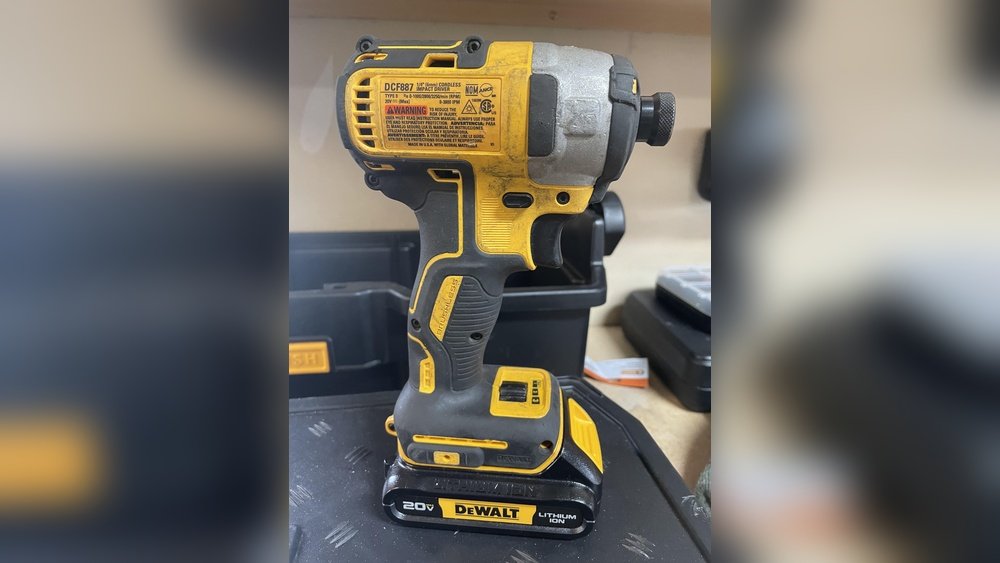
Not all cordless drills are fit for removing nuts. Impact drivers are better for this task than standard drills. Impact drivers deliver higher torque with quick bursts. This helps loosen nuts faster and with less effort.
Standard drills work for light nut removal but may not be ideal. Choose a drill with adjustable torque settings. This protects the nut and drill from damage.
Nuts And Fasteners
Nuts and fasteners hold many things tightly. They keep parts joined and strong. Removing nuts often means using tools that fit well. Cordless drills are popular tools for many tasks. Understanding nuts helps know if a cordless drill can remove them easily.
Common Nut Types
There are many nut types. Hex nuts are the most common. They have six sides and fit standard sockets. Wing nuts have two “wings” for hand turning. Lock nuts resist loosening from vibration. Each type needs a suitable tool to remove it.
Material And Size Impact
Nuts come in different materials like steel, brass, and plastic. Steel nuts are strong and harder to remove. Plastic nuts are softer and easier. Size also matters. Large nuts need more power and bigger sockets. Small nuts require precision and less force.
When Nuts Get Stuck
Sometimes nuts get stuck tight. Rust or dirt can cause this. Tight spaces make tool use harder. A cordless drill may struggle with stuck nuts. Using penetrating oil or hand tools can help loosen them first. Patience and care avoid damage to nuts and tools.
Using A Cordless Drill For Nuts
Using a cordless drill to remove nuts can save time and effort. This tool is handy for many tasks beyond just drilling holes. With the right setup, it can easily loosen or tighten nuts on bolts. Learning to use a cordless drill properly ensures better control and safety.
Choosing The Right Bit
Select a socket bit that fits the nut size exactly. A loose bit can slip and damage the nut. Socket bits come in various sizes and shapes. Match the bit to the nut to avoid stripping or rounding the edges.
Adjusting Speed And Torque
Set the drill to low speed for better control. High speed may cause the nut to spin without loosening. Adjust torque to prevent overtightening or breaking the nut. Start with low torque and increase as needed to avoid damage.
Proper Grip And Positioning
Hold the drill firmly with both hands for stability. Position the bit straight onto the nut to avoid slipping. Keep your body balanced and the drill steady. Proper grip and alignment improve efficiency and reduce accidents.
Techniques For Easy Removal
Removing nuts with a cordless drill can be simple with the right methods. Using proper techniques helps avoid damage and saves time. The key is knowing how to use your drill effectively and preparing the nuts before removal. Below are some easy ways to remove nuts using a cordless drill.
Reverse Mode Operation
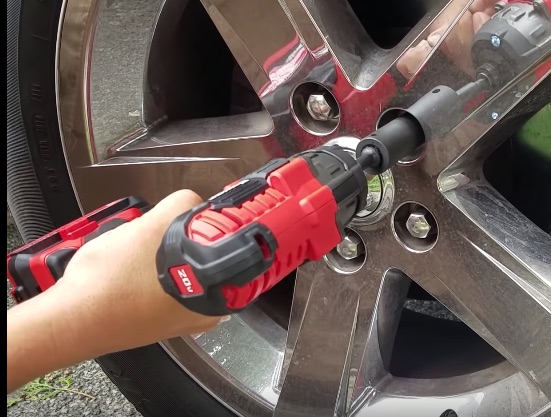
Set your cordless drill to reverse mode to loosen nuts. This mode turns the drill in the opposite direction. Place the drill bit or socket on the nut firmly. Apply steady pressure and start the drill slowly. Increasing speed helps if the nut is tight. Reverse mode helps break the nut free without slipping.
Applying Lubricants
Spray lubricant on rusty or stuck nuts before drilling. Lubricants reduce friction and make nuts easier to turn. Let the lubricant sit for a few minutes to work well. Use penetrating oil or WD-40 for best results. Lubricants protect the nut and drill from damage during removal.
Using Impact Settings
Some cordless drills have impact or hammer settings. These settings deliver quick bursts of force to loosen tight nuts. Use impact mode carefully with the right socket size. It reduces the risk of stripping the nut head. Impact mode works well for rusted or hard-to-turn nuts.
Safety Tips
Using a cordless drill to remove nuts can be quick and easy. Safety is very important during this task. Follow simple safety tips to protect yourself and your tools.
Protective Gear
Wear safety glasses to protect your eyes from flying debris. Gloves help protect your hands from sharp edges and slipping. Use ear protection if the drill noise is loud. Dress in close-fitting clothes to avoid catching in the drill.
Avoiding Damage
Choose the right drill bit or socket for the nut size. Too large or small bits can slip and cause injury. Do not force the drill if the nut is stuck. Stop and try loosening the nut by hand first. Keep the drill steady and use slow speed to avoid stripping the nut.
Battery Care
Use a fully charged battery to maintain drill power. Do not let the battery overheat during use. Allow the battery to cool if it feels hot. Store batteries in a dry, cool place away from metal objects. Regularly check battery contacts and clean them if dirty.
Credit: fundacioninbursa.org
Alternatives To Cordless Drills
Cordless drills are popular tools for many tasks, but they may not always be the best choice for removing nuts. Different tools offer better control, power, or ease of use. Exploring alternatives can help you pick the right tool for your project. Here are some common options that work well for removing nuts.
Manual Wrenches
Manual wrenches provide simple and direct control. They come in various sizes to fit nuts tightly. You can apply steady force without worrying about batteries. They work well for small jobs or tight spaces. Manual wrenches are quiet and easy to use. They also help prevent over-tightening or stripping nuts.
Impact Drivers
Impact drivers deliver strong, quick bursts of power. They loosen rusted or stuck nuts more easily than drills. Their concussive force reduces the effort needed from your hands. Impact drivers fit standard sockets for nuts and bolts. They work well for heavy-duty tasks and tough materials. These tools combine power with good control.
Power Ratchets
Power ratchets speed up nut removal with a compact design. They use a motor to turn the socket repeatedly. This saves time and reduces hand strain. Power ratchets are useful in tight or awkward spaces. They offer adjustable torque settings for delicate or tough nuts. These tools balance power and precision well.
Troubleshooting Common Issues
Using a cordless drill to remove nuts can save time and effort. Still, some common issues might slow you down. Knowing how to handle these problems helps keep your work smooth and efficient. Here are some frequent problems and how to fix them.
Stripped Nuts
Stripped nuts happen when the drill slips or uses too much force. The nut’s edges get damaged, making removal hard. Use a socket that fits the nut tightly. Try a manual wrench if the drill won’t grip well. Applying steady, gentle pressure helps avoid stripping.
Drill Slippage
Slippage occurs if the drill bit or socket does not fit properly. Check that the socket size matches the nut exactly. Tighten the drill chuck firmly to hold the bit in place. Using a drill with variable speed helps control torque and reduces slipping.
Battery Drain Problems
Battery drains quickly if the drill works too hard or the battery is old. Charge batteries fully before starting. Keep a spare battery ready for long tasks. Avoid running the drill at full power constantly to save battery life.

Credit: vixencomposites.com
Frequently Asked Questions
Can A Cordless Drill Remove Nuts Effectively?
Yes, a cordless drill can remove nuts if equipped with the right socket attachment. It works well for most common sizes and bolts.
What Drill Settings Are Best For Removing Nuts?
Use low speed and reverse torque settings to prevent stripping the nut or damaging the drill.
Can Cordless Drills Replace Impact Wrenches For Nuts?
Cordless drills can remove nuts but may lack the torque of impact wrenches for heavy-duty tasks.
How To Avoid Damaging Nuts With A Cordless Drill?
Use the correct socket size and apply controlled torque to avoid rounding off or stripping nuts.
Conclusion
A cordless drill can remove nuts with the right bit and care. It works best on nuts that are not too tight or rusted. Using the correct drill speed helps avoid damage to the nut or tool. This tool saves time and effort compared to manual methods.
Always check if the drill fits the nut size before starting. For tough nuts, extra tools might be needed. Overall, a cordless drill is a handy option for many nut removal tasks.
