


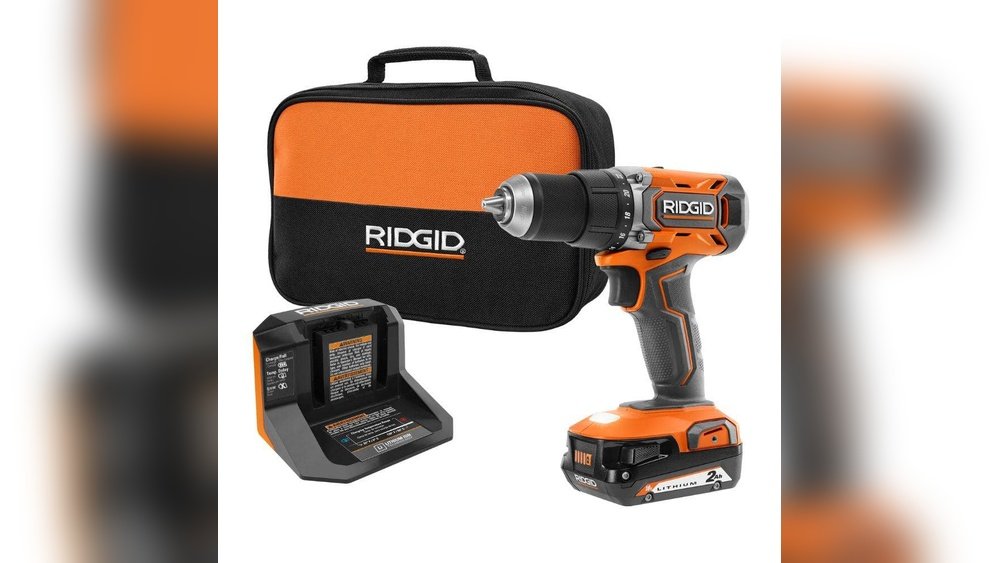
Are you ready to tackle your next project but unsure how to start your Ridgid cordless drill driver? You’re not alone.
Sometimes, the simplest tools can feel tricky if you don’t know the right steps. This guide will walk you through everything you need to get your drill up and running quickly and safely. By the end, you’ll have the confidence to power through your tasks like a pro.
Keep reading to unlock the full potential of your Ridgid drill driver!

Credit: powertools.ridgid.com
Choosing The Right Drill Driver
Choosing the right drill driver is important for any project. The right tool makes your work easier and faster. Ridgid cordless drill drivers offer many options. Picking the best one depends on your needs and tasks. Understanding key features and models helps you decide well.
Key Features Of Ridgid Cordless Drills
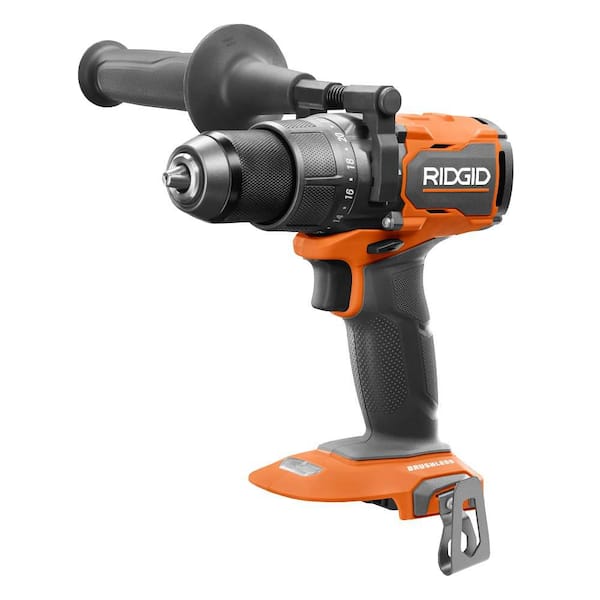
Ridgid cordless drills have strong batteries. They offer good power for drilling and driving screws. Many models have adjustable speed settings. This lets you control the drill for different jobs. The drills are lightweight, making them easy to hold. Some models include built-in LED lights. These lights help you see in dark areas. Most drills come with a comfortable grip. This reduces hand fatigue during long use.
Selecting The Correct Model For Your Needs
Think about the type of work you do. Simple home tasks need less power. Heavy work needs more torque and battery life. Choose a drill with the right voltage. 12V models suit small jobs. 18V or higher works for tough tasks. Check if the drill comes with extra batteries. This helps if you work for long hours. Consider the drill’s size and weight. A compact drill is easier for tight spaces. Match the drill’s features to your projects. This ensures better results and comfort.
Credit: www.homedepot.com
Charging The Battery
Charging the battery is the first step to using your Ridgid cordless drill driver. Without a fully charged battery, the drill will not work well or last long. Proper charging helps keep the battery healthy and ready for your tasks. Follow these simple steps to charge your battery correctly and safely.
Inserting The Battery Into The Charger
Place the battery into the charger with the contacts aligned. Slide it in gently until it clicks or fits snugly. Make sure the charger is plugged into a power outlet. Avoid forcing the battery to prevent damage to the contacts or charger.
Charging Time And Indicators
Charging usually takes about one to two hours. The charger has lights to show the battery status. A red light means charging is in progress. A green light means the battery is fully charged. If the light blinks, check the battery for issues or remove it and try again.
Battery Maintenance Tips
Charge the battery before its power is completely gone. Store the battery in a cool, dry place. Avoid leaving the battery in the charger too long. Keep the contacts clean and dry. Regular care will make the battery last longer and work better.
Assembling The Drill
Starting your Ridgid cordless drill driver is simple once you assemble it correctly. The assembly process prepares the drill for smooth operation. It involves three main steps: attaching the battery, installing the drill bit, and adjusting the chuck. Each step is easy to follow and important for safety and performance.
Attaching The Battery To The Drill
First, find the battery pack that fits your Ridgid drill. Align the battery with the drill’s base. Slide it into place until you hear a click. This sound means the battery is locked securely. Never force the battery if it does not fit easily. Check that it is fully charged before use.
Installing The Drill Bit
Choose the right drill bit for your task. Hold the drill with one hand. With the other, open the chuck by turning it counterclockwise. Insert the drill bit straight into the chuck. Push it in as far as it will go. Tighten the chuck by turning it clockwise until it holds the bit firmly.
Adjusting The Chuck
The chuck controls the drill bit’s grip. After installing the bit, ensure the chuck is tight. A loose chuck can cause the bit to slip or fall out. Turn the chuck by hand until it feels snug. Use the drill’s key or grip if needed to secure it further. This step keeps your drill safe and reliable.
Basic Controls And Settings
Starting a Ridgid cordless drill driver is simple with the right knowledge. Understanding the basic controls and settings helps you work safely and efficiently. These controls let you adjust power, speed, and direction to fit your task. Let’s explore how to use them.
Power Switch Operation
The power switch turns the drill on and off. Press it gently to start the drill. Release the switch to stop the drill immediately. The switch is usually located near the handle for easy access. Control the pressure on the switch to change the drill’s speed.
Speed And Torque Settings
Speed controls how fast the drill spins. Torque controls the twisting force. Lower speed is best for drilling into hard materials. Higher speed works well for soft materials and screwing tasks. Adjust the torque ring near the chuck to match your task. Higher torque prevents slipping when driving screws.
Using The Forward/reverse Switch
The forward/reverse switch changes the drill’s rotation direction. Push it to forward to drive screws in or drill holes. Push it to reverse to remove screws or back out drill bits. Always stop the drill before switching directions. This prevents damage to the tool and workpiece.
Safety Precautions
Safety is the top priority before starting a Ridgid cordless drill driver. Taking the right precautions helps avoid accidents and injuries. Understanding safe use protects both the user and the tool. Simple safety steps make every job easier and safer.
Proper Handling And Grip
Hold the drill firmly with both hands. Use a steady and balanced grip. This control stops the drill from slipping during use. Always keep your fingers away from the drill bit area. Proper handling improves accuracy and prevents damage.
Wearing Protective Gear
Wear safety glasses to protect your eyes from dust and debris. Use ear protection if the drill noise is loud. Gloves help protect your hands from sharp edges and heat. Dress in close-fitting clothes to avoid getting caught in moving parts.
Avoiding Common Mistakes
Do not force the drill into the material. Let the drill bit do the work at its own speed. Avoid loose cords or clutter around your workspace. Never touch the drill bit immediately after use; it may be hot. Check the battery charge before starting to prevent sudden stops.

Credit: www.pawnamerica.com
First Use Tips
Starting a Ridgid cordless drill driver for the first time requires some simple steps. These first use tips help you work safely and get the best results. Follow these tips to prepare your drill and avoid common mistakes.
Testing The Drill On Scrap Material
Begin by testing the drill on a piece of scrap wood or metal. This helps you see how the drill works. Check the speed and power without risking your project. Make small holes or drive screws to feel the tool’s balance and control.
Adjusting Settings For Optimal Performance
Set the drill’s speed and torque according to your task. Use low speed for screws and high speed for drilling. Adjust the clutch to avoid stripping screws or damaging materials. Proper settings improve your work and save battery life.
Troubleshooting Common Issues
If the drill does not start, check the battery charge. Make sure the battery is fully inserted and locked in place. Listen for unusual sounds or overheating during use. If problems persist, consult the user manual or contact support.
Frequently Asked Questions
How Do I Turn On A Ridgid Cordless Drill Driver?
Press the power button or trigger located on the handle. Hold it gently to start the drill. Release to stop.
What Battery Powers A Ridgid Cordless Drill Driver?
Ridgid cordless drills use rechargeable lithium-ion batteries. Ensure your battery is fully charged before use.
How To Adjust Speed On A Ridgid Cordless Drill Driver?
Use the variable speed trigger to control drill speed. Press lightly for slow speed, harder for fast.
Can I Change Drill Bits On A Ridgid Cordless Driver?
Yes, unlock the chuck by twisting it counterclockwise. Insert the new bit and tighten the chuck securely.
Conclusion
Starting a Ridgid cordless drill driver is simple and quick. First, insert the battery firmly into the drill. Then, press the power button to turn it on. Adjust the speed or torque settings as needed for your task. Remember to keep the drill steady while using it.
With these easy steps, you can begin your project confidently. Practice a little, and you will feel more comfortable. Using the drill safely ensures better results every time. Ready to build something great?
