


If you’ve just got your hands on a Ryobi cordless hammer drill or are thinking about using one, you might wonder how to get the most out of it. This powerful tool can make your drilling tasks faster and easier, but only if you know how to operate it correctly.
In this guide, you’ll discover simple, step-by-step instructions to help you use your Ryobi cordless hammer drill safely and effectively. By the end, you’ll feel confident tackling your projects like a pro. Ready to unlock the full potential of your drill?
Let’s dive in!
Credit: www.homedepot.com
Ryobi Cordless Hammer Drill Features
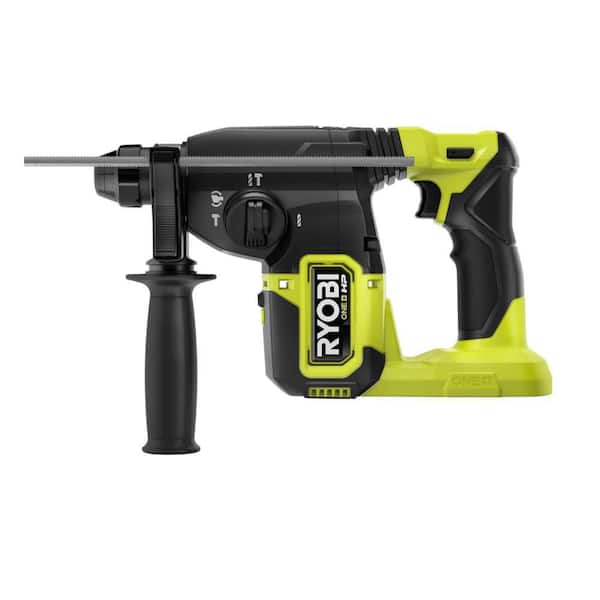
The Ryobi cordless hammer drill is a handy tool for many tasks. It combines power and ease of use in one device. Understanding its features helps users get the best from it. These features make drilling and hammering simpler and faster.
Key Components
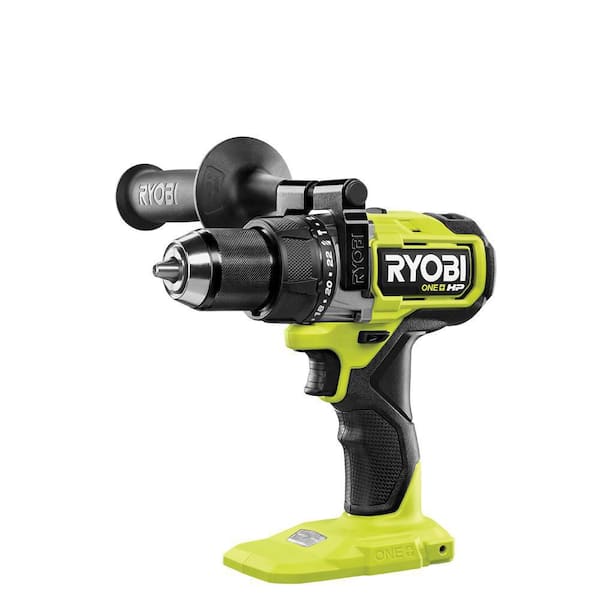
The drill has a strong motor that delivers steady power. Its chuck holds different drill bits firmly. The handle is designed for a good grip and comfort. A trigger controls the drill’s speed with ease. There is also a forward and reverse switch for versatile use.
Battery Types
Ryobi cordless hammer drills use lithium-ion batteries. These batteries last longer than older types. They charge quickly and hold power well. Some models use 18V batteries, giving good strength. The battery slides in and out for quick changes.
Speed Settings
Speed settings let users control the drill power. Low speed is good for tough materials. High speed works well for soft materials. Some drills have variable speed triggers for smooth control. Changing speeds is easy with a simple switch.

Credit: www.youtube.com
Preparing The Drill
Preparing the Ryobi cordless hammer drill is key for safe and effective use. This step ensures the tool works smoothly and lasts longer. Proper preparation reduces mistakes and makes drilling easier. Follow simple steps to get the drill ready before starting your project.
Installing The Battery
Start by inserting the battery pack into the drill’s handle. Align the battery with the slot and push it until it clicks. Make sure the battery is fully charged for best performance. Remove the battery after use to save power and keep it safe.
Selecting The Right Bit
Choose a drill bit that fits your project needs. For wood, use a wood bit; for metal, a metal bit is best. Insert the bit into the chuck and tighten it by hand. Use the drill’s chuck key or twist the chuck to secure the bit firmly.
Adjusting Torque Settings
Set the torque to control the drill’s power. Lower torque is good for soft materials to avoid damage. Higher torque helps with harder surfaces like concrete. Use the torque collar on the drill and turn it to the desired level. Adjust the setting before drilling for better control.
Basic Operation Steps
Operating a Ryobi cordless hammer drill is simple once you know the basic steps. This guide covers the essential actions to get you started. Follow these instructions carefully for safe and effective use.
Powering On And Off
Insert the charged battery into the drill’s base. Press the power button or trigger to turn it on. To stop, release the trigger or press the power button again. Always remove the battery before changing bits or storing the drill.
Choosing Hammer Mode
Locate the mode switch on the drill. Slide or rotate it to select hammer mode for drilling into hard materials. For regular drilling, switch back to drill mode. Use hammer mode only on surfaces like concrete or brick.
Drilling Techniques
Hold the drill firmly with both hands. Position the bit at the desired spot. Apply steady pressure without forcing the drill. Start slow, then increase speed as needed. Keep the drill straight to avoid damaging the bit or surface.
Safety Tips
Operating a Ryobi cordless hammer drill requires focus on safety. Following safety tips helps prevent accidents and injuries. Pay attention to these key points before and during use.
Protective Gear
Wear safety glasses to protect your eyes from debris. Use earplugs or earmuffs to guard against loud noise. Put on gloves to improve grip and protect your hands. Wear a dust mask if drilling dusty materials. Closed-toe shoes keep your feet safe from falling objects.
Handling Precautions
Hold the drill firmly with both hands for control. Keep fingers away from the drill bit and moving parts. Do not force the drill; let it work at its own speed. Check the drill bit is tight before starting. Turn off the drill before changing bits or making adjustments.
Maintaining Balance
Stand with your feet shoulder-width apart for stability. Avoid overreaching or awkward positions while drilling. Keep your body weight balanced and steady. Work on a stable surface to reduce slips or falls. Take breaks if you feel tired or unsteady.
Troubleshooting Common Issues
Troubleshooting common issues helps keep your Ryobi cordless hammer drill working well. Some problems may slow down your work or stop the drill from working. Knowing how to fix these issues saves time and avoids frustration. Below are simple tips to solve frequent problems.
Battery Problems
Check if the battery is fully charged before use. A weak battery can cause slow or no power. Remove the battery and clean the contacts with a dry cloth. Use only Ryobi-approved batteries for best results. Replace old batteries that do not hold charge well.
Bit Slippage
Tighten the chuck firmly to hold the drill bit in place. Loose bits cause slipping and damage the material. Use the correct bit size for your task. Inspect bits for wear and replace if they are dull or bent. Hold the drill steady during use to avoid slippage.
Overheating
Stop drilling if the tool feels hot. Overheating can damage the motor. Take breaks to let the drill cool down. Avoid pressing too hard on the drill, which increases heat. Keep vents clear of dust and debris to allow airflow.
Credit: www.homedepot.com
Maintenance And Care
Proper maintenance and care keep your Ryobi cordless hammer drill working well. It helps the drill last longer and perform better. Simple habits prevent damage and save money on repairs. Follow these tips to keep your drill in top shape.
Cleaning The Drill
After each use, wipe the drill with a dry cloth. Remove dust and dirt from vents and around buttons. Use a small brush to clean hard-to-reach areas. Avoid water or liquid cleaners. Keep the chuck free of debris to ensure smooth operation.
Storing Properly
Store the drill in a cool, dry place away from direct sunlight. Avoid damp or dusty environments. Use the original case or a tool bag for protection. Keep the drill and battery separate if storing for a long time. Proper storage prevents rust and damage.
Battery Care Tips
Charge the battery fully before first use. Avoid letting the battery drain completely before recharging. Use only the charger made for your Ryobi battery. Store batteries in a cool, dry spot. Remove the battery from the drill if not using for weeks.
Accessories And Upgrades
Accessories and upgrades help you get the most from your Ryobi cordless hammer drill. They improve performance and make tasks easier. Choosing the right add-ons keeps your drill ready for any job.
Additional Bits
Different bits fit various materials and tasks. Wood, metal, or masonry bits expand your drill’s uses. Having many bits saves time and effort. Change bits quickly to match your project needs.
Battery Packs
Extra battery packs keep you working without breaks. Batteries drain fast on tough jobs. Having backups means no waiting for charging. Choose batteries that match your drill model for best results.
Carrying Cases
Carrying cases protect your drill and accessories. They keep everything organized and easy to find. Cases make transport safer and simpler. Look for sturdy, compact designs for better convenience.
Frequently Asked Questions
How Do I Start A Ryobi Cordless Hammer Drill?
Insert a fully charged battery into the drill’s base. Select the appropriate drill bit and tighten it securely. Press the trigger to start the drill. Adjust speed and torque settings as needed for your task.
What Safety Precautions Should I Follow When Using It?
Wear safety goggles and gloves to protect yourself. Keep your hands clear of the drill bit while operating. Use the drill in a well-lit, stable environment. Always remove the battery before changing bits or making adjustments.
How Do I Change The Drill Bit On A Ryobi Hammer Drill?
Remove the battery for safety. Rotate the chuck counterclockwise to loosen it. Insert the desired drill bit fully into the chuck. Tighten the chuck clockwise to secure the bit firmly. Reinsert the battery before use.
What Maintenance Does A Ryobi Cordless Hammer Drill Need?
Regularly clean the drill’s exterior and vents to prevent dust buildup. Check the battery’s charge and condition often. Lubricate moving parts if recommended in the user manual. Store the drill in a dry, cool place to extend its life.
Conclusion
Operating a Ryobi cordless hammer drill is simple with practice. Always check the battery before starting your work. Choose the right drill bit for the job. Hold the drill firmly and apply steady pressure. Keep your workspace clear and safe.
Regularly clean and store the drill properly. Following these steps helps you work efficiently. Enjoy completing your projects with confidence and ease.
