


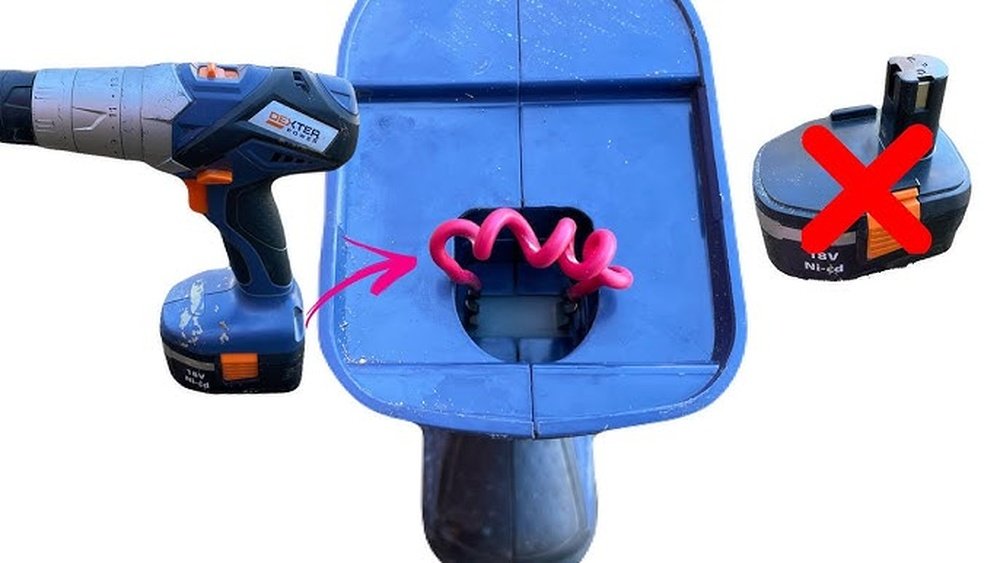
Have you ever been in the middle of a project, only to realize your cordless drill’s battery is dead—and you don’t have a spare? It’s frustrating, right?
But what if you could power your cordless drill without a battery and keep working without delay? You’ll discover simple, practical ways to get your drill running again, saving you time and hassle. Keep reading to unlock these easy solutions that could turn a stuck moment into smooth progress.
Why Power A Drill Without A Battery
Powering a cordless drill without a battery is useful in many situations. Sometimes, the battery runs out of charge. Other times, the battery might be lost or broken. Knowing how to power the drill without a battery saves time and helps finish tasks quickly.
Using a drill without its battery also helps test the tool. It checks if the drill motor works well. This method can be handy for repairs or troubleshooting.
Save Time During Battery Issues
Drill batteries can die at any moment. Waiting for a battery to charge can stop your work. Powering the drill without a battery keeps the project moving. It reduces downtime and frustration on the job.
Test The Drill Motor Easily
Sometimes the drill stops working. It is unclear if the problem is the battery or the motor. Powering the drill directly helps find the issue. This step helps decide if repair or replacement is needed.
Work Without Extra Batteries
Not everyone owns multiple drill batteries. Buying spare batteries costs extra money. Powering the drill without a battery removes this need. It allows you to use your drill even with one battery.
Emergency Use In Remote Areas
Working far from power outlets means no chance to charge batteries. Powering a drill without a battery helps in these cases. It ensures you can keep working without delay or extra gear.

Credit: www.reddit.com
Safety Tips Before You Start
Before powering a cordless drill without its battery, safety is the top priority. This process involves handling tools and electricity in ways that may not be typical. Taking precautions reduces the risk of injury or damage. Follow these safety tips closely before you start any work.
Wear Protective Gear
Always wear safety glasses to protect your eyes from sparks or debris. Use gloves to avoid cuts and electric shocks. Closed-toe shoes help protect your feet from falling objects.
Check The Drill And Power Source
Inspect the drill for any visible damage or loose parts. Make sure the power source you plan to use is compatible and safe. Avoid using damaged cords or adapters that can cause shorts or shocks.
Work In A Dry Environment
Keep your workspace dry to prevent electric shocks. Avoid working near water or in damp areas. Dry hands and tools help maintain better control and safety.
Disconnect Power When Not In Use
Always unplug or disconnect the power source when adjusting or setting up the drill. This step prevents accidental starts or electric shocks. Stay alert and focused during the entire process.
Using A Dc Power Supply
Using a DC power supply is a practical way to power a cordless drill without a battery. This method lets you run the drill directly from an external power source. It works well for indoor projects or when batteries are not available. Understanding the right voltage and current is key. Safe and proper connections keep the drill working smoothly.
Choosing The Right Voltage And Current
Select a DC power supply that matches the drill’s voltage needs. Most cordless drills use 12V, 18V, or 20V batteries. Using the correct voltage prevents damage to the motor and electronics. Check the drill label or manual for exact voltage requirements.
Current capacity is also important. The power supply should provide enough amps to meet the drill’s power demands. Look for a supply with a current rating equal to or higher than the drill’s draw. This ensures stable and efficient operation without overheating.
Connecting The Power Supply To The Drill
Identify the drill’s battery terminals or connector first. You may need to remove the battery pack to access these points. Use wires with proper insulation to avoid short circuits.
Connect the positive terminal of the power supply to the drill’s positive terminal. Then connect the negative terminal to the drill’s negative terminal. Secure the connections tightly for good electrical contact.
Double-check polarity before turning on the power supply. Reversing the connections can harm the drill’s motor. Once connected, switch on the power supply and test the drill’s function carefully.
Credit: www.reddit.com
Powering With A Car Battery
Powering a cordless drill without a battery is possible using a car battery. This method provides a steady power source for your drill. It is useful during emergencies or when your original battery is dead.
A car battery delivers 12 volts, which matches many cordless drills. Using it correctly can keep your drill running smoothly. Safety is important to avoid damage or injury.
Required Tools And Materials
- Car battery (12V)
- Battery clamps or alligator clips
- Wire with proper gauge (14-16 AWG)
- Voltage regulator or DC-DC converter (optional but recommended)
- Insulated electrical tape
- Multimeter (to check voltage)
Step-by-step Connection Guide
- Turn off the drill and car battery before starting.
- Attach the positive (red) clamp to the positive terminal on the car battery.
- Connect the other end of the positive wire to the drill’s positive input.
- Attach the negative (black) clamp to the negative terminal on the car battery.
- Connect the negative wire to the drill’s negative input or ground.
- Use a multimeter to verify the voltage at the drill’s terminals.
- Secure all connections with electrical tape to prevent shorts.
- Turn on the drill carefully and test its operation.
Diy Power Pack With Rechargeable Batteries
Creating a DIY power pack with rechargeable batteries offers a practical way to run a cordless drill without its original battery. This method saves money and reduces waste by reusing common rechargeable cells. You gain more control over power capacity and can customize the pack for different needs.
Building your own power pack needs some care. Choosing the right batteries and assembling them correctly ensures the drill works safely and efficiently. Follow the steps below to create a reliable power source.
Selecting Compatible Batteries
Pick batteries that match your drill’s voltage and current needs. Most cordless drills use 18V or 20V packs, so select cells that add up to the same voltage. Lithium-ion batteries are best for their power and weight. Avoid mixing old and new cells to keep performance steady.
Check the size and shape of batteries so they fit your DIY pack case. Buy cells from trusted brands to avoid safety risks. Make sure the batteries have built-in protection circuits to prevent overheating or overcharging.
Assembling The Battery Pack
Connect batteries in series to increase voltage or in parallel to boost capacity. Use a battery holder or solder the connections carefully. Insulate all exposed wires to avoid shorts. Add a proper battery management system (BMS) for safety and balance.
Test the pack voltage with a multimeter before linking it to the drill. Secure the pack inside a sturdy case to protect it during use. Attach connectors that fit your drill’s power input. This setup lets you power the drill smoothly without the original battery.
Using A Power Inverter
Powering a cordless drill without a battery can be done using a power inverter. This device changes power from a car or other source into the right form for your drill. It allows you to use your drill in places without electricity or spare batteries.
What Is A Power Inverter?
A power inverter changes direct current (DC) into alternating current (AC). Most cordless drills use AC power from batteries. The inverter makes it possible to run your drill from a car battery or other DC source. It is a small box with plugs and cords for easy use.
Power inverters come in different sizes and power levels. Choose one that matches your drill’s power needs. A 12-volt inverter is common for most drills. This tool is simple and useful for many outdoor or emergency tasks.
Setting Up The Inverter For Your Drill
First, connect the inverter to a power source like a car battery or a portable battery pack. Make sure the connections are tight and secure to avoid power loss. Next, plug your cordless drill’s charger into the inverter’s AC outlet.
Turn on the inverter and then switch on the drill charger. Your drill will start charging without its battery. Keep an eye on the power levels and avoid overloading the inverter. This setup is ideal for short-term use and emergency charging.
Tips For Maintaining Power And Performance
Maintaining power and performance without a battery takes careful attention. The drill needs steady power to work well. Small actions can keep it running strong for longer. This section shares easy tips to help you maintain your cordless drill’s power and performance without its battery.
Simple steps can prevent power loss and improve drill efficiency. Follow these tips to keep your tool ready for use anytime.
Keep The Power Source Stable
Use a reliable power adapter or cable. Avoid loose connections that cause power drops. Check all plugs and wires regularly. A steady power supply keeps the drill running smoothly.
Clean The Drill Regularly
Dust and dirt reduce performance. Wipe the drill’s vents and motor area often. Use a soft cloth or small brush. Clean tools last longer and work better.
Avoid Overheating The Drill
Overheating damages the motor and power system. Let the drill cool after heavy use. Take short breaks during long projects. Cool tools perform better and last longer.
Use The Correct Power Settings
Match the power source voltage with your drill’s needs. Too high or too low voltage causes problems. Check the drill’s manual for recommended settings. Correct power settings protect the drill and improve performance.
Store The Drill Properly
Keep the drill in a dry, cool place. Avoid humid or dusty areas. Proper storage prevents damage and power loss. A well-stored drill is always ready to work.

Credit: www.youtube.com
Common Mistakes To Avoid
Powering a cordless drill without a battery can be useful but tricky. Many people make simple mistakes that cause problems or damage. Avoiding these errors helps keep your drill safe and working well.
Understanding common mistakes improves your success. It saves time, money, and frustration. Here are key errors to watch out for.
Using Incorrect Voltage Supply
Using the wrong voltage can harm your drill. Too high voltage may cause overheating or damage. Too low voltage results in poor performance. Always check the drill’s voltage rating before connecting power.
Ignoring Safety Precautions
Bypassing the battery means handling exposed wires and connections. This can be dangerous. Always wear safety gloves and eye protection. Avoid touching live wires to prevent shocks.
Improper Wiring Connections
Incorrect wiring can stop the drill from working or cause short circuits. Match positive and negative terminals carefully. Secure connections to avoid loose contacts or sparks.
Overlooking Power Source Limitations
Not all power supplies can provide enough current for a drill. Weak power sources cause the drill to stall or stop. Use a power source that matches the drill’s current needs.
Skipping Insulation On Exposed Wires
Exposed wires without insulation can short circuit easily. Cover all exposed wires with electrical tape or heat shrink tubing. This prevents accidental contact and damage.
Frequently Asked Questions
How Can I Power A Cordless Drill Without Its Battery?
You can power a cordless drill without a battery by using an external DC power supply or a compatible power adapter. Ensure the voltage and current match the drill’s requirements to avoid damage. This method is useful for testing or temporary use.
Is It Safe To Use A Drill Without The Original Battery?
Using a drill without the original battery can be safe if you use a proper power source. Avoid makeshift connections that risk short circuits or damage. Always match voltage and polarity to protect both the drill and the user.
Can A Power Bank Replace A Cordless Drill Battery?
A power bank alone cannot directly replace a drill battery. You need a DC converter to match the drill’s voltage and current. This setup is complex and not recommended for prolonged use but can work for short-term power.
What Voltage Is Required To Power Cordless Drills Without Batteries?
Most cordless drills require 12V, 18V, or 20V DC. Check your drill’s label for exact voltage. Using a power supply with the correct voltage ensures proper operation and prevents damage.
Conclusion
Powering a cordless drill without a battery is possible and practical. Using alternative power sources can keep your project moving. Simple tools like adapters or direct wiring work well. Always stay safe and check your connections carefully. This way, you save time and avoid delays.
Try these methods to keep your drill running. Small fixes can make a big difference. Keep your work steady, even without a battery.
